Vai al contenuto principale
Collega la tua app Base44 a strumenti popolari e sorgenti di dati usando integrazioni gestite.
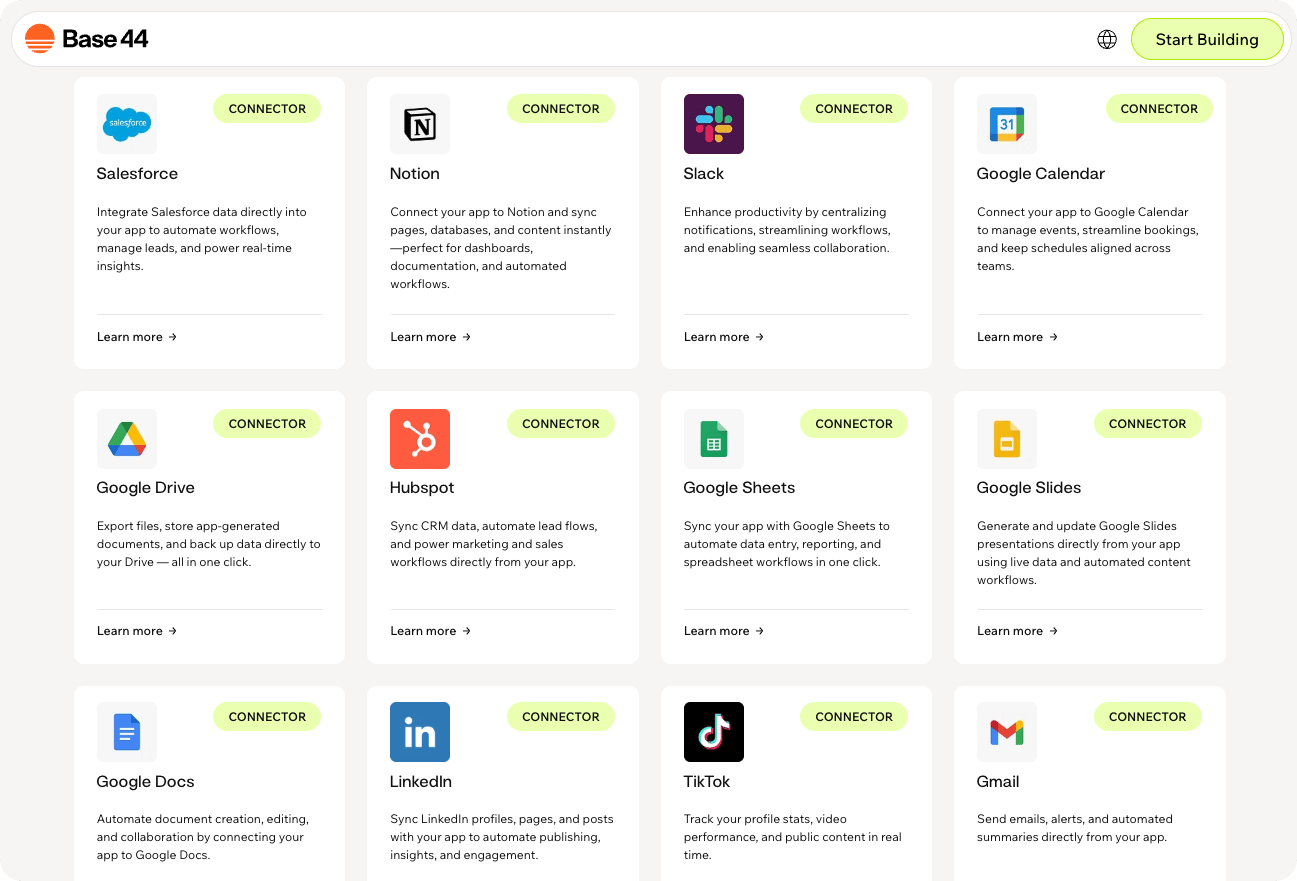
Connector catalog showing available connector cards in a grid
Ti serve un piano Builder o superiore per usare i connettori.

Sfoglia per categoria

Comunicazione

Gmail, Outlook, Slack, Discord, Microsoft Teams, Google Meet

Produttività

Drive, Docs, Sheets, Calendar, Slides, Tasks, Notion, Dropbox, Box, Airtable, OneDrive, Classroom

Social

Instagram Business, LinkedIn, TikTok

Dati e analytics

Google Analytics, BigQuery, Search Console, Snowflake, Databricks

CRM

HubSpot, Salesforce

Project management

ClickUp, Linear, Wrike

Sviluppo

GitHub, GitLab

Strumenti sviluppatore

Contentful, Supabase

Documenti

Microsoft SharePoint

Finanza

Splitwise

Contabilità

QuickBooks

Form e sondaggi

Typeform

HR

BambooHR

Pianificazione

Calendly

IA e ML

Hugging Face

Sito web ed e-commerce

Wix
Apri la AI chat e descrivi cosa vuoi costruire con parole tue. Base44 suggerisce prompt di connettori pertinenti in base alla struttura, alle pagine e ai dati della tua app.

Pagamenti

Vendi prodotti o abbonamenti e ricevi pagamenti online.Scopri di più sulla configurazione di StripeCosa puoi fare:
  • Vendere abbonamenti o prodotti una tantum.
  • Attivare workflow dopo pagamenti riusciti.
  • Collegare acquisti ai dati della tua app.
Prompt di esempio:
Connect Stripe and let people pay for a subscription in my app.
Charge customers with Stripe when they place an order in my app.
When a payment succeeds in Stripe, update the order status in my app and send a confirmation email.
Permessi richiesti:
read_write access to payments, customers, and checkout sessions

Comunicazione

Automatizza l’invio email e la gestione della casella di posta.Cosa puoi fare:
  • Inviare digest email giornalieri.
  • Avvisare i colleghi quando qualcosa cambia.
  • Inviare via email riepiloghi di attività.
Prompt di esempio:
Send me a daily email with my to-do list using Gmail.
Email me a summary of all new signups from today.
Send a weekly Gmail digest with key metrics from this dashboard.
Permessi richiesti:
gmail.readonly
gmail.send
gmail.modify
gmail.compose
Email e calendario.Cosa puoi fare:
  • Inviare riepiloghi email.
  • Creare eventi calendario.
  • Controllare la disponibilità.
Prompt di esempio:
Connect to my Outlook account and send me a daily email summary from this app.
Create Outlook calendar events when a new meeting is confirmed in this app.
Check my Outlook calendar availability before scheduling appointments.
Permessi richiesti:
Mail.ReadWrite
Mail.Send
Calendars.ReadWrite
Invia messaggi e gestisci Slack come utente.Cosa puoi fare:
  • Pubblicare aggiornamenti sui canali.
  • Notificare i colleghi.
  • Cercare messaggi.
Prompt di esempio:
Post a message to the #support channel when a new ticket is created.
Send a daily summary of completed tasks to my team's Slack channel.
Send alerts to a Slack channel when deadlines are approaching.
Permessi richiesti:
channels:read
chat:write
users:read
Pubblica come un bot brandizzato.Cosa puoi fare:
  • Inviare messaggi bot automatizzati.
  • Pubblicare aggiornamenti.
  • Attivare avvisi.
Prompt di esempio:
Send a message as a bot to the #announcements channel when a release is published.
Send a daily bot summary to #team-updates at 5pm.
Send a bot message to #product-updates when a feature flag is enabled.
Permessi richiesti:
chat:write
channels:read
bot access
Notifica canali e community.Cosa puoi fare:
  • Pubblicare messaggi.
  • Inviare avvisi.
  • Notificare community.
Prompt di esempio:
Post a message to the #announcements channel when a new feature is released.
Send an alert to the #ops channel when a critical error occurs.
Notify a Discord channel when a new support ticket is created.
Permessi richiesti:
webhook or bot access
Chat di team e meeting.Cosa puoi fare:
  • Inviare messaggi su canali.
  • Pianificare meeting.
  • Condividere aggiornamenti.
Prompt di esempio:
Send a notification to my Teams channel when a new client is added.
Send meeting summaries to a Teams channel.
Schedule a Teams meeting when a booking is confirmed.
Permessi richiesti:
User.Read
Calendars.Read
Calendars.ReadWrite
offline_access
Chat.ReadWrite
OnlineMeetings.ReadWrite
Team.ReadBasic.All
Channel.ReadBasic.All
ChannelMessage.Send
Group.Read.All
Directory.Read.All
Meeting video.Cosa puoi fare:
  • Creare link di meeting.
  • Generare spazi di meeting.
  • Sincronizzare meeting.
Prompt di esempio:
Create a Google Meet space when a new meeting is scheduled.
Generate a Google Meet link when a booking is confirmed.
Add a Google Meet link to scheduled appointments in my app.
Permessi richiesti:
/auth/meetings.space.created
/auth/meetings.space.readonly

Produttività

Memorizza e gestisci file.Cosa puoi fare:
  • Salvare file.
  • Organizzare cartelle.
  • Fare backup dei dati.
Prompt di esempio:
Save generated PDF reports from my app to Google Drive.
Upload files from this app to a Google Drive folder for each client.
Back up exported data from this app to Google Drive every week.
Permessi richiesti:
https://www.googleapis.com/auth/drive.file
Crea e modifica documenti.Cosa puoi fare:
  • Generare documenti.
  • Compilare template.
  • Creare note.
Prompt di esempio:
Generate a Google Doc contract when a new client is added.
Create a Google Doc with a daily summary of activity from my app.
Save meeting notes from this app to a Google Doc.
Permessi richiesti:
https://www.googleapis.com/auth/documents
https://www.googleapis.com/auth/documents.readonly
Gestisci dati in fogli di calcolo.Cosa puoi fare:
  • Sincronizzare dati.
  • Importare ed esportare.
  • Generare report.
Prompt di esempio:
Sync new records from this app into a Google Sheets spreadsheet.
Keep a Google Sheets dashboard updated with daily metrics from my app.
Export weekly reports from this app to Google Sheets automatically.
Permessi richiesti:
https://www.googleapis.com/auth/spreadsheets
https://www.googleapis.com/auth/spreadsheets.readonly
Gestisci pianificazioni.Cosa puoi fare:
  • Sincronizzare prenotazioni.
  • Creare eventi.
  • Controllare la disponibilità.
Prompt di esempio:
Sync all my bookings directly to my Google Calendar.
Show my real-time availability from Google Calendar to clients.
When an appointment is confirmed, create a calendar event and invite attendees.
Permessi richiesti:
https://www.googleapis.com/auth/calendar
https://www.googleapis.com/auth/calendar.readonly
https://www.googleapis.com/auth/calendar.events
https://www.googleapis.com/auth/calendar.events.readonly
https://www.googleapis.com/auth/calendar.events.freebusy
https://www.googleapis.com/auth/calendar.freebusy
https://www.googleapis.com/auth/calendar.app.created
https://www.googleapis.com/auth/calendar.calendarlist.readonly
https://www.googleapis.com/auth/calendar.events.public.readonly
https://www.googleapis.com/auth/calendar.settings.readonly
Gestisci contenuti del workspace.Cosa puoi fare:
  • Sincronizzare database.
  • Scrivere pagine.
  • Organizzare contenuti.
Prompt di esempio:
Sync a Notion database with my CRM records.
Write project updates from this app into a Notion page.
Create a new Notion page for every new client added in this app.
Permessi richiesti:
read_content
update_content
insert_content
read_comments
create_comments
read_users
Memorizza file nel cloud.Cosa puoi fare:
  • Caricare file.
  • Sincronizzare contenuti.
  • Organizzare lo storage.
Prompt di esempio:
Upload files from this app to Dropbox.
Save client documents from this app to a Dropbox folder.
Sync uploaded files from this app to Dropbox automatically.
Permessi richiesti:
account_info.read
files.metadata.read
files.content.read
files.content.write
Gestione sicura dei contenuti.Cosa puoi fare:
  • Memorizzare file.
  • Gestire cartelle.
  • Condividere contenuti.
Prompt di esempio:
Connect Box and list files for a selected project.
Upload files from this app to a Box folder.
Show Box files related to each client inside my app.
Permessi richiesti:
root_readwrite
Database flessibili.Cosa puoi fare:
  • Sincronizzare record.
  • Gestire tabelle.
  • Costruire workflow.
Prompt di esempio:
Sync data from this app with Airtable.
Create Airtable records when a new form is submitted in this app.
Show Airtable data in a dashboard inside my app.
Permessi richiesti:
data.records:read
data.records:write
schema.bases:read
Crea presentazioni.Cosa puoi fare:
  • Generare slide.
  • Compilare template.
  • Condividere deck.
Prompt di esempio:
Generate a Google Slides presentation summarizing this week's key KPIs.
Create a presentation from KPI data in this app.
Build a Google Slides deck from a weekly report in this app.
Permessi richiesti:
https://www.googleapis.com/auth/presentations
https://www.googleapis.com/auth/presentations.readonly
Gestisci attività.Cosa puoi fare:
  • Creare attività.
  • Tracciare progresso.
  • Gestire liste.
Prompt di esempio:
Create a Google Task when a new item is added in this app.
Add a Google Task when a request is marked urgent.
Sync tasks from this app to my Google Tasks list.
Permessi richiesti:
tasklists.readonly
tasks.readonly
tasks
Archiviazione file nel cloud.Cosa puoi fare:
  • Memorizzare file.
  • Sincronizzare dati.
  • Accedere ai documenti.
Prompt di esempio:
Save files from this app to OneDrive.
Upload generated reports from this app to OneDrive automatically.
Show OneDrive files related to each client in my app.
Permessi richiesti:
files.ReadWrite.All
Sites.ReadWrite.All
Search.Read.All
User.Read
offline_access
openid
profile
email
Gestione corsi.Cosa puoi fare:
  • Gestire corsi.
  • Visualizzare compiti.
  • Tracciare studenti.
Prompt di esempio:
List assignments from Google Classroom.
Show active Google Classroom courses in a dashboard.
Pull Google Classroom assignments and due dates into this app.
Permessi richiesti:
classroom.announcements
classroom.courses.readonly
classroom.coursework.me
classroom.coursework.students
classroom.courseworkmaterials
classroom.rosters.readonly
classroom.student-submissions.me.readonly
classroom.topics

Social

Pubblica post del feed e gestisci commenti per un account Instagram Business.Cosa puoi fare:
  • Pubblicare foto e video su un feed Instagram Business.
  • Leggere, rispondere, modificare ed eliminare commenti.
  • Accedere a dettagli di base dell’account, come username, ID e media.
Prompt di esempio:
Publish an approved Instagram Business feed post from this app.
Show recent Instagram Business posts and comments in a dashboard.
Reply to new Instagram Business comments from this app.
Permessi richiesti:
instagram_business_basic
instagram_business_manage_comments
instagram_business_content_publish
Instagram Business supporta solo post del feed. Storie, Reel, messaggi diretti e aggiornamenti del profilo non sono supportati.
Condividi aggiornamenti e profili.Cosa puoi fare:
  • Pubblicare aggiornamenti.
  • Condividere contenuti.
  • Gestire dati del profilo.
Prompt di esempio:
Post a LinkedIn update when I publish a new article.
Share company announcements to my LinkedIn profile.
Draft a LinkedIn post and let me approve it before publishing.
Permessi richiesti:
openid
profile
r_ads_reporting
r_organization_social
rw_organization_admin
w_member_social
r_profile_basicinfo
r_ads
r_verify
w_organization_social
rw_ads
r_basicprofile
r_organization_admin
email
r_1st_connections_size
Traccia performance social.Cosa puoi fare:
  • Visualizzare statistiche.
  • Tracciare follower.
  • Analizzare contenuti.
Prompt di esempio:
Show my TikTok profile stats and follower count in a dashboard.
List my recent TikTok videos with their view counts.
Show my total likes, followers, and video count from TikTok.
Permessi richiesti:
artist.certification.read
artist.certification.update
user.info.basic
user.info.profile
user.info.stats
video.list

Dati e analytics

Traccia le performance del sito web.Cosa puoi fare:
  • Visualizzare il traffico.
  • Monitorare l’engagement.
  • Generare report.
Prompt di esempio:
Connect Google Analytics and show pageviews, sessions, and top pages in a dashboard.
Pull my Google Analytics traffic by source and show trends week over week.
Create a weekly report from Google Analytics and email it to me.
Permessi richiesti:
analytics.readonly
analytics.edit
Interroga dati di analytics.Cosa puoi fare:
  • Eseguire query.
  • Analizzare dati.
  • Costruire dashboard.
Prompt di esempio:
Connect this app to my BigQuery project and add a data agent that answers questions about my analytics.
Let users ask questions about sales trends from my BigQuery dataset.
Alert me when a KPI drops below a threshold based on BigQuery data.
Permessi richiesti:
https://www.googleapis.com/auth/bigquery.readonly
Data warehouse e analytics nel cloud.Cosa puoi fare:
  • Interrogare dati Snowflake.
  • Costruire dashboard da dati Snowflake.
  • Lavorare con dati esterni mentre costruisci app.
Prompt di esempio:
Connect Snowflake and create a dashboard from my warehouse data.
Query Snowflake to show sales trends by region.
Use Snowflake data to answer questions in this app.
Dettagli di accesso:
Access depends on the Snowflake connection set up for your workspace and the permissions available in Snowflake.
Costruisci ed esegui workflow dati e IA su una piattaforma di analytics unificata.Cosa puoi fare:
  • Interrogare dati Databricks.
  • Costruire dashboard da dati Databricks.
  • Lavorare con dati esterni mentre costruisci app.
Prompt di esempio:
Connect Databricks and create a dashboard from my workspace data.
Query Databricks to show product usage trends.
Use Databricks data to answer questions in this app.
Dettagli di accesso:
Access depends on the Databricks connection set up for your workspace and the permissions available in Databricks.
Insight SEO.Cosa puoi fare:
  • Tracciare i ranking.
  • Monitorare i click.
  • Analizzare le query.
Prompt di esempio:
Connect Search Console and show my top queries and click data.
Alert me when a page drops in search rankings.
Track indexing status for new pages in this app.
Permessi richiesti:
webmasters
webmasters.readonly

CRM

Gestisci dati CRM.Cosa puoi fare:
  • Sincronizzare contatti.
  • Tracciare trattative.
  • Automatizzare il marketing.
Prompt di esempio:
Sync new leads from this app into HubSpot contacts.
Show HubSpot deal stages inside my project dashboard.
Create HubSpot contacts when people sign up in this app.
Permessi richiesti:
crm.objects.contacts.read
crm.objects.contacts.write
crm.objects.companies.read
crm.objects.companies.write
crm.objects.deals.read
crm.objects.deals.write
crm.objects.owners.read
crm.objects.quotes.read
crm.objects.quotes.write
crm.lists.read
crm.lists.write
crm.schemas.contacts.read
crm.schemas.companies.read
crm.schemas.deals.read
tickets
e-commerce
automation
forms
files
content
social
analytics.read
Gestisci pipeline CRM.Cosa puoi fare:
  • Sincronizzare lead.
  • Tracciare opportunità.
  • Gestire pipeline.
Prompt di esempio:
Sync new leads from this app into Salesforce.
Show Salesforce opportunity stages inside my project dashboard.
Log customer support requests in Salesforce automatically.
Permessi richiesti:
api
refresh_token
full
web
id
openid
profile
email
address
phone
offline_access
custom_permissions
wave_api
chatter_api
visualforce
content
cdp_api
cdp_profile_api
cdp_query_api
cdp_segment_api
interaction_api
cdp_ingest_api
pardot_api

Project management

Gestisci progetti.Cosa puoi fare:
  • Creare attività.
  • Tracciare il lavoro.
  • Gestire team.
Prompt di esempio:
Connect ClickUp and show my tasks by status and due date in a dashboard.
Create a new ClickUp task when a new record is added to my Requests entity.
Sync ClickUp task status back into this app so I can track progress here.
Permessi richiesti:
Access to ClickUp resources such as tasks, lists, and spaces, based on the permissions you already have in your workspace.
Traccia issue.Cosa puoi fare:
  • Creare issue.
  • Tracciare progresso.
  • Gestire workflow.
Prompt di esempio:
Connect Linear and show my issues by status, assignee, and priority in a dashboard.
Create a Linear issue automatically when a bug is submitted in this app.
Sync Linear issue status back into this app so I can track progress here.
Permessi richiesti:
read
issues:create
comments:create
write
admin
Coordina team.Cosa puoi fare:
  • Pianificare progetti.
  • Tracciare attività.
  • Generare report.
Prompt di esempio:
Connect Wrike and show tasks for a selected project in a dashboard.
Display Wrike task statuses and assignees in a read-only dashboard.
Generate a weekly Wrike project status report and email it to me.
Permessi richiesti:
Default
wsReadOnly

Sviluppo

Gestisci repository e PR.Cosa puoi fare:
  • Tracciare le PR.
  • Gestire repository.
  • Creare issue.
Prompt di esempio:
Connect to my GitHub account and list all open pull requests for review.
Show open issues from my repository in a dashboard.
Create a new GitHub issue when a bug is reported in this app.
Permessi richiesti:
exact scopes depend on the flows you build and may include access to repositories and organization data
Gestisci pipeline.Cosa puoi fare:
  • Tracciare le MR.
  • Eseguire pipeline.
  • Gestire repository.
Prompt di esempio:
List open merge requests in my GitLab project.
Show open GitLab merge requests in a dashboard.
Create a GitLab issue when a bug is reported in this app.
Permessi richiesti:
api
read_user
openid
profile
email

Strumenti sviluppatore

CMS headless.Cosa puoi fare:
  • Recuperare contenuti.
  • Gestire voci.
  • Sincronizzare dati.
Prompt di esempio:
Show content from Contentful in this app.
Pull blog posts from Contentful and display them in a dashboard.
Sync published Contentful entries into this app.
Permessi richiesti:
content_management_manage
Leggi dati del progetto.Cosa puoi fare:
  • Sfogliare lo schema.
  • Leggere tabelle.
  • Visualizzare lo stato.
Prompt di esempio:
Show Supabase tables in this app.
Browse my Supabase schema and list all tables with row counts.
Show project status and recent database tables from Supabase.
Permessi richiesti:
Projects:Read
Secrets:Read
Database:Read

Documenti

Gestisci documenti.Cosa puoi fare:
  • Memorizzare file.
  • Condividere documenti.
  • Gestire liste.
Prompt di esempio:
Show SharePoint documents for a selected site in this app.
Display files from a SharePoint document library in a dashboard.
Sync documents from SharePoint to records in this app.
Permessi richiesti:
offline_access
User.Read
Files.ReadWrite.All
Sites.ReadWrite.All

Finanza

Traccia spese.Cosa puoi fare:
  • Tracciare saldi.
  • Dividere conti.
  • Gestire spese.
Prompt di esempio:
Show current Splitwise balances for my group in this app.
Display all shared expenses from Splitwise in a dashboard.
Show who owes what across my Splitwise group.
Permessi richiesti:
read:user_profile
read:network
write:manage_network
read:expenses
write:create_expenses
write:modify_expenses
read:metadata
read:notifications

Contabilità

Gestisci fatture, spese, clienti e contabilità in QuickBooks Online.Cosa puoi fare:
  • Creare e gestire fatture.
  • Tracciare spese e pagamenti.
  • Gestire clienti e dati contabili.
Prompt di esempio:
Connect QuickBooks and show my outstanding invoices in this app.
Create a QuickBooks invoice when a customer places an order in my app.
Show expenses and customer balances from QuickBooks in a dashboard.
Permessi richiesti:
com.intuit.quickbooks.accounting

Form e sondaggi

Raccogli risposte.Cosa puoi fare:
  • Raccogliere dati.
  • Attivare workflow.
  • Analizzare risposte.
Prompt di esempio:
Show Typeform responses in this app.
Pull the latest Typeform responses into a dashboard.
Trigger a workflow in this app when a new Typeform response is submitted.
Permessi richiesti:
accounts:read
forms:read
forms:write
responses:read

HR

Gestisci dipendenti.Cosa puoi fare:
  • Visualizzare la directory.
  • Tracciare le ferie.
  • Gestire dati HR.
Prompt di esempio:
Show my employee directory from BambooHR in this app.
Display upcoming time off from BambooHR in a dashboard.
Show employee details and managers from BambooHR.
Permessi richiesti:
application
application.write
job_opening
job_opening.write
email
openid
company:details
company:info
job_organization
employee
employee.write
employee:contact
employee:demographic
employee:job
employee:management
employee:name
employee:photo
employee_directory
offline_access
public.integration
public.user
webhooks
webhooks.write
time_off

Pianificazione

Gestisci prenotazioni.Cosa puoi fare:
  • Mostrare la disponibilità.
  • Tracciare meeting.
  • Attivare workflow.
Prompt di esempio:
Show upcoming Calendly bookings in this app.
Display available Calendly meeting slots in a dashboard.
Trigger a workflow in this app when a new Calendly booking is confirmed.
Permessi richiesti:
availability:read
event_types:read
locations:read
scheduled_events:read
users:read

IA e ML

Modelli IA e inferenza.Cosa puoi fare:
  • Eseguire modelli.
  • Analizzare dati.
  • Costruire funzionalità IA.
Prompt di esempio:
Run sentiment analysis on customer feedback using Hugging Face.
Use a Hugging Face model to classify support tickets in this app.
Analyze text from this app with a Hugging Face model and return structured results.
Permessi richiesti:
manage-repos
read-repos
contribute-repos
openid
profile
email
inference-api

Sito web ed e-commerce

Accedi ai dati del sito.Cosa puoi fare:
  • Visualizzare analytics.
  • Sincronizzare clienti.
  • Tracciare ordini.
Prompt di esempio:
Show Wix site analytics in this app.
Display recent Wix store orders in a dashboard.
Sync Wix customer data into this app and show it in a table.
Permessi richiesti:
Manage stores
Manage form submissions
Manage payments
Manage coupons
Manage events
Manage Paylinks
Manage blog
Manage Media Manager
Read stores
Manage inbox messages
Read site, business, and email details
Manage restaurants
Manage bookings
Manage eCommerce data
Manage email marketing
Manage members and contacts

Articoli correlati

Impostare connettori condivisi

Usa un account collegato in tutta la tua app

Connettori per utenti dell'app

Permetti agli utenti di collegare i propri account

Connettori dati

Interroga e lavora con dati esterni mentre costruisci app
Questa pagina è stata tradotta utilizzando l’IA. Per informazioni più accurate e aggiornate, consulta la versione inglese.