

myapp.base44.app) from the moment you create it. You can personalize that URL anytime, or connect your own custom domain to make your app easier to find, remember, and share.
Changing your Base44 app URL
Every Base44 app comes with a free built-in domain (myapp.base44.app) that you can personalize anytime. No DNS setup or payment required.
To change your URL:
- Click Dashboard in your app editor.
- Click Domains.
- Click Edit URL under your app’s Built-in URL.
- Enter a new name for your link. For example:
best-business→best-business.base44.app. - Click Change to save.
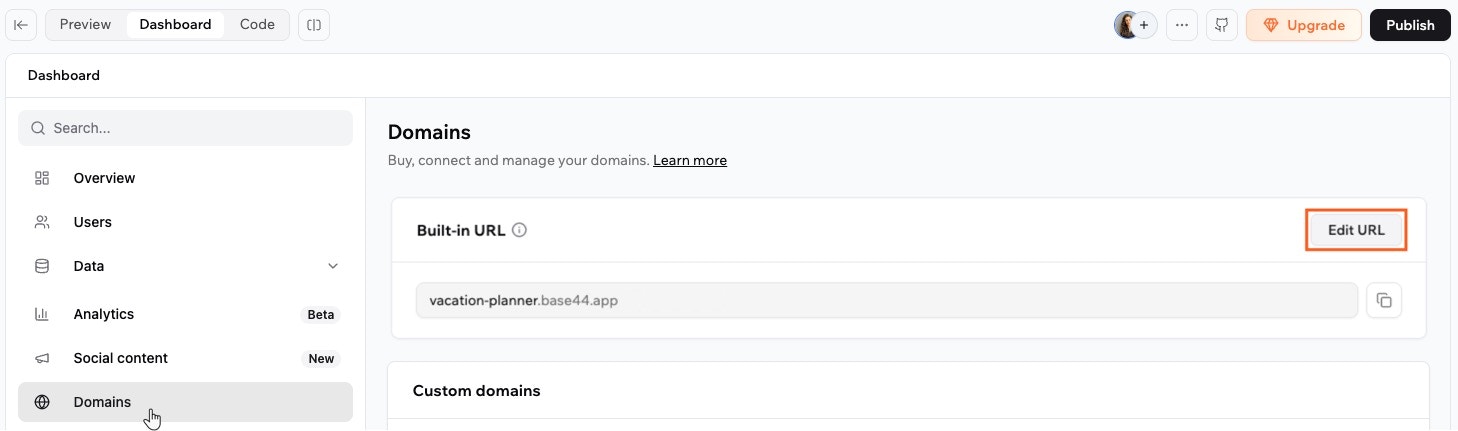
Editing your built-in URL
Setting up a custom domain
A custom domain is your own web address, such asmybusiness.com, that people use to reach your app instead of the built-in Base44 link. For example, instead of sharing my-app-948908fb.base44.app, you can share mybusiness.com. A custom domain looks more professional and reinforces your brand every time someone visits.
There are 2 ways to set one up: buy a domain, or connect one you already own. Whichever you choose, Base44 issues and renews your SSL certificate automatically once your domain is connected, so your app is always served securely over HTTPS.
You buy a domain from inside Base44, by clicking Buy Domain on your app’s Domains page. Base44 then registers it for you, and every domain bought from September 9, 2026 comes from Wix, unless your Base44 plan is billed through the Apple App Store. Older domains may be registered with GoDaddy, or with IONOS if they were bought before August 14, 2026. Follow the guide below that matches your domain.
Buy a domain with Wix
Buy a new domain through Wix. DNS and SSL are set up for you automatically.
Connect an external domain
Already own a domain? Set up your DNS with Base44, or add the records manually.
Manage a GoDaddy or IONOS domain
Renew, confirm your contact details, or transfer a domain registered with GoDaddy or IONOS.
Checking where your domain is registered
If you already have a domain and you are not sure who registered it, open your Domains page and click the More actions icon next to it.- If Manage Domain appears in the menu, you bought your domain through Wix, and you manage it from your domains dashboard. See Buying a domain with Wix.
- If it does not appear and you bought your domain from Base44, it is registered with GoDaddy, or with IONOS if you bought it before August 14, 2026, and you manage it by signing in to your account with that registrar. See Managing a GoDaddy or IONOS domain.
- If you connected a domain you already owned, it stays with the provider you bought it from, and you manage it there. See Connecting an external domain.
Setting up a subdomain
A subdomain is an address that sits in front of your main domain, such asapp.example.com or shop.example.com. Connect one to give your Base44 app its own address while your main domain keeps serving whatever is already there.
You connect a subdomain the same way you connect any other domain you own. Base44 can add the record for you, or you can manually add a CNAME record at your DNS provider and verify it from your app dashboard. For the exact record values, and the extra record that keeps the www version working, see Connecting a subdomain.
Base44 issues an SSL certificate for each subdomain you connect, so list every subdomain you want to use. Wildcard subdomains are not supported.
Setting up 301 redirects
A 301 redirect permanently sends visitors from an old address to a new one. Old links keep working, and search engines move your existing ranking over to the new address. For example, if you rename your/pricing page to /plans, a redirect sends anyone who opens the old /pricing link straight to /plans instead of a missing page.
301 redirects are available on the Starter plan and above, the same plans as custom domains.
- Path-level redirect: Sends one page on your app to another page, such as
/old-pricingto/pricing, or to an external address. - Whole-domain redirect: Sends all traffic from one connected domain to another domain on the same app.
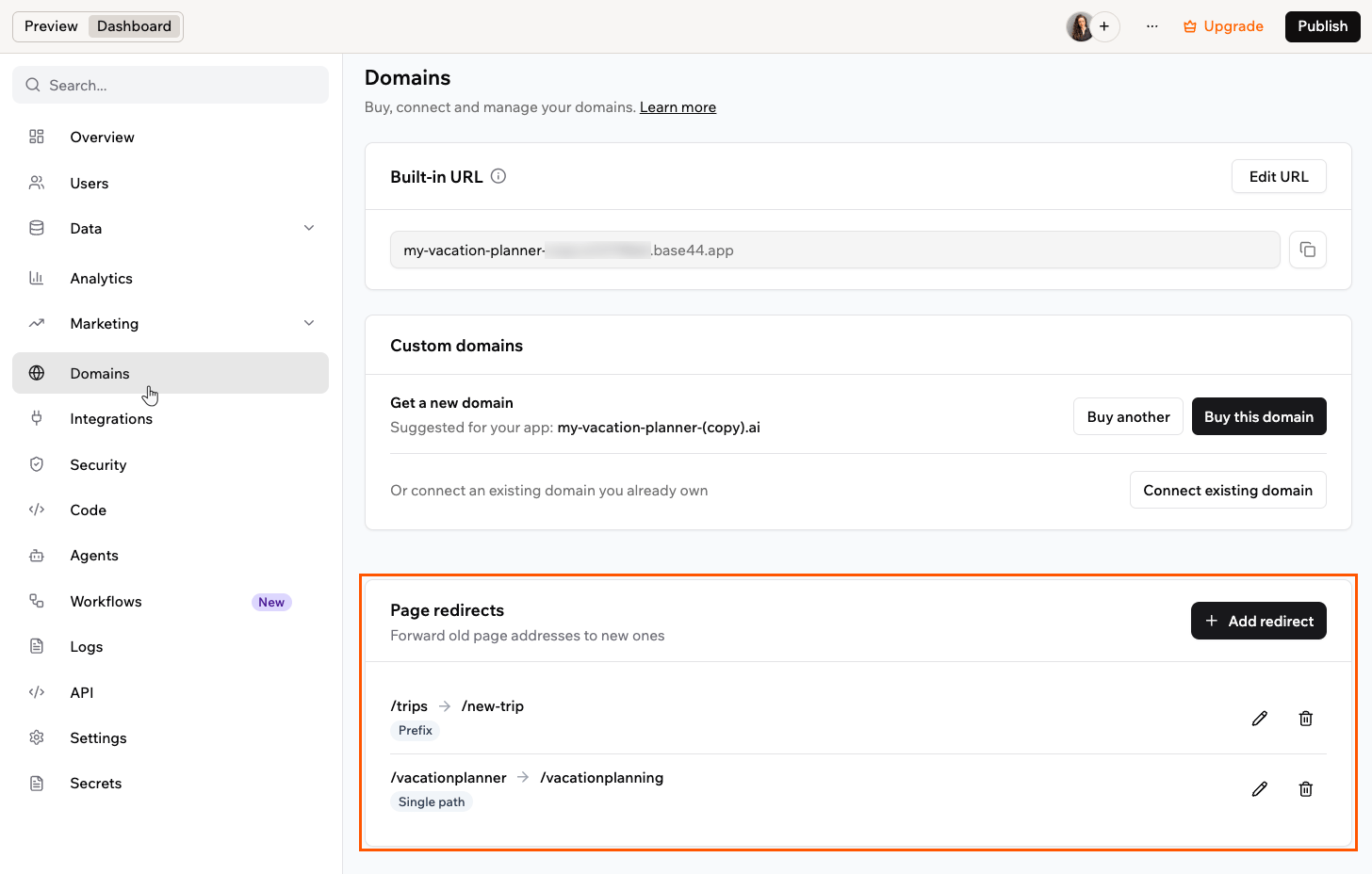
Managing page redirects
Redirecting one page to another
Path-level redirects send visitors from one page on your app to another page, or to an external address. A path is the part of a web address that comes after your domain, such as/pricing, and usually points to a specific page. Use these redirects when you rename or move a page and want the old links to keep working, or when a path on your domain needs to point to a file hosted on another server, such as an ads.txt feed.
Path redirect rules:
- You can add up to 50 redirects per app.
- The source is a path on your app, starting with
/, and it needs to differ from the target. - The target is either a path on your app, such as
/pricing, or a full external address starting withhttps://. - Targets point to a page or file, so leave out any query string, parameters, or fragment. A visitor’s own query string carries over to the target address.
- Prefix redirects start at a path below the root, such as
/blog. - Base44 serves your sign-in paths (such as login and password reset) and system files (such as
/sitemap.xml,/robots.txt,/favicon.ico,/link_preview.png,/manifest.json,/llms.txt, and/.well-knownand anything under it) directly, so choose a source path outside those.
- Click Dashboard in your app editor.
- Click Domains.
- In the Page redirects section, click Add redirect.
- In Source path, enter the old path, starting with
/. For example,/old-page. - In Target path, enter the new path starting with
/, such as/new-page, or a full external address starting withhttps://, such ashttps://example.com/ads.txt. - Under Match type, choose how the redirect matches:
- Single path: Redirects the exact source path.
- Prefix: Redirects the source path and everything under it, keeping the rest of the address. This works with external targets too, so
/docspointing tohttps://example.com/helpsends/docs/setuptohttps://example.com/help/setup.
- Click Save redirect.
Redirecting a whole domain
A whole-domain redirect sends all traffic from one connected domain to another domain on the same app. The full path and query string are preserved, soold-domain.com/pricing goes to new-domain.com/pricing. Use it when you move your app to a new domain and want the old one to keep sending visitors to the right place.
A whole-domain redirect needs at least 2 verified domains on the same app: the one you redirect from and the one you send traffic to. The Redirect domain option appears only once your app has another verified domain to redirect to.
- Click Dashboard in your app editor.
- Click Domains.
- In the Custom domains section, find the domain you want to redirect.
- Click the More actions icon next to it and select Redirect domain.
- Under Target domain, select the domain you want to send traffic to.
- Click Save redirect.
Sending emails from your domain
Once your custom domain is connected, you can send your app’s emails from it, such assupport@your-domain.com, so they match your brand. See Sending emails from a custom domain to set it up.
Getting a business email
A sending address only sends your app’s emails. If you also want a real inbox at your domain, such asyou@yourdomain.com, that you can send and receive email from, you can buy a business email through Base44. It is powered by Google Workspace, so it includes Gmail, Calendar, Drive, Meet, and Docs on your domain. See Buying a business email to set it up.
FAQs
Click a question below to learn more about domains.How do I remove a domain?
How do I remove a domain?
Deleting a domain removes it from your app’s domain list and frees it up for use elsewhere. To move a domain you bought in Base44 to another app in the same workspace, see Moving to another app.To remove a domain:
- Click Dashboard in your app editor.
- Click Domains.
- Under Custom domains, click the More actions icon next to the domain.
- If you bought the domain in Base44, select Unlink Domain, confirm, and open the menu again. Delete domain stays unavailable until the domain is unlinked.
- Select Delete domain and confirm.
Can I connect multiple domains to one Base44 app?
Can I connect multiple domains to one Base44 app?
Yes. You can connect up to 150 domains and subdomains to a single app, and up to 350 domains in total across your account.
How long do redirects take to take effect?
How long do redirects take to take effect?
Redirects usually start working within a few minutes of saving them.
Can I chain redirects?
Can I chain redirects?
Redirects resolve in one hop, so each rule sends visitors straight to its final destination. Base44 checks your rules as you save them and flags any that would chain or loop. A redirect to an external address leaves your app entirely, so it always counts as that single hop.