הגדירו את Stripe באפליקציה מצ’אט הבינה המלאכותית. התקינו את Stripe, צרו מוצרים, בדקו את התשלום, תבעו את ה-sandbox של Stripe והפעילו תשלומים חיים כשתהיו מוכנים.
האזנה לדףכ-20 דק׳
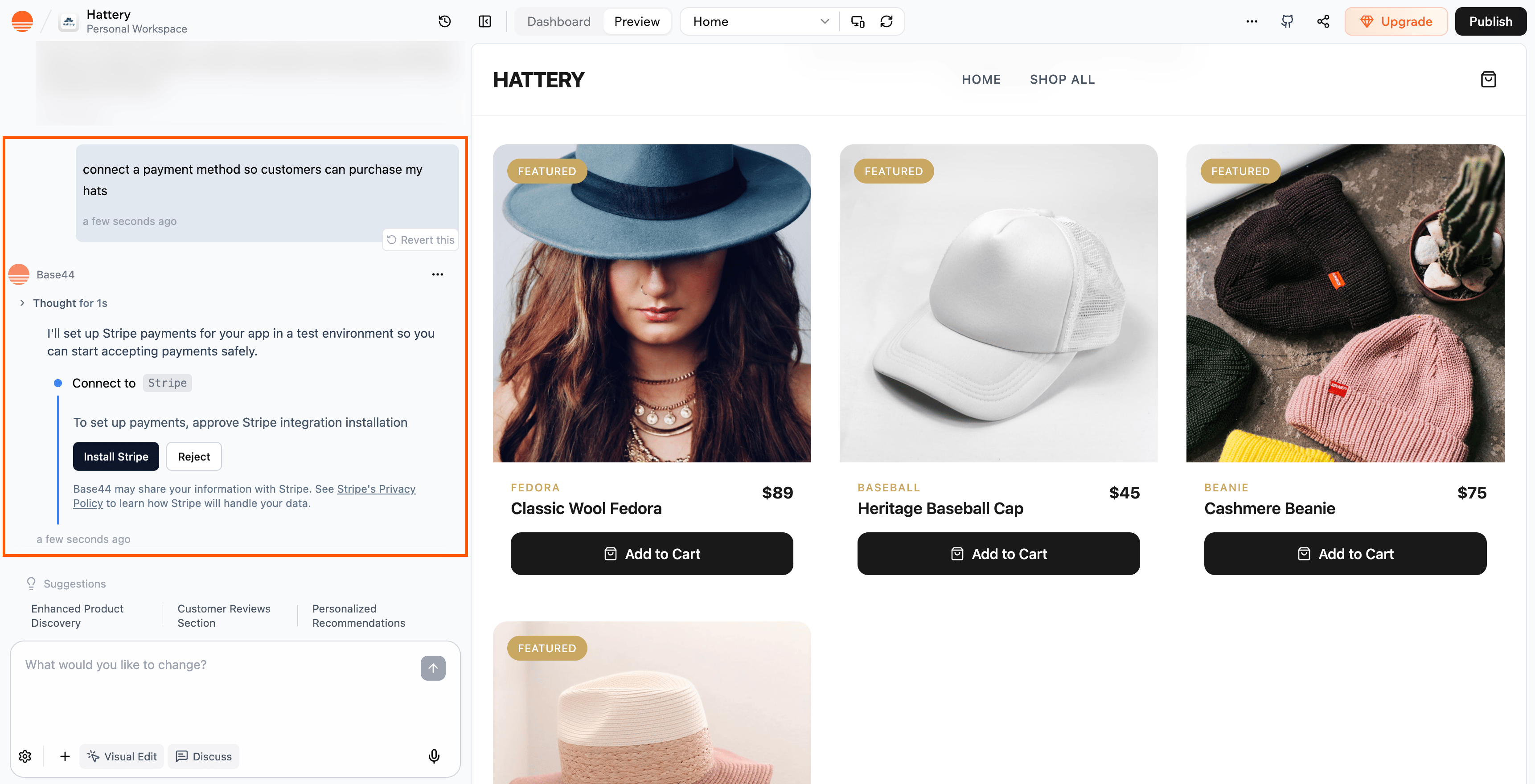
Base44 מאפשרת לכם להגדיר תשלומי Stripe ישירות מצ’אט הבינה המלאכותית בעורך האפליקציה שלכם. תוכלו לבקש מהצ’אט להתקין את Stripe וליצור זרימת תשלום לאפליקציה שלכם. הכל מתחיל בסביבת בדיקה בטוחה של Stripe, כך שתוכלו להריץ תשלומי בדיקה לפני שאתם מחברים את חשבון Stripe החי שלכם ומוסיפים את מפתחות ה-API.
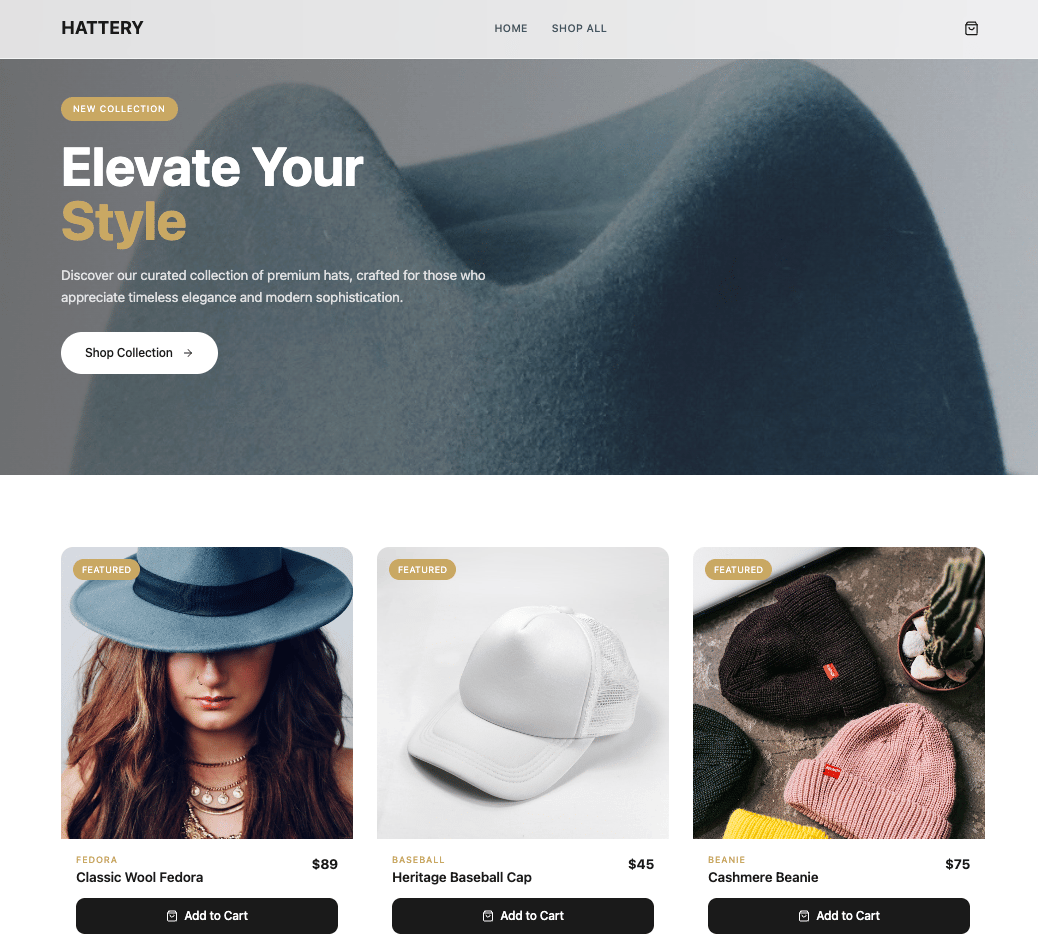
דוגמה לחנות שבה לקוחות יכולים לעיין במוצרים ולשלם דרך תשלום מופעל על ידי Stripe
זרימה זו שוחררה בינואר 2026 ומחליפה את זרימת Stripe הישנה.
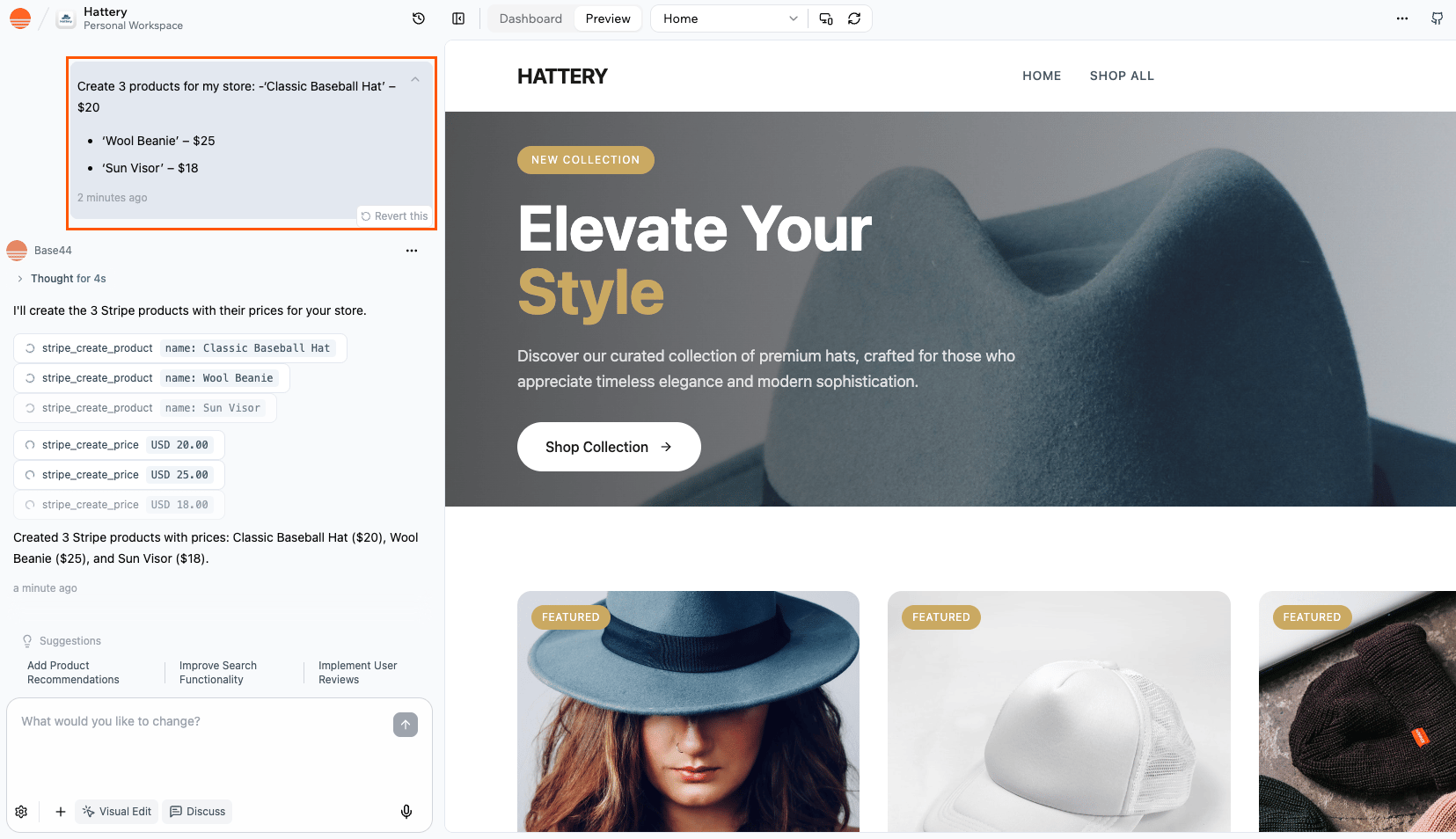
בקשו מצ’אט הבינה המלאכותית ליצור את המוצרים שלכם. לדוגמה, תוכלו לבקש מהצ’אט:Create 3 products for my store:
Classic Baseball Hat' – $20
Wool Beanie – $25
Sun Visor – $18
המוצרים והמחירים נוצרים ישירות ב-Stripe, ותראו ותנהלו אותם מלוח הבקרה של Stripe. אם תרצו לשנות או להוסיף מוצרים מאוחר יותר, תוכלו לבקש מצ’אט הבינה המלאכותית לעשות זאת עבורכם.Base44 משתמשת אז במוצרים והמחירים האלה של Stripe כשהיא בונה את זרימות התשלום שלכם. היא לא יוצרת לכם מסד נתונים נפרד של מוצרים אוטומטית.
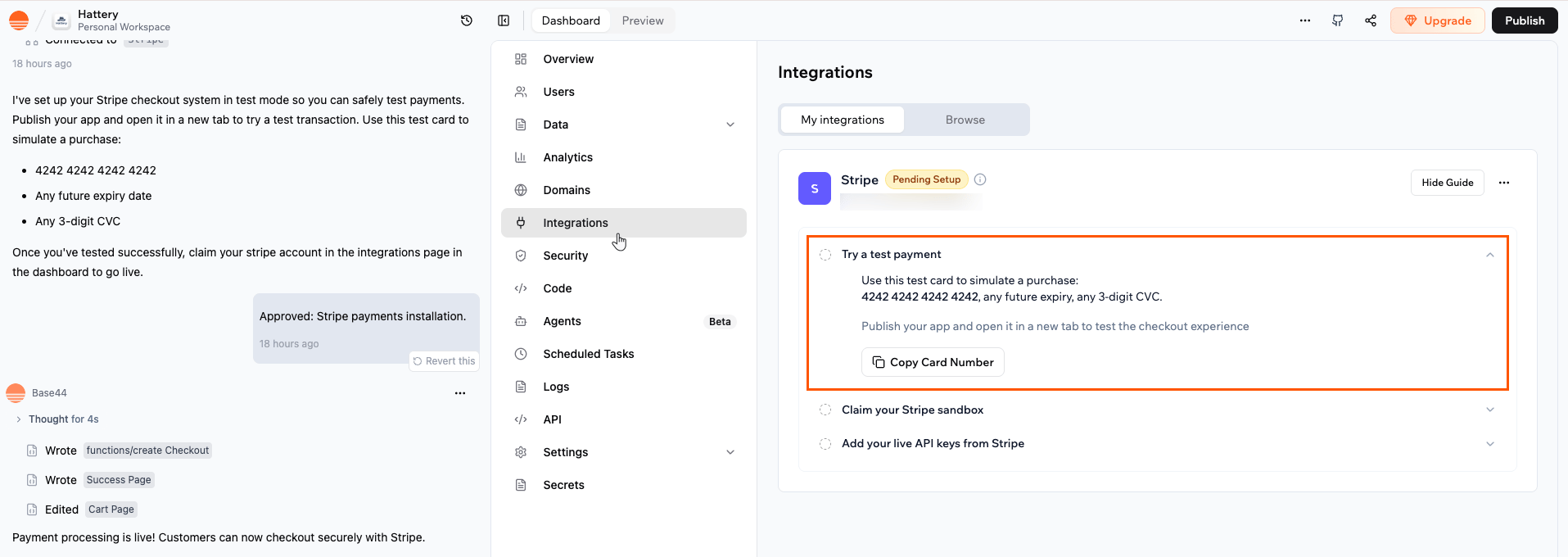
לאחר ש-Stripe מותקן, תוכלו לבדוק את זרימת התשלום שלכם באמצעות כרטיס הבדיקה של Stripe. זה עוזר לכם לאשר שמסע הלקוח, מבחירת המוצר ועד התשלום, מתנהג כפי שצפוי.
הערה: זרימת התשלום רצה רק באפליקציה שפרסמתם, לא בתצוגה המקדימה של העורך. ודאו שאתם מפרסמים את האפליקציה שלכם תחילה, ואז פתחו את האתר החי כדי להריץ את תשלום הבדיקה.
כדי להריץ תשלום בדיקה:
לחצו על Dashboard בעורך האפליקציה שלכם.
לחצו על Integrations.
לחצו על Stripe.
לחצו על Try a test payment ואז על Copy Card Number כדי שתוכלו להדביק אותו במהלך התשלום
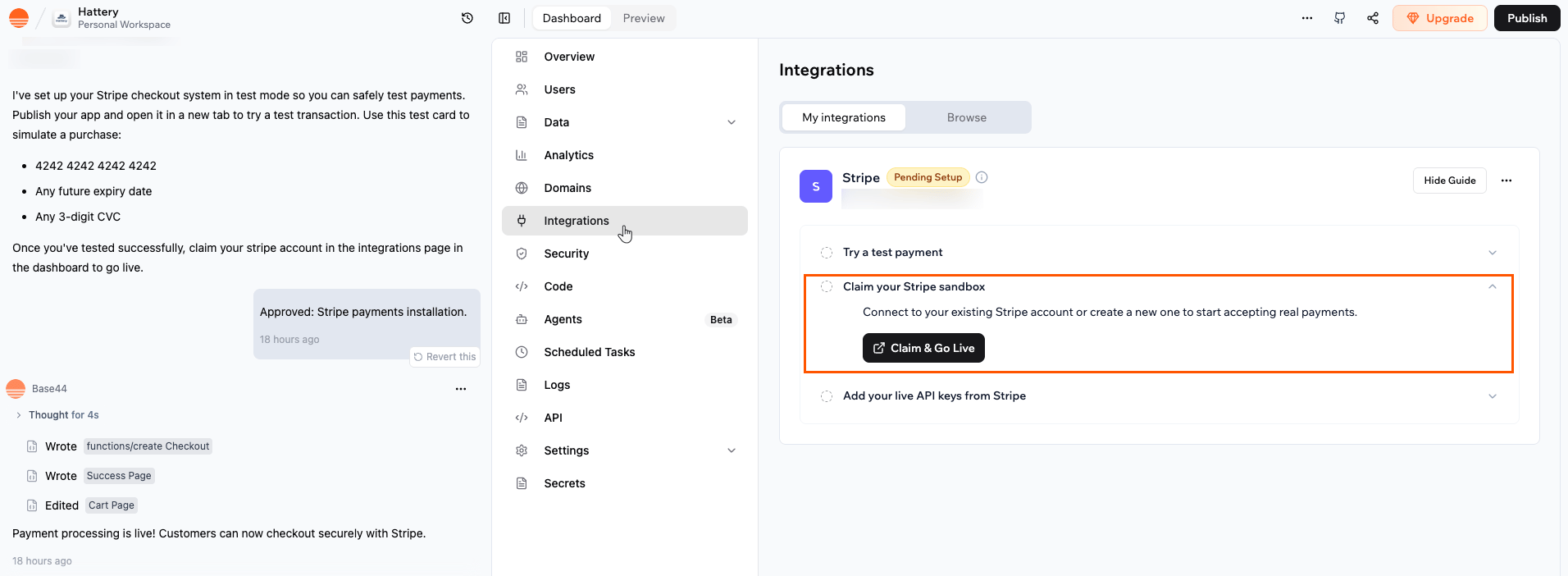
כשאתם מרוצים מאיך שזרימת הבדיקה עובדת, תבעו את ה-sandbox שלכם על ידי חיבור חשבון Stripe משלכם או יצירת חדש. שלב זה מקשר את סביבת הבדיקה ב-Base44 לחשבון Stripe שלכם כך שתוכלו להתקדם להגדרה חיה.תוכלו לבקש מצ’אט הבינה המלאכותית לתבוע את ה-sandbox של Stripe שלכם, או שתוכלו לעשות זאת בעצמכם מלוח הבקרה של האפליקציה שלכם.
חשוב:
יש לכם 60 יום לתבוע את ה-sandbox של Stripe שלכם.
ודאו שאתם מחברים את חשבון Stripe הנכון לעסק שלכם. זהו החשבון שמקבל את התשלומים שלכם כשאתם עולים לאוויר.
כדי לתבוע את ה-sandbox של Stripe שלכם:
לחצו על Dashboard בעורך האפליקציה שלכם.
לחצו על Integrations.
לחצו על Stripe.
לחצו על Claim your Stripe sandbox.
לחצו על Claim & Go Live.
עקבו אחר ההנחיות להתחבר לחשבון Stripe הקיים שלכם, או צרו חשבון Stripe חדש אם עדיין אין לכם.
השלימו כל פרטי onboarding ש-Stripe מבקש, כגון מידע עסקי ובנקאי.
כשאתם חוזרים ל-Base44, בדקו ב-Setup כדי לאשר שהשלב Claim your Stripe sandbox מוצג כהושלם.
אחרי שאתם תובעים את ה-sandbox, Base44 מפעילה עבורכם תשלומים חיים. כשהפעלת חשבון ה-Stripe מסתיימת, Base44 יוצרת את מפתחות ה-API החיים באופן אוטומטי. אין צורך יותר למצוא ולהדביק אותם מ-Stripe. כך האפליקציה עוברת ממצב בדיקה למצב חי, ונוצרים חיובים אמיתיים כשלקוחות משלימים checkout.כדי להפעיל תשלומים חיים:
לחצו על Dashboard בעורך האפליקציה שלכם.
לחצו על Integrations.
לחצו על Stripe.
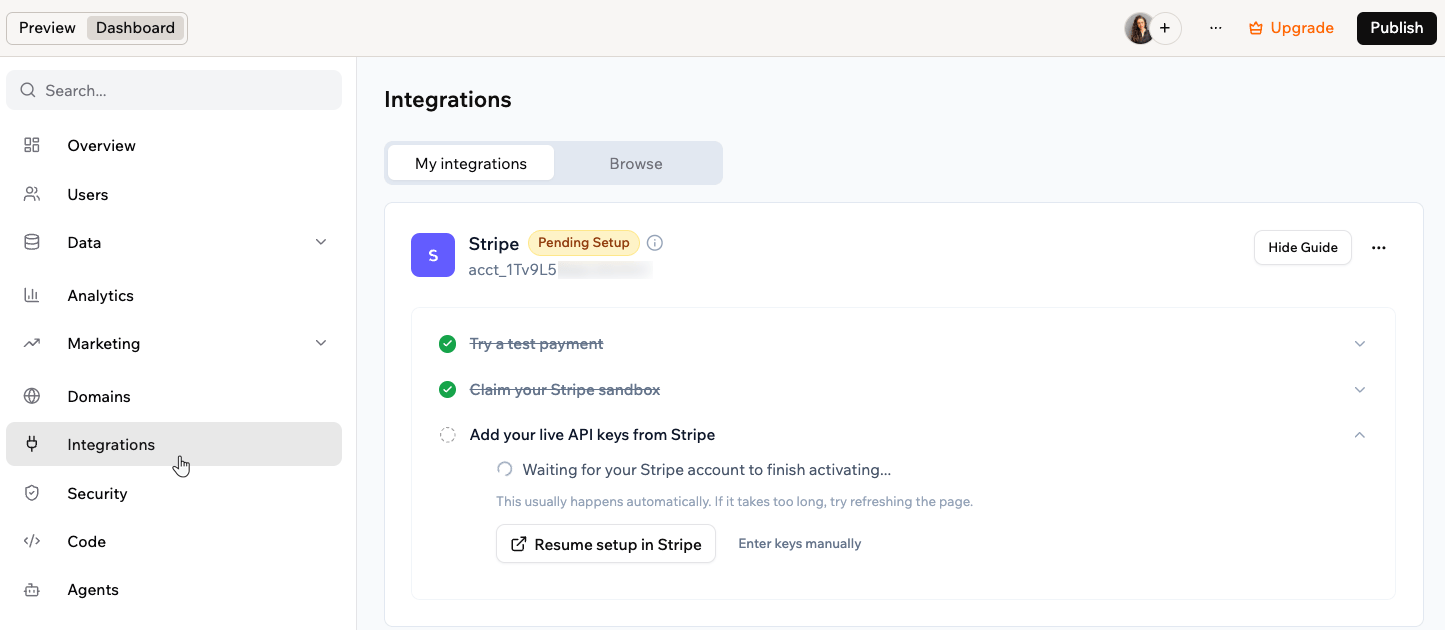
פתחו את השלב Add your live API keys from Stripe. בזמן שהחשבון מסיים להתחבר, מוצגת ההודעה Waiting for your Stripe account to finish activating. בדרך כלל זה קורה אוטומטית.
אם Stripe עדיין צריכה מידע נוסף, לחצו על Resume setup in Stripe. השלימו את פרטי ההצטרפות ש-Stripe מבקשת, כמו פרטי העסק והבנק.
כשחשבון ה-Stripe פעיל, המפתחות החיים מתווספים אוטומטית והאפליקציה מתחילה לקבל תשלומים אמיתיים. כדי לעקוב אחר הכנסות, עסקאות ומנויים מדשבורד האפליקציה, ראו מעקב אחר תשלומים באפליקציה.
כדי להשתמש במפתחות משלכם, לחצו על Enter keys manually. הדביקו את המפתח החי הניתן לפרסום ואת המפתח החי הסודי מלוח הבקרה של Stripe, ולחצו על Save API keys. תשלומים שתקבלו עם המפתחות האלה יופיעו ברשימת העסקאות החל מרגע השמירה.
הפעלת תשלומים חיים ב-Base44
אם אתם מזינים מפתח מוגבל (restricted key), הוא חייב לאפשר קריאת נתוני חשבון וניהול webhooks. Base44 לא יכולה לשמור מפתח בלי ההרשאות האלה.
לאחר חיבור Stripe בצ’אט הבינה המלאכותית והפעלת תשלומים חיים, אתם מוכנים להגדיר זרימות תשלום אמיתיות באפליקציה שלכם. כל זרימה צריכה לשלוח אדם מחובר ל-Stripe Checkout, ובדף ההצלחה, לאשר את התשלום ולעדכן את החשבון שלהם בזמן שהם עדיין מחוברים, במקום להסתמך רק על webhooks.השתמשו בהודעות לדוגמה למטה בצ’אט הבינה המלאכותית והתאימו את הפרטים כך שיתאימו למה שאתם רוצים למכור ואיך האפליקציה שלכם צריכה לשנות את הגישה של מישהו לאחר שהוא משלם. תוכלו להעתיק אותן כפי שהן או לכוונן אותן לתאר בדיוק מה אתם רוצים שהאפליקציה שלכם תעשה.
אם אתם מתכננים לפרסם את האפליקציה ב-App Store או ב-Google Play, אל תמכרו תוכן דיגיטלי באפליקציית המובייל. זה כולל קרדיטים, מנויים או מוצרים דיגיטליים. Apple ו-Google דורשות לשם כך מערכות רכישה מתוך האפליקציה משלהן, ואפליקציות Base44 עדיין לא תומכות בהן. למדו מה אפשר למכור במכירה באפליקציה.
תשלום חד פעמי עבור קרדיטים
אפשרו למשתמשי האפליקציה שלכם לקנות קרדיטים (לדוגמה, “Buy 10 credits for $10”) ולעדכן אוטומטית את החשבון שלהם לאחר התשלום.
מה להקליד בצ’אט:
I want to let my users buy credits in my app using Stripe.
After a successful payment, the user should be returned to my app and their credits should be added to their account.
Verify the payment securely before adding credits.
Add the correct number of credits to the user’s account.
Make sure credits are only added once, even if the page is refreshed.
המשך אופציונלי:
Add a “Buy 10 Credits” button to my homepage.
מכירת מוצר דיגיטלי (ספרי eBooks, קורסים מקוונים, אמנות דיגיטלית וכו')
אפשרו למשתמשי האפליקציה שלכם לרכוש פריט להורדה ולפתוח גישה לאחר התשלום.
מה להקליד בצ’אט:
I want to sell a digital product in my app using Stripe (for example, an eBook or course).
After a successful payment, the user should be returned to my app and get access to the download or content.
Record the purchase in my app.
Unlock the user’s access to the product.
Make sure the same payment can’t be used to unlock the product multiple times.
הזמנת שירות (יוגה, אימון וכו')
אפשרו למשתמשי האפליקציה שלכם לשלם כדי להזמין משבצת זמן ולשמור את הפגישה בחשבון שלהם.
מה להקליד בצ’אט:
I want to let my users book a paid service in my app using Stripe (for example, a yoga session or coaching call).
Let my users choose a service and time slot.
Handle the payment with Stripe.
After a successful payment, save the booking (service, time, user) to a bookings collection.
Show a clear confirmation in the app.
Prevent double‑booking, even if the user refreshes the page or retries the confirmation.
התחלת מנוי
אפשרו למשתמשי האפליקציה שלכם להירשם לתוכנית חוזרת ולתייג אותם כמנויים.
מה להקליד בצ’אט:
Build a Stripe subscription flow where my users can sign up for a recurring plan.
Let my users choose a subscription plan in my app.
Handle the recurring payment with Stripe.
After a successful signup, mark the user as “Pro” (or subscribed) in their account.
Store the subscription details so I can manage cancellations or billing updates later.
ביטול מנוי
אפשרו למשתמשי האפליקציה שלכם לבטל את התוכנית שלהם ולהוריד את רמת הגישה שלהם.
מה להקליד בצ’אט:Create a cancellation flow for subscriptions.
Let my users cancel their subscription, either from a page in my app or via the Stripe customer portal.
After a cancellation, update the user’s account so they lose their “Pro” / subscribed status.
Optionally, show a clear message or redirect them to a downgraded page or plan.
הנפקת החזר ושלילת גישה
אם החזר מעובד, הסירו קרדיטים או חסמו גישה לתוכן.
מה להקליד בצ’אט:
Set up a secure flow to handle Stripe refunds.
When a refund is processed, let an admin trigger a check from inside the app.
Verify that the refunded payment belongs to the correct user.
Revoke access or subtract credits from that user’s account.
Prevent the same refund from being processed more than once.
המשך אופציונלי:
Create an admin page where I can enter a Stripe payment or session ID, review the details, and apply the refund-related changes (like removing access or credits) manually.
מכירת כרטיסים לאירוע
אפשרו למשתמשי האפליקציה שלכם לקנות כרטיס לאירוע חד פעמי ולשמור את הרישום שלהם.
מה להקליד בצ’אט:
I want to sell tickets for an event in my app using Stripe.
Let my users buy a ticket for a specific event.
After a successful payment, save the attendee’s details (name, email, event) in an attendees list or collection.
Show a clear confirmation or thank-you page after purchase.
Optionally, generate a simple ticket or confirmation code the attendee can use at the event.
קבלת טיפים או תרומות
אפשרו למשתמשי האפליקציה שלכם לתמוך בעבודה או בפרויקט שלכם עם תשלום חד פעמי או חודשי.
מה להקליד בצ’אט:
Create a flow to accept donations or tips in my app using Stripe.
Let my users choose a suggested amount (for example, $5, $10, $25) or enter a custom amount.
Handle the payment with Stripe.
After a successful payment, show a thank-you page or message.
Optionally, save each donation in a Donations collection linked to the user’s account.
המשך אופציונלי:
Add a “Support Me” button to my About page that takes users into this donation flow.
קבלת תשלומים בינלאומיים
אפשרו למשתמשי האפליקציה שלכם לשלם ממדינות אחרות באמצעות מטבע או שיטות מקומיות.
מה להקליד בצ’אט:
Set up my Stripe payments so they work well for international users.
Enable common international payment methods (for example, iDEAL, Bancontact, Apple Pay, Google Pay).
Use Stripe’s automatic currency conversion so my users can pay in their local currency.
Show prices in USD in my app, but let Stripe handle local pricing at checkout.
Make sure the checkout flow works smoothly for users in different countries.
שליחת חשבוניות ממותגות
אפשרו למשתמשי האפליקציה שלכם לקבל חשבונית מקצועית ולשלם מאוחר יותר באמצעות דף מתארח של Stripe.
מה להקליד בצ’אט:
Set up a Stripe invoicing flow in my app.
Let me generate and send an invoice to a user from my app.
Include a description, amount, and due date on each invoice.
Email the user a secure payment link they can use to pay the invoice.
After the invoice is paid, update the user’s record in my app (for example, mark the invoice as paid or unlock access).
המשך אופציונלי:
Add an “Invoice a Client” button to my admin dashboard that starts this flow.
בניית marketplace פשוט (מתקדם - Stripe Connect)
אפשרו למשתמשי האפליקציה שלכם למכור מוצרים או שירותים משלהם ולקבל תשלומים ישירים.
מה להקליד בצ’אט:
Create a basic marketplace in my app using Stripe Connect.
Let my users register as sellers and connect their own Stripe accounts.
When a customer buys something, route the payment to the correct seller.
Optionally, take a small platform fee from each transaction.
Track transactions and show each seller their earnings and payout history.
Stripe Connect מתקדם יותר ועשוי לדרוש הגדרה נוספת או אישור מ-Stripe.
לא. כשאתם עוקבים אחר שלב 2, תשלומים נוצרים במצב בדיקה של Stripe. אתם משתמשים במספר כרטיס האשראי לבדיקה, ולא עובר כסף אמיתי בין חשבונות.
איפה אוכל לראות את העסקאות וההחזרים שלי?
תוכלו לעקוב אחר כל התשלומים וההחזרים ישירות בלוח הבקרה של Stripe שלכם.
עברו ל-Payments כדי לראות חיובים בודדים וסטטוס שלהם.
עברו ל-Customers כדי לראות היסטוריה של תשלומים והחזרים לכל לקוח.
עברו ל-Balance →Transactions לתצוגה בסגנון פנקס של תשלומים, עמלות והתאמות.
כל פעילות תשלום שמתרחשת דרך אפליקציית Base44 שלכם מתועדת שם בזמן אמת.
האם אוכל לשנות מוצרים או תמחור לאחר שאני מחבר את Stripe?
כן. תוכלו לעדכן מוצרים ותמחור בלוח הבקרה של Stripe שלכם בכל עת.השינויים האלה חלים על תשלומים ומנויים שנוצרו דרך אפליקציית Base44 שלכם. אם האפליקציה שלכם מאחסנת מזהי מוצר או מחיר ספציפיים (לדוגמה, בנתוני המוצר שלכם), ודאו שאתם מעדכנים את ההפניות הללו אם אתם יוצרים מחירים חדשים ב-Stripe ולא עורכים קיימים.
האם אני צריך עסק כדי להשתמש ב-Stripe?
אינכם צריכים עסק רשום כדי לבדוק דברים. תוכלו להשתמש במצב sandbox (בדיקה) של Stripe מבלי להזין פרטי עסק אמיתיים. אבל כדי לקבל תשלומים אמיתיים, Stripe דורש מידע עסקי ובנקאי מאומת.
אילו סוגי תשלומים אוכל לקבל באפליקציית Base44 שלי?
ברגע שמחוברים, האפליקציה שלכם יכולה לקבל:
כרטיסי אשראי וחיוב
Apple Pay ו-Google Pay
שיטות תשלום מקומיות (כמו iDEAL, Bancontact וכו’)
מספר מטבעות עם המרה אוטומטית
האם אוכל לחייב משתמשים באפליקציה שלי על בסיס חוזר?
כן. תוכלו להציע מנויים או חברויות באפליקציית Base44 שלכם באמצעות Stripe. Stripe מטפלת אוטומטית בתשלומים חוזרים וחידושים.
האם משתמשים יכולים לנהל את החיוב שלהם באפליקציה שלי?
כן. ברגע ש-Stripe מחובר, משתמשי האפליקציה שלכם יכולים לעדכן את פרטי הכרטיס שלהם, לצפות בחשבוניות ולנהל מנויים דרך פורטל החיוב המאובטח של Stripe.
איך אני מקבל תשלומים מלקוחות בישראל?
ל-Base44 אין כרגע פתרון תשלומים מובנה לישראל. אתם עדיין יכולים לקבל תשלומים על ידי חיבור ספק התשלומים שבחרתם כאינטגרציה: בקשו מצ’אט הבינה המלאכותית לחבר את הספק שלכם, והוא יגדיר את האינטגרציה עבורכם.
איך אוכל לפתור בעיות Stripe באפליקציית Base44 שלי?
אם Stripe לא עובד כפי שצפוי באפליקציה שלכם, לדוגמה, שום דבר לא קורה כשמשתמש לוחץ על כפתור “Pay” או “Checkout”, תוכלו לצפות ב-Function Logs בלוח הבקרה של Base44 שלכם כדי לגלות מה משתבש.זה עובד עבור כל תכונה הקשורה לתשלום, בין אם אתם מוכרים מוצרים, מקבלים הזמנות או מציעים מנויים.הנה איך לבדוק את הלוגים:
לחצו על Dashboard בעורך האפליקציה שלכם.
עברו ל-Code → Functions.
מצאו את הפונקציה הקשורה לזרימת התשלום שלכם (לדוגמה, createCheckout לחנות).
לחצו על הפונקציה, ואז גללו לקטע Logs.
הלוגים מציגים הודעות על מה שקרה כשהפונקציה רצה. חפשו הודעות שגיאה אדומות. אלה יכולות לעזור לאתר מה השתבש
דוגמה:
אם האפליקציה שלכם היא חנות ופונקציית createCheckout נכשלת, הלוגים עשויים להציג:
“Product not found” → אחד הפריטים בעגלה חסר או עם מזהה שגוי
“Invalid price” → מוצר חסר מחיר או מוגדר ל-0
“Missing success_url” → Stripe לא יודע לאן לשלוח משתמשים לאחר שהם משלמים
“API Key invalid” → Stripe לא מחובר נכון
ברגע שאתם מוצאים את הודעת השגיאה, תוכלו להעתיק אותה ולהדביק אותה בצ’אט הבינה המלאכותית כדי לבקש מאפליקציית Base44 שלכם עזרה בתיקון.
למה זרימת התשלום שלי לא עובדת או מציגה דף ריק לאחר התשלום?
אם זרימת התשלום שלכם לא משלימה או שאתם רואים דף ריק לאחר התשלום, זה בדרך כלל נגרם על ידי סביבת האפליקציה או הגדרות הפניה. אם אתם משתמשים ב-Stripe, בדקו את הזרימה שלכם על ידי עקיבה אחר שלב 3 לעיל. אם בניתם זרימת תשלום מותאמת אישית או משתמשים בספק אחר, בדקו את הבאים:בעיות נפוצות:
תצוגה מקדימה לעומת פרסום: זרימות תשלום מותאמות אישית בדרך כלל לא עובדות נכון בתצוגה מקדימה. תמיד בדקו תשלומים באפליקציה שפרסמתם, באמצעות ה-URL החי.
בעיות URL הפניה: אם אתם רואים לולאות הפניה או דף ריק לאחר התשלום, בדקו שכתובות ההצלחה והביטול שלכם מצביעות לדומיין האפליקציה שפרסמתם, ושאינכם מערבבים URLs של תצוגה מקדימה עם callbacks של תשלום חי.
דרישות התחברות: אם אתם דורשים התחברות כדי לגשת לאפליקציה שלכם או דפי תשלום, ודאו שדף ההצלחה לאחר התשלום עדיין נגיש לאנשים מחוברים. הגדרת אימות שגויה יכולה להוביל לדפים ריקים לאחר התשלום.
חלון קופץ לעומת אותו חלון: במובייל, חלק מהספקים עובדים טוב יותר בכרטיסיית תשלום נפרדת או חלון קופץ. אם אתם רואים בעיות בעת החלפת הדף הנוכחי, שקלו לפתוח את דף התשלום בחלון חדש אם הספק שלכם תומך בכך.
כדי לתקן את הבעיה:
בדקו את קונסולת הדפדפן שלכם לשגיאות.
בלוח הבקרה של Base44 שלכם, עברו ל-Code → Functions וסקרו את הלוגים עבור פונקציות צד-שרת הקשורות לתשלום.
אם אתם משתמשים ב-webhooks, ודאו שכתובת ה-webhook שלכם נכונה ושה-endpoint נפרס ומגיב.
אם אתם עדיין לא יכולים למצוא את הסיבה, העתיקו הודעות שגיאה כלשהן מהקונסולה או לוגי הפונקציה שלכם והדביקו אותן בצ’אט הבינה המלאכותית של Base44. בקשו ממנו “help troubleshoot this payment flow step by step” וכללו פרטים על הספק וההגדרה שלכם.
האם שימוש ב-Stripe משתמש בקרדיטי אינטגרציה של Base44?
קריאה ל-Stripe עצמה לא משתמשת בקרדיטי אינטגרציה של Base44. כשהאפליקציה שלכם קוראת ל-Stripe באמצעות מפתחות ה-API שלכם דרך פונקציות צד-שרת, הבקשה הולכת ישירות מפונקציית צד-השרת שלכם ל-Stripe. השירותים המובנים של Base44 לא מעורבים.קרדיטי אינטגרציה משמשים רק כשהאפליקציה שלכם משתמשת בשירותים המובנים של Base44.אם זרימת התשלום של Stripe שלכם גם מפעילה כל אחד מהשירותים המובנים האלה, לדוגמה, שליחת מייל אישור דרך SendEmail של Base44, הפעולות הספציפיות הללו צורכות קרדיטי אינטגרציה כרגיל. Stripe עצמה לא.
דף זה תורגם באמצעות AI. למידע המדויק והעדכני ביותר, עיין בגרסה האנגלית.
האם דף זה היה מועיל?
{"docsConfig":{"theme":"mint","$schema":"https://mintlify.com/docs.json","name":"Base44 Support Documentation","colors":{"primary":"#FF6A00","light":"#FF8E5D","dark":"#FF6A00"},"logo":{"light":"https://mintcdn.com/base44/jhCpOaGylNweq32m/logo/new-brand-light.svg?fit=max\u0026auto=format\u0026n=jhCpOaGylNweq32m\u0026q=85\u0026s=7724705143e6cfece3b0a237be2a6890","dark":"https://mintcdn.com/base44/jhCpOaGylNweq32m/logo/new-brand-dark.svg?fit=max\u0026auto=format\u0026n=jhCpOaGylNweq32m\u0026q=85\u0026s=6c3ad8a8d1ae8299c119d554dc371843","href":"/"},"favicon":"https://mintcdn.com/base44/XkAHbvyG1CwOBCSP/images/base44-favicon.svg?fit=max\u0026auto=format\u0026n=XkAHbvyG1CwOBCSP\u0026q=85\u0026s=2a7fda75e5497e8b44f47f01bb3aa807","api":{"playground":{}},"background":{"color":{"light":"#FAF9F7","dark":"#1E1E24"}},"navbar":{"links":[{"href":"https://app.base44.com/support/conversations","label":"Support"},{"href":"/changelog/product","label":"Changelog"}],"primary":{"type":"button","label":"Base44","href":"https://base44.com/?utm_source=Mintlify\u0026utm_medium=Main\u0026utm_content=menu"}},"footer":{"socials":{"twitter":"https://x.com/base44","discord":"https://discord.com/invite/ThpYPZpVts","linkedin":"https://www.linkedin.com/company/base44"}},"seo":{"metatags":{"canonical":"https://docs.base44.com","og:image":"https://docs.base44.com/images/base44-docs-og.png","og:image:width":"2400","og:image:height":"1260","twitter:image":"https://docs.base44.com/images/base44-docs-og.png","twitter:card":"summary_large_image"},"indexing":"all"},"integrations":{"mixpanel":{"projectToken":"cc6e9e106e4b833fc3a3819c11b74138"}},"contextual":{"options":["copy","view","mcp","cursor","vscode"],"display":"header"},"metadata":{"timestamp":false},"styling":{"latex":true},"navigation":{"languages":[{"language":"en","default":true,"href":""},{"language":"pt-BR","navbar":{"links":[{"href":"https://app.base44.com/support/conversations","label":"Support"},{"href":"/pt-BR/changelog/product","label":"Registro de alterações"}],"primary":{"type":"button","label":"Base44","href":"https://base44.com/?utm_source=Mintlify\u0026utm_medium=Main\u0026utm_content=menu"}},"href":"pt-BR"},{"language":"es","navbar":{"links":[{"href":"https://app.base44.com/support/conversations","label":"Support"},{"href":"/es/changelog/product","label":"Registro de cambios"}],"primary":{"type":"button","label":"Base44","href":"https://base44.com/?utm_source=Mintlify\u0026utm_medium=Main\u0026utm_content=menu"}},"href":"es"},{"language":"he","hidden":true,"navbar":{"links":[{"href":"https://app.base44.com/support/conversations","label":"Support"},{"href":"/he/changelog/product","label":"יומן שינויים"}],"primary":{"type":"button","label":"Base44","href":"https://base44.com/?utm_source=Mintlify\u0026utm_medium=Main\u0026utm_content=menu"}},"href":"he"},{"language":"ja","navbar":{"links":[{"href":"https://app.base44.com/support/conversations","label":"Support"},{"href":"/ja/changelog/product","label":"変更履歴"}],"primary":{"type":"button","label":"Base44","href":"https://base44.com/?utm_source=Mintlify\u0026utm_medium=Main\u0026utm_content=menu"}},"href":"ja"},{"language":"de","navbar":{"links":[{"href":"https://app.base44.com/support/conversations","label":"Support"},{"href":"/de/changelog/product","label":"Änderungsprotokoll"}],"primary":{"type":"button","label":"Base44","href":"https://base44.com/?utm_source=Mintlify\u0026utm_medium=Main\u0026utm_content=menu"}},"href":"de"},{"language":"fr","navbar":{"links":[{"href":"https://app.base44.com/support/conversations","label":"Support"},{"href":"/fr/changelog/product","label":"Notes de version"}],"primary":{"type":"button","label":"Base44","href":"https://base44.com/?utm_source=Mintlify\u0026utm_medium=Main\u0026utm_content=menu"}},"href":"fr"},{"language":"it","navbar":{"links":[{"href":"https://app.base44.com/support/conversations","label":"Support"},{"href":"/it/changelog/product","label":"Registro modifiche"}],"primary":{"type":"button","label":"Base44","href":"https://base44.com/?utm_source=Mintlify\u0026utm_medium=Main\u0026utm_content=menu"}},"href":"it"}]}},"deployment":{"deploymentMetadataValue":{"subdomain":"base44","hasAudioNarration":true,"actualSubdomain":"base44","customDomains":["docs.base44.com"],"gitSource":{"type":"github","owner":"base44-dev","repo":"mintlify-docs","deployBranch":"main","contentDirectory":"","isPrivate":true,"mountPath":"","label":""},"chroma":{"liveDeploymentHistoryId":"6ae5dc043d1d28d235824470","collectionId":"33261931-842f-496e-8d15-08d921cdfd33","schemaVersion":"v3","latestBuiltDeploymentHistoryId":"6ae5dc043d1d28d235824470"},"feedback":{"thumbs":true},"entitlements":{"AI_CHAT":{"status":"ENABLED"},"WEB_MCP":{"status":"ENABLED"},"NARRATION":{"status":"ENABLED"}},"buildId":"6ae5dc043d1d28d235824470","clientVersion":"0.0.4043","searchFilterCounts":[{"language":"en","tag":"Developers","count":789},{"language":"en","tag":"APIs","count":569},{"language":"en","tag":"Apps API (Beta)","count":441},{"language":"de","tag":"Entwickler","count":138},{"language":"es","tag":"Desarrolladores","count":138},{"language":"fr","tag":"Développeurs","count":138},{"language":"he","tag":"מפתחים","count":138},{"language":"it","tag":"Sviluppatori","count":138},{"language":"ja","tag":"開発者","count":138},{"language":"pt-BR","tag":"Desenvolvedores","count":138},{"language":"en","tag":"API Reference","count":115},{"language":"en","tag":"Apps","count":106},{"language":"en","tag":"Google Ads","count":90},{"language":"en","tag":"Skills","count":76},{"language":"en","tag":"Workspace API (Beta)","count":75},{"language":"de","tag":"Apps","count":74},{"language":"es","tag":"Aplicaciones","count":74},{"language":"fr","tag":"Applications","count":74},{"language":"it","tag":"App","count":74},{"language":"ja","tag":"アプリ","count":74},{"language":"pt-BR","tag":"Apps","count":74},{"language":"he","tag":"אפליקציות","count":73},{"language":"en","tag":"CLI","count":59},{"language":"de","tag":"CLI","count":59},{"language":"es","tag":"CLI","count":59},{"language":"fr","tag":"CLI","count":59},{"language":"he","tag":"CLI","count":59},{"language":"it","tag":"CLI","count":59},{"language":"ja","tag":"CLI","count":59},{"language":"pt-BR","tag":"CLI","count":59},{"language":"en","tag":"Commands","count":57},{"language":"de","tag":"Commands","count":57},{"language":"es","tag":"Commands","count":57},{"language":"fr","tag":"Commands","count":57},{"language":"he","tag":"Commands","count":57},{"language":"it","tag":"Commands","count":57},{"language":"ja","tag":"Commands","count":57},{"language":"pt-BR","tag":"Commands","count":57},{"language":"de","tag":"App erstellen","count":45},{"language":"es","tag":"Creando tu app","count":45},{"language":"fr","tag":"Créer votre app","count":45},{"language":"he","tag":"בניית האפליקציה","count":45},{"language":"it","tag":"Creare la tua app","count":45},{"language":"ja","tag":"アプリの構築","count":45},{"language":"pt-BR","tag":"Criando seu app","count":45},{"language":"de","tag":"Backend (Beta)","count":42},{"language":"es","tag":"Backend (Beta)","count":42},{"language":"fr","tag":"Backend (Beta)","count":42},{"language":"he","tag":"Backend (בטא)","count":42},{"language":"it","tag":"Backend (Beta)","count":42},{"language":"ja","tag":"バックエンド (Beta)","count":42},{"language":"pt-BR","tag":"Backend (Beta)","count":42},{"language":"de","tag":"Konto \u0026 Abrechnung","count":31},{"language":"es","tag":"Cuenta y facturación","count":31},{"language":"fr","tag":"Compte et facturation","count":31},{"language":"he","tag":"חשבון וחיוב","count":31},{"language":"it","tag":"Account e fatturazione","count":31},{"language":"ja","tag":"アカウントと請求","count":31},{"language":"pt-BR","tag":"Conta e faturamento","count":31},{"language":"de","tag":"SDKs","count":29},{"language":"es","tag":"SDKs","count":29},{"language":"fr","tag":"SDKs","count":29},{"language":"he","tag":"SDKs","count":29},{"language":"it","tag":"SDKs","count":29},{"language":"ja","tag":"SDKs","count":29},{"language":"pt-BR","tag":"SDKs","count":29},{"language":"de","tag":"App SDK","count":22},{"language":"es","tag":"App SDK","count":22},{"language":"fr","tag":"App SDK","count":22},{"language":"he","tag":"App SDK","count":22},{"language":"it","tag":"App SDK","count":22},{"language":"ja","tag":"App SDK","count":22},{"language":"pt-BR","tag":"App SDK","count":22},{"language":"de","tag":"Unternehmen","count":21},{"language":"es","tag":"Empresas","count":21},{"language":"fr","tag":"Entreprise","count":21},{"language":"he","tag":"ארגונים","count":21},{"language":"it","tag":"Aziende","count":21},{"language":"ja","tag":"エンタープライズ","count":21},{"language":"pt-BR","tag":"Empresas","count":21},{"language":"default","tag":"Developers","count":2},{"language":"default","tag":"APIs","count":2},{"language":"default","tag":"Audit Logs API","count":2},{"language":"default","tag":"API Reference","count":2},{"language":"default","tag":"audit-logs","count":2}],"searchSettings":{"showContentSnippets":true,"maxResults":10}},"assistantConfig":{"enableStarterQuestions":true},"basePath":"","hasChatPermissions":true,"hasWebMcpPermissions":true,"toggles":[{"name":"kill-isr","enabled":true,"variant":{"name":"disabled","enabled":false,"feature_enabled":true},"impressionData":false},{"name":"agent-mintlify-slack","enabled":true,"variant":{"name":"disabled","enabled":false,"feature_enabled":true},"impressionData":false},{"name":"agent-integrations-settings","enabled":true,"variant":{"name":"disabled","enabled":false,"feature_enabled":true},"impressionData":false},{"name":"automations-pr-grouping","enabled":true,"variant":{"name":"disabled","enabled":false,"feature_enabled":true},"impressionData":false},{"name":"custom-prefix","enabled":true,"variant":{"name":"disabled","enabled":false,"feature_enabled":true},"impressionData":false},{"name":"analytics-v7","enabled":true,"variant":{"name":"disabled","enabled":false,"feature_enabled":true},"impressionData":false},{"name":"user-flows-analytics","enabled":true,"variant":{"name":"disabled","enabled":false,"feature_enabled":true},"impressionData":false},{"name":"no-publish-flow","enabled":true,"variant":{"name":"disabled","enabled":false,"feature_enabled":true},"impressionData":false},{"name":"workos-onboarding","enabled":true,"variant":{"name":"disabled","enabled":false,"feature_enabled":true},"impressionData":false},{"name":"llms-txt-v2","enabled":true,"variant":{"name":"disabled","enabled":false,"feature_enabled":true},"impressionData":false},{"name":"snapshot-serving-live","enabled":true,"variant":{"name":"disabled","enabled":false,"feature_enabled":true},"impressionData":false},{"name":"stripTemperatureMiddleware","enabled":true,"variant":{"name":"disabled","enabled":false,"feature_enabled":true},"impressionData":false},{"name":"support-platform-pylon-zendesk","enabled":true,"variant":{"name":"disabled","enabled":false,"feature_enabled":true},"impressionData":false},{"name":"snapshot-serving","enabled":true,"variant":{"name":"disabled","enabled":false,"feature_enabled":true},"impressionData":false},{"name":"instant-rollback","enabled":true,"variant":{"name":"disabled","enabled":false,"feature_enabled":true},"impressionData":false},{"name":"granular-notifications-server","enabled":true,"variant":{"name":"disabled","enabled":false,"feature_enabled":true},"impressionData":false},{"name":"granular-notifications","enabled":true,"variant":{"name":"disabled","enabled":false,"feature_enabled":true},"impressionData":false},{"name":"automations-fable","enabled":true,"variant":{"name":"disabled","enabled":false,"feature_enabled":true},"impressionData":false},{"name":"fixed-ai-action-pricing","enabled":true,"variant":{"name":"disabled","enabled":false,"feature_enabled":true},"impressionData":false},{"name":"automation-resolve-merge-conflict","enabled":true,"variant":{"name":"disabled","enabled":false,"feature_enabled":true},"impressionData":false},{"name":"scoped-publishing","enabled":true,"variant":{"name":"disabled","enabled":false,"feature_enabled":true},"impressionData":false},{"name":"mintql","enabled":true,"variant":{"name":"disabled","enabled":false,"feature_enabled":true},"impressionData":false},{"name":"page-level-analytics","enabled":true,"variant":{"name":"disabled","enabled":false,"feature_enabled":true},"impressionData":false},{"name":"editor-version-history-v2","enabled":true,"variant":{"name":"disabled","enabled":false,"feature_enabled":true},"impressionData":false},{"name":"billing-page-v2","enabled":true,"variant":{"name":"disabled","enabled":false,"feature_enabled":true},"impressionData":false},{"name":"full-page-search","enabled":true,"variant":{"name":"disabled","enabled":false,"feature_enabled":true},"impressionData":false},{"name":"workspace-projects","enabled":true,"variant":{"name":"disabled","enabled":false,"feature_enabled":true},"impressionData":false},{"name":"assistant-v5","enabled":true,"variant":{"name":"disabled","enabled":false,"feature_enabled":true},"impressionData":false},{"name":"byok-sep-25","enabled":true,"variant":{"name":"disabled","enabled":false,"feature_enabled":true},"impressionData":false},{"name":"fork-pr-previews","enabled":true,"variant":{"name":"disabled","enabled":false,"feature_enabled":true},"impressionData":false},{"name":"revalidation-jwt","enabled":true,"variant":{"name":"disabled","enabled":false,"feature_enabled":true},"impressionData":false},{"name":"vite-origin","enabled":true,"variant":{"name":"disabled","enabled":false,"feature_enabled":true},"impressionData":false},{"name":"billing-updated-9-15","enabled":true,"variant":{"name":"disabled","enabled":false,"feature_enabled":true},"impressionData":false},{"name":"workos-sso-scim","enabled":true,"variant":{"name":"disabled","enabled":false,"feature_enabled":true},"impressionData":false},{"name":"hobby-abuse-scan","enabled":true,"variant":{"name":"disabled","enabled":false,"feature_enabled":true},"impressionData":false},{"name":"dashboard-inbox","enabled":true,"variant":{"name":"disabled","enabled":false,"feature_enabled":true},"impressionData":false},{"name":"workos-signup","enabled":true,"variant":{"name":"disabled","enabled":false,"feature_enabled":true},"impressionData":false},{"name":"turbopuffer-dual-write","enabled":true,"variant":{"name":"disabled","enabled":false,"feature_enabled":true},"impressionData":false},{"name":"workos-enabled","enabled":true,"variant":{"name":"disabled","enabled":false,"feature_enabled":true},"impressionData":false},{"name":"approve-review-flow","enabled":true,"variant":{"name":"disabled","enabled":false,"feature_enabled":true},"impressionData":false},{"name":"sso-setup-deadline-banner","enabled":true,"variant":{"name":"disabled","enabled":false,"feature_enabled":true},"impressionData":false}],"starterQuestions":[{"_id":"68f8934ac32e3459832881b0","deploymentId":"6792c6d6e85c02040dc386df","questionText":"Which plans come with a free domain?","status":"active","generatedBy":"manual","createdAt":"2025-10-22T08:18:18.293Z","updatedAt":"2025-10-22T08:18:18.293Z","__v":0},{"_id":"68f892c4c32e345983287064","deploymentId":"6792c6d6e85c02040dc386df","questionText":"How are credits used?","status":"active","generatedBy":"manual","createdAt":"2025-10-22T08:16:04.700Z","updatedAt":"2025-10-22T08:16:24.261Z","__v":0},{"_id":"68f892aec32e345983286ddf","deploymentId":"6792c6d6e85c02040dc386df","questionText":"How do I use Discuss mode?","status":"active","generatedBy":"manual","createdAt":"2025-10-22T08:15:42.469Z","updatedAt":"2025-10-22T08:15:42.469Z","__v":0}],"googleFontsInlined":false},"customCss":[{"filePath":"custom.css","href":"/_mintlify/custom/base44/07406dc4820eb06f/custom.css"}],"page":{"pagePath":"he/documentation/setting-up-your-app/setting-up-payments","slug":"/he/documentation/setting-up-your-app/setting-up-payments","pageMetadata":{"title":"הגדרת Stripe","description":"הגדירו את Stripe באפליקציה מצ'אט הבינה המלאכותית. התקינו את Stripe, צרו מוצרים, בדקו את התשלום, תבעו את ה-sandbox של Stripe והפעילו תשלומים חיים כשתהיו מוכנים.","sidebarTitle":"הגדרת Stripe","href":"/he/documentation/setting-up-your-app/setting-up-payments","hidden":true},"description":{"compiledSource":"\"use strict\";\nconst {jsx: _jsx} = arguments[0];\nconst {useMDXComponents: _provideComponents} = arguments[0];\nfunction _createMdxContent(props) {\n const _components = {\n p: \"p\",\n ..._provideComponents(),\n ...props.components\n };\n return _jsx(_components.p, {\n children: \"הגדירו את Stripe באפליקציה מצ’אט הבינה המלאכותית. התקינו את Stripe, צרו מוצרים, בדקו את התשלום, תבעו את ה-sandbox של Stripe והפעילו תשלומים חיים כשתהיו מוכנים.\"\n });\n}\nfunction MDXContent(props = {}) {\n const {wrapper: MDXLayout} = {\n ..._provideComponents(),\n ...props.components\n };\n return MDXLayout ? _jsx(MDXLayout, {\n ...props,\n children: _jsx(_createMdxContent, {\n ...props\n })\n }) : _createMdxContent(props);\n}\nreturn {\n default: MDXContent\n};\n","frontmatter":{},"scope":{}},"pageType":"default","mdx":{"mdxSource":{"compiledSource":"\"use strict\";const{Fragment:_Fragment,jsx:_jsx,jsxs:_jsxs}=arguments[0];const{useMDXComponents:_provideComponents}=arguments[0];function _createMdxContent(props){const _components={a:`a`,br:`br`,code:`code`,em:`em`,hr:`hr`,li:`li`,ol:`ol`,p:`p`,strong:`strong`,ul:`ul`,..._provideComponents(),...props.components},{Accordion,AccordionGroup,Frame,Heading,Info,Note,OptimizedImage,Tip,Warning}=_components;if(!Accordion)_missingMdxReference(`Accordion`,true);if(!AccordionGroup)_missingMdxReference(`AccordionGroup`,true);if(!Frame)_missingMdxReference(`Frame`,true);if(!Heading)_missingMdxReference(`Heading`,true);if(!Info)_missingMdxReference(`Info`,true);if(!Note)_missingMdxReference(`Note`,true);if(!OptimizedImage)_missingMdxReference(`OptimizedImage`,true);if(!Tip)_missingMdxReference(`Tip`,true);if(!Warning)_missingMdxReference(`Warning`,true);return _jsxs(_Fragment,{children:[_jsx(_components.p,{children:`Base44 מאפשרת לכם להגדיר תשלומי Stripe ישירות מצ’אט הבינה המלאכותית בעורך האפליקציה שלכם. תוכלו לבקש מהצ’אט להתקין את Stripe וליצור זרימת תשלום לאפליקציה שלכם. הכל מתחיל בסביבת בדיקה בטוחה של Stripe, כך שתוכלו להריץ תשלומי בדיקה לפני שאתם מחברים את חשבון Stripe החי שלכם ומוסיפים את מפתחות ה-API.`}),`\n`,_jsx(Frame,{caption:`דוגמה לחנות שבה לקוחות יכולים לעיין במוצרים ולשלם דרך תשלום מופעל על ידי Stripe`,children:_jsx(OptimizedImage,{src:`https://mintcdn.com/base44/SkIHOaOBC5y_B2cQ/images/hatss.png?fit=max\u0026auto=format\u0026n=SkIHOaOBC5y_B2cQ\u0026q=85\u0026s=b9f57ea60c8d73a4a6e4b061a1e42dea`,alt:`חנות Hattery עם באנר Elevate Your Style ו-3 כובעים מומלצים`,className:`mint-mx-auto`,style:{width:`75%`},\"data-og-width\":`1038`,width:`1038`,\"data-og-height\":`947`,height:`947`,\"data-path\":`images/hatss.png`,\"data-optimize\":`true`,\"data-opv\":`3`,srcset:`https://mintcdn.com/base44/SkIHOaOBC5y_B2cQ/images/hatss.png?w=280\u0026fit=max\u0026auto=format\u0026n=SkIHOaOBC5y_B2cQ\u0026q=85\u0026s=28a7dad28217ab6f1a20d3977f10dab8 280w, https://mintcdn.com/base44/SkIHOaOBC5y_B2cQ/images/hatss.png?w=560\u0026fit=max\u0026auto=format\u0026n=SkIHOaOBC5y_B2cQ\u0026q=85\u0026s=84144bbce3372cb2c0d235f050abb8a8 560w, https://mintcdn.com/base44/SkIHOaOBC5y_B2cQ/images/hatss.png?w=840\u0026fit=max\u0026auto=format\u0026n=SkIHOaOBC5y_B2cQ\u0026q=85\u0026s=25e3d078ce4e337538e085491f196565 840w, https://mintcdn.com/base44/SkIHOaOBC5y_B2cQ/images/hatss.png?w=1100\u0026fit=max\u0026auto=format\u0026n=SkIHOaOBC5y_B2cQ\u0026q=85\u0026s=69d1204f35acf2ba497b494846320d33 1100w, https://mintcdn.com/base44/SkIHOaOBC5y_B2cQ/images/hatss.png?w=1650\u0026fit=max\u0026auto=format\u0026n=SkIHOaOBC5y_B2cQ\u0026q=85\u0026s=652e82eb8cc5bf30eb65139218d1a9ed 1650w, https://mintcdn.com/base44/SkIHOaOBC5y_B2cQ/images/hatss.png?w=2500\u0026fit=max\u0026auto=format\u0026n=SkIHOaOBC5y_B2cQ\u0026q=85\u0026s=5c37ff40b5cd77f786ce5157a3233035 2500w`})}),`\n`,_jsx(Info,{children:_jsx(_components.p,{children:`זרימה זו שוחררה בינואר 2026 ומחליפה את זרימת Stripe הישנה.`})}),`\n`,_jsx(_components.hr,{}),`\n`,_jsx(Heading,{level:`2`,id:`שלב-1-|-התקנת-stripe`,children:`שלב 1 | התקנת Stripe`}),`\n`,_jsx(_components.p,{children:`התחילו בכך שתבקשו מצ’אט Base44 להתקין את Stripe עבור האפליקציה שלכם. Base44 מגדירה הכל בסביבת בדיקה כך שתוכלו להתנסות ללא חיובים אמיתיים.`}),`\n`,_jsx(Note,{children:_jsxs(_components.p,{children:[_jsx(_components.strong,{children:`הערה:`}),` Stripe זמין בתוכנית `,_jsx(_components.strong,{children:`Builder`}),` ומעלה.`]})}),`\n`,_jsx(_components.p,{children:_jsx(_components.strong,{children:`כדי להתקין את Stripe:`})}),`\n`,_jsxs(_components.ol,{children:[`\n`,_jsx(_components.li,{children:`עברו לעורך האפליקציה שלכם.`}),`\n`,_jsxs(_components.li,{children:[`בקשו מצ’אט הבינה המלאכותית להגדיר תשלומים באפליקציה שלכם. לדוגמה, תוכלו לבקש:\n`,_jsx(_components.code,{children:`Connect a payment method so I can take payments from customers.`})]}),`\n`,_jsxs(_components.li,{children:[`סקרו את התשובה מ-Base44 שמתארת שהיא תגדיר תשלומי Stripe לאפליקציה שלכם בסביבת בדיקה ולחצו על `,_jsx(_components.strong,{children:`Install Stripe`}),`.`]}),`\n`]}),`\n`,_jsx(Frame,{caption:`התקנת Stripe מצ'אט הבינה המלאכותית`,children:_jsx(OptimizedImage,{src:`https://mintcdn.com/base44/mj9-2pZ9VZmt-8l3/images/stripeaichat.png?fit=max\u0026auto=format\u0026n=mj9-2pZ9VZmt-8l3\u0026q=85\u0026s=f5a920d1f1b439c135bc411e55697dab`,alt:`Connecting Stripe payment method via the AI chat in Base44`,\"data-og-width\":`3444`,width:`3444`,\"data-og-height\":`1760`,height:`1760`,\"data-path\":`images/stripeaichat.png`,\"data-optimize\":`true`,\"data-opv\":`3`,srcset:`https://mintcdn.com/base44/mj9-2pZ9VZmt-8l3/images/stripeaichat.png?w=280\u0026fit=max\u0026auto=format\u0026n=mj9-2pZ9VZmt-8l3\u0026q=85\u0026s=e14d28798c813d9062a22e50a1c54b4d 280w, https://mintcdn.com/base44/mj9-2pZ9VZmt-8l3/images/stripeaichat.png?w=560\u0026fit=max\u0026auto=format\u0026n=mj9-2pZ9VZmt-8l3\u0026q=85\u0026s=3a3f51970be91230728820f8286d1176 560w, https://mintcdn.com/base44/mj9-2pZ9VZmt-8l3/images/stripeaichat.png?w=840\u0026fit=max\u0026auto=format\u0026n=mj9-2pZ9VZmt-8l3\u0026q=85\u0026s=20648b0c70b07b80ce0f31c675e32be3 840w, https://mintcdn.com/base44/mj9-2pZ9VZmt-8l3/images/stripeaichat.png?w=1100\u0026fit=max\u0026auto=format\u0026n=mj9-2pZ9VZmt-8l3\u0026q=85\u0026s=abc030651e274a7ea08e2ec3be559b0c 1100w, https://mintcdn.com/base44/mj9-2pZ9VZmt-8l3/images/stripeaichat.png?w=1650\u0026fit=max\u0026auto=format\u0026n=mj9-2pZ9VZmt-8l3\u0026q=85\u0026s=f2bc0b23365590714a18c152cc47428a 1650w, https://mintcdn.com/base44/mj9-2pZ9VZmt-8l3/images/stripeaichat.png?w=2500\u0026fit=max\u0026auto=format\u0026n=mj9-2pZ9VZmt-8l3\u0026q=85\u0026s=be4ec648c0a711ece4fa09897735cb7a 2500w`})}),`\n`,_jsx(Tip,{children:_jsxs(_components.p,{children:[`כשהתקנתם את Stripe, עברו ל-`,_jsx(_components.strong,{children:`Dashboard`}),` → `,_jsx(_components.strong,{children:`Integrations`}),` → `,_jsx(_components.strong,{children:`Stripe`}),` כדי לראות את מדריך ההגדרה.`]})}),`\n`,_jsx(_components.hr,{}),`\n`,_jsx(Heading,{level:`2`,id:`שלב-2-|-יצירת-המוצרים-שלכם`,children:`שלב 2 | יצירת המוצרים שלכם`}),`\n`,_jsx(_components.p,{children:`בקשו מצ’אט הבינה המלאכותית ליצור את המוצרים שלכם. לדוגמה, תוכלו לבקש מהצ’אט:`}),`\n`,_jsx(_components.p,{children:_jsx(_components.code,{children:`Create 3 products for my store:`})}),`\n`,_jsxs(_components.ul,{children:[`\n`,_jsx(_components.li,{children:_jsx(_components.code,{children:`Classic Baseball Hat' – $20`})}),`\n`,_jsx(_components.li,{children:_jsx(_components.code,{children:`Wool Beanie – $25`})}),`\n`,_jsx(_components.li,{children:_jsx(_components.code,{children:`Sun Visor – $18`})}),`\n`]}),`\n`,_jsx(_components.p,{children:`המוצרים והמחירים נוצרים ישירות ב-Stripe, ותראו ותנהלו אותם מלוח הבקרה של Stripe. אם תרצו לשנות או להוסיף מוצרים מאוחר יותר, תוכלו לבקש מצ’אט הבינה המלאכותית לעשות זאת עבורכם.`}),`\n`,_jsx(_components.p,{children:`Base44 משתמשת אז במוצרים והמחירים האלה של Stripe כשהיא בונה את זרימות התשלום שלכם. היא לא יוצרת לכם מסד נתונים נפרד של מוצרים אוטומטית.`}),`\n`,_jsx(Frame,{caption:`יצירת מוצרים מהצ'אט`,children:_jsx(OptimizedImage,{src:`https://mintcdn.com/base44/VilgCnF0z9rvpr-1/images/addingproducts.png?fit=max\u0026auto=format\u0026n=VilgCnF0z9rvpr-1\u0026q=85\u0026s=d3ef0dc6fb338f7cdb65f0c3f506133b`,alt:`צ'אט הבינה המלאכותית עם הנחיה ליצירת 3 מוצרים מסומנת, לצד החנות שהוא בנה`,\"data-og-width\":`1655`,width:`1655`,\"data-og-height\":`954`,height:`954`,\"data-path\":`images/addingproducts.png`,\"data-optimize\":`true`,\"data-opv\":`3`,srcset:`https://mintcdn.com/base44/VilgCnF0z9rvpr-1/images/addingproducts.png?w=280\u0026fit=max\u0026auto=format\u0026n=VilgCnF0z9rvpr-1\u0026q=85\u0026s=8a8f1a6beac0cff78a03d63b914046fc 280w, https://mintcdn.com/base44/VilgCnF0z9rvpr-1/images/addingproducts.png?w=560\u0026fit=max\u0026auto=format\u0026n=VilgCnF0z9rvpr-1\u0026q=85\u0026s=1316627ed784621fa79e5ccca19c4c34 560w, https://mintcdn.com/base44/VilgCnF0z9rvpr-1/images/addingproducts.png?w=840\u0026fit=max\u0026auto=format\u0026n=VilgCnF0z9rvpr-1\u0026q=85\u0026s=f6a3380c8b354f9c212edd6cc7c18678 840w, https://mintcdn.com/base44/VilgCnF0z9rvpr-1/images/addingproducts.png?w=1100\u0026fit=max\u0026auto=format\u0026n=VilgCnF0z9rvpr-1\u0026q=85\u0026s=27566d0a670e270c52844053c11ef245 1100w, https://mintcdn.com/base44/VilgCnF0z9rvpr-1/images/addingproducts.png?w=1650\u0026fit=max\u0026auto=format\u0026n=VilgCnF0z9rvpr-1\u0026q=85\u0026s=20b51c2a2b3bb2350e010c46ed6a5761 1650w, https://mintcdn.com/base44/VilgCnF0z9rvpr-1/images/addingproducts.png?w=2500\u0026fit=max\u0026auto=format\u0026n=VilgCnF0z9rvpr-1\u0026q=85\u0026s=e40c747db5c6b4adf1c00161e42da7d0 2500w`})}),`\n`,_jsx(_components.hr,{}),`\n`,_jsx(Heading,{level:`2`,id:`שלב-3-|-בדיקת-זרימת-התשלום-שלכם`,children:`שלב 3 | בדיקת זרימת התשלום שלכם`}),`\n`,_jsx(_components.p,{children:`לאחר ש-Stripe מותקן, תוכלו לבדוק את זרימת התשלום שלכם באמצעות כרטיס הבדיקה של Stripe. זה עוזר לכם לאשר שמסע הלקוח, מבחירת המוצר ועד התשלום, מתנהג כפי שצפוי.`}),`\n`,_jsx(Note,{children:_jsxs(_components.p,{children:[_jsx(_components.strong,{children:`הערה:`}),` זרימת התשלום רצה רק באפליקציה שפרסמתם, לא בתצוגה המקדימה של העורך. ודאו שאתם מפרסמים את האפליקציה שלכם תחילה, ואז פתחו את האתר החי כדי להריץ את תשלום הבדיקה.`]})}),`\n`,_jsx(_components.p,{children:_jsx(_components.strong,{children:`כדי להריץ תשלום בדיקה:`})}),`\n`,_jsxs(_components.ol,{children:[`\n`,_jsxs(_components.li,{children:[`לחצו על `,_jsx(_components.strong,{children:`Dashboard`}),` בעורך האפליקציה שלכם.`]}),`\n`,_jsxs(_components.li,{children:[`לחצו על `,_jsx(_components.strong,{children:`Integrations`}),`.`]}),`\n`,_jsxs(_components.li,{children:[`לחצו על `,_jsx(_components.strong,{children:`Stripe`}),`.`]}),`\n`,_jsxs(_components.li,{children:[`לחצו על `,_jsx(_components.strong,{children:`Try a test payment`}),` ואז על `,_jsx(_components.strong,{children:`Copy Card Number`}),` כדי שתוכלו להדביק אותו במהלך התשלום`]}),`\n`,_jsx(_components.li,{children:`פרסמו את האפליקציה שלכם.`}),`\n`,_jsxs(_components.li,{children:[`עברו דרך זרימת התשלום ובשלב התשלום, הזינו:`,`\n`,_jsxs(_components.ul,{children:[`\n`,_jsx(_components.li,{children:`את מספר כרטיס הבדיקה`}),`\n`,_jsx(_components.li,{children:`כל תאריך תפוגה עתידי`}),`\n`,_jsx(_components.li,{children:`כל CVC בן 3 ספרות`}),`\n`]}),`\n`]}),`\n`,_jsx(_components.li,{children:`השלימו את התשלום כדי ליצור תשלום בדיקה.`}),`\n`]}),`\n`,_jsx(Frame,{caption:`הרצת תשלום בדיקה`,children:_jsx(OptimizedImage,{src:`https://mintcdn.com/base44/mj9-2pZ9VZmt-8l3/images/testpayment.png?fit=max\u0026auto=format\u0026n=mj9-2pZ9VZmt-8l3\u0026q=85\u0026s=8488e04e92b0d18d48c021ccb3c51a8e`,alt:`כרטיס אינטגרציית Stripe עם Try a test payment מסומן ומספר כרטיס הבדיקה`,\"data-og-width\":`1915`,width:`1915`,\"data-og-height\":`680`,height:`680`,\"data-path\":`images/testpayment.png`,\"data-optimize\":`true`,\"data-opv\":`3`,srcset:`https://mintcdn.com/base44/mj9-2pZ9VZmt-8l3/images/testpayment.png?w=280\u0026fit=max\u0026auto=format\u0026n=mj9-2pZ9VZmt-8l3\u0026q=85\u0026s=38be473b67fc9638e13ce6f877669b28 280w, https://mintcdn.com/base44/mj9-2pZ9VZmt-8l3/images/testpayment.png?w=560\u0026fit=max\u0026auto=format\u0026n=mj9-2pZ9VZmt-8l3\u0026q=85\u0026s=b72631555185d9f06a7080cb2cb313fb 560w, https://mintcdn.com/base44/mj9-2pZ9VZmt-8l3/images/testpayment.png?w=840\u0026fit=max\u0026auto=format\u0026n=mj9-2pZ9VZmt-8l3\u0026q=85\u0026s=eaaa3ac1d81f9d75f4cc03d84e1f8f9e 840w, https://mintcdn.com/base44/mj9-2pZ9VZmt-8l3/images/testpayment.png?w=1100\u0026fit=max\u0026auto=format\u0026n=mj9-2pZ9VZmt-8l3\u0026q=85\u0026s=89b16e0acb40e66b89fcbb45e0aa79a1 1100w, https://mintcdn.com/base44/mj9-2pZ9VZmt-8l3/images/testpayment.png?w=1650\u0026fit=max\u0026auto=format\u0026n=mj9-2pZ9VZmt-8l3\u0026q=85\u0026s=f7ed448d4c21d5a355905597167a6fe6 1650w, https://mintcdn.com/base44/mj9-2pZ9VZmt-8l3/images/testpayment.png?w=2500\u0026fit=max\u0026auto=format\u0026n=mj9-2pZ9VZmt-8l3\u0026q=85\u0026s=a490a9f8db2dbb3565bcb877d7812f3f 2500w`})}),`\n`,_jsx(_components.hr,{}),`\n`,_jsx(Heading,{level:`2`,id:`שלב-4-|-תביעת-ה-sandbox-של-stripe-שלכם`,children:`שלב 4 | תביעת ה-sandbox של Stripe שלכם`}),`\n`,_jsx(_components.p,{children:`כשאתם מרוצים מאיך שזרימת הבדיקה עובדת, תבעו את ה-sandbox שלכם על ידי חיבור חשבון Stripe משלכם או יצירת חדש. שלב זה מקשר את סביבת הבדיקה ב-Base44 לחשבון Stripe שלכם כך שתוכלו להתקדם להגדרה חיה.`}),`\n`,_jsx(_components.p,{children:`תוכלו לבקש מצ’אט הבינה המלאכותית לתבוע את ה-sandbox של Stripe שלכם, או שתוכלו לעשות זאת בעצמכם מלוח הבקרה של האפליקציה שלכם.`}),`\n`,_jsxs(Warning,{children:[_jsx(_components.p,{children:_jsx(_components.strong,{children:`חשוב:`})}),_jsxs(_components.ul,{children:[`\n`,_jsx(_components.li,{children:`יש לכם 60 יום לתבוע את ה-sandbox של Stripe שלכם.`}),`\n`,_jsx(_components.li,{children:`ודאו שאתם מחברים את חשבון Stripe הנכון לעסק שלכם. זהו החשבון שמקבל את התשלומים שלכם כשאתם עולים לאוויר.`}),`\n`]})]}),`\n`,_jsx(_components.p,{children:_jsx(_components.strong,{children:`כדי לתבוע את ה-sandbox של Stripe שלכם:`})}),`\n`,_jsxs(_components.ol,{children:[`\n`,_jsxs(_components.li,{children:[`לחצו על `,_jsx(_components.strong,{children:`Dashboard`}),` בעורך האפליקציה שלכם.`]}),`\n`,_jsxs(_components.li,{children:[`לחצו על `,_jsx(_components.strong,{children:`Integrations`}),`.`]}),`\n`,_jsxs(_components.li,{children:[`לחצו על `,_jsx(_components.strong,{children:`Stripe`}),`.`]}),`\n`,_jsxs(_components.li,{children:[`לחצו על `,_jsx(_components.strong,{children:`Claim your Stripe sandbox`}),`.`]}),`\n`,_jsxs(_components.li,{children:[`לחצו על `,_jsx(_components.strong,{children:`Claim \u0026 Go Live`}),`.`]}),`\n`,_jsx(_components.li,{children:`עקבו אחר ההנחיות להתחבר לחשבון Stripe הקיים שלכם, או צרו חשבון Stripe חדש אם עדיין אין לכם.`}),`\n`,_jsx(_components.li,{children:`השלימו כל פרטי onboarding ש-Stripe מבקש, כגון מידע עסקי ובנקאי.`}),`\n`,_jsxs(_components.li,{children:[`כשאתם חוזרים ל-Base44, בדקו ב-`,_jsx(_components.strong,{children:`Setup`}),` כדי לאשר שהשלב Claim your Stripe sandbox מוצג כהושלם.`]}),`\n`]}),`\n`,_jsx(Frame,{caption:`תביעת ה-sandbox של Stripe שלכם ב-Base44`,children:_jsx(OptimizedImage,{src:`https://mintcdn.com/base44/mj9-2pZ9VZmt-8l3/images/sandbox1.png?fit=max\u0026auto=format\u0026n=mj9-2pZ9VZmt-8l3\u0026q=85\u0026s=00f804ef6ad94c35865012726735acb1`,alt:`דף Integrations בדשבורד האפליקציה עם כרטיס Stripe במצב Pending Setup. השלב Claim your Stripe sandbox מסומן ופתוח, ומציג כפתור לתביעת ה-sandbox ולעלייה לאוויר`,\"data-og-width\":`1912`,width:`1912`,\"data-og-height\":`702`,height:`702`,\"data-path\":`images/sandbox1.png`,\"data-optimize\":`true`,\"data-opv\":`3`,srcset:`https://mintcdn.com/base44/mj9-2pZ9VZmt-8l3/images/sandbox1.png?w=280\u0026fit=max\u0026auto=format\u0026n=mj9-2pZ9VZmt-8l3\u0026q=85\u0026s=0a24dd191215cebfdedd70733171c014 280w, https://mintcdn.com/base44/mj9-2pZ9VZmt-8l3/images/sandbox1.png?w=560\u0026fit=max\u0026auto=format\u0026n=mj9-2pZ9VZmt-8l3\u0026q=85\u0026s=0767176f7be5daaecbe17bed8c05deeb 560w, https://mintcdn.com/base44/mj9-2pZ9VZmt-8l3/images/sandbox1.png?w=840\u0026fit=max\u0026auto=format\u0026n=mj9-2pZ9VZmt-8l3\u0026q=85\u0026s=474d8cf32210c27be8bd4c9115f3e4c7 840w, https://mintcdn.com/base44/mj9-2pZ9VZmt-8l3/images/sandbox1.png?w=1100\u0026fit=max\u0026auto=format\u0026n=mj9-2pZ9VZmt-8l3\u0026q=85\u0026s=2ecbcb5a9d880733b27363a15a33aac8 1100w, https://mintcdn.com/base44/mj9-2pZ9VZmt-8l3/images/sandbox1.png?w=1650\u0026fit=max\u0026auto=format\u0026n=mj9-2pZ9VZmt-8l3\u0026q=85\u0026s=0890fa9b8003039a3b5531f59f2577f0 1650w, https://mintcdn.com/base44/mj9-2pZ9VZmt-8l3/images/sandbox1.png?w=2500\u0026fit=max\u0026auto=format\u0026n=mj9-2pZ9VZmt-8l3\u0026q=85\u0026s=2a31b73b4297acfd0e95570eb1778203 2500w`})}),`\n`,_jsx(_components.hr,{}),`\n`,_jsx(Heading,{level:`2`,id:`שלב-5-|-הפעלת-תשלומים-חיים`,children:`שלב 5 | הפעלת תשלומים חיים`}),`\n`,_jsx(_components.p,{children:`אחרי שאתם תובעים את ה-sandbox, Base44 מפעילה עבורכם תשלומים חיים. כשהפעלת חשבון ה-Stripe מסתיימת, Base44 יוצרת את מפתחות ה-API החיים באופן אוטומטי. אין צורך יותר למצוא ולהדביק אותם מ-Stripe. כך האפליקציה עוברת ממצב בדיקה למצב חי, ונוצרים חיובים אמיתיים כשלקוחות משלימים checkout.`}),`\n`,_jsx(_components.p,{children:_jsx(_components.strong,{children:`כדי להפעיל תשלומים חיים:`})}),`\n`,_jsxs(_components.ol,{children:[`\n`,_jsxs(_components.li,{children:[`לחצו על `,_jsx(_components.strong,{children:`Dashboard`}),` בעורך האפליקציה שלכם.`]}),`\n`,_jsxs(_components.li,{children:[`לחצו על `,_jsx(_components.strong,{children:`Integrations`}),`.`]}),`\n`,_jsxs(_components.li,{children:[`לחצו על `,_jsx(_components.strong,{children:`Stripe`}),`.`]}),`\n`,_jsxs(_components.li,{children:[`פתחו את השלב `,_jsx(_components.strong,{children:`Add your live API keys from Stripe`}),`. בזמן שהחשבון מסיים להתחבר, מוצגת ההודעה `,_jsx(_components.strong,{children:`Waiting for your Stripe account to finish activating`}),`. בדרך כלל זה קורה אוטומטית.`]}),`\n`,_jsxs(_components.li,{children:[`אם Stripe עדיין צריכה מידע נוסף, לחצו על `,_jsx(_components.strong,{children:`Resume setup in Stripe`}),`. השלימו את פרטי ההצטרפות ש-Stripe מבקשת, כמו פרטי העסק והבנק.`]}),`\n`]}),`\n`,_jsxs(_components.p,{children:[`כשחשבון ה-Stripe פעיל, המפתחות החיים מתווספים אוטומטית והאפליקציה מתחילה לקבל תשלומים אמיתיים. כדי לעקוב אחר הכנסות, עסקאות ומנויים מדשבורד האפליקציה, ראו `,_jsx(_components.a,{href:`/he/Setting-up-your-app/tracking-payments`,children:`מעקב אחר תשלומים באפליקציה`}),`.`]}),`\n`,_jsx(Tip,{children:_jsxs(_components.p,{children:[`כדי להשתמש במפתחות משלכם, לחצו על `,_jsx(_components.strong,{children:`Enter keys manually`}),`. הדביקו את המפתח החי הניתן לפרסום ואת המפתח החי הסודי מלוח הבקרה של Stripe, ולחצו על `,_jsx(_components.strong,{children:`Save API keys`}),`. תשלומים שתקבלו עם המפתחות האלה יופיעו ברשימת העסקאות החל מרגע השמירה.`]})}),`\n`,_jsx(Frame,{caption:`הפעלת תשלומים חיים ב-Base44`,children:_jsx(OptimizedImage,{src:`https://mintcdn.com/base44/1qwNtF-e9eNO7w2F/images/stripe-api.png?fit=max\u0026auto=format\u0026n=1qwNtF-e9eNO7w2F\u0026q=85\u0026s=d78eede2e586fdabeafdf322c7d21fdc`,alt:`A Stripe integration card with the test payment and sandbox steps ticked off, and the live API keys step waiting for the Stripe account to finish activating, offering Resume setup in Stripe or Enter keys manually`,\"data-og-width\":`1445`,width:`1445`,\"data-og-height\":`630`,height:`630`,\"data-path\":`images/stripe-api.png`,\"data-optimize\":`true`,\"data-opv\":`3`,srcset:`https://mintcdn.com/base44/1qwNtF-e9eNO7w2F/images/stripe-api.png?w=280\u0026fit=max\u0026auto=format\u0026n=1qwNtF-e9eNO7w2F\u0026q=85\u0026s=7cffce1eb379fa56f88976fac58ed296 280w, https://mintcdn.com/base44/1qwNtF-e9eNO7w2F/images/stripe-api.png?w=560\u0026fit=max\u0026auto=format\u0026n=1qwNtF-e9eNO7w2F\u0026q=85\u0026s=6adf1ece1a24cb1dacc278e6abcc563c 560w, https://mintcdn.com/base44/1qwNtF-e9eNO7w2F/images/stripe-api.png?w=840\u0026fit=max\u0026auto=format\u0026n=1qwNtF-e9eNO7w2F\u0026q=85\u0026s=3542257339298c814f6f808948ffc443 840w, https://mintcdn.com/base44/1qwNtF-e9eNO7w2F/images/stripe-api.png?w=1100\u0026fit=max\u0026auto=format\u0026n=1qwNtF-e9eNO7w2F\u0026q=85\u0026s=05fdea25e2305d15f0eda53f4817d6cc 1100w, https://mintcdn.com/base44/1qwNtF-e9eNO7w2F/images/stripe-api.png?w=1650\u0026fit=max\u0026auto=format\u0026n=1qwNtF-e9eNO7w2F\u0026q=85\u0026s=654a7126d725e0a0a3683509cf9c4ae7 1650w, https://mintcdn.com/base44/1qwNtF-e9eNO7w2F/images/stripe-api.png?w=2500\u0026fit=max\u0026auto=format\u0026n=1qwNtF-e9eNO7w2F\u0026q=85\u0026s=f1138597627eaaaaa74ea8415ee398c5 2500w`})}),`\n`,_jsx(Warning,{children:_jsx(_components.p,{children:`אם אתם מזינים מפתח מוגבל (restricted key), הוא חייב לאפשר קריאת נתוני חשבון וניהול webhooks. Base44 לא יכולה לשמור מפתח בלי ההרשאות האלה.`})}),`\n`,_jsx(_components.hr,{}),`\n`,_jsx(Heading,{level:`2`,id:`הגדרת-זרימות-תשלום`,children:`הגדרת זרימות תשלום`}),`\n`,_jsx(_components.p,{children:`לאחר חיבור Stripe בצ’אט הבינה המלאכותית והפעלת תשלומים חיים, אתם מוכנים להגדיר זרימות תשלום אמיתיות באפליקציה שלכם. כל זרימה צריכה לשלוח אדם מחובר ל-Stripe Checkout, ובדף ההצלחה, לאשר את התשלום ולעדכן את החשבון שלהם בזמן שהם עדיין מחוברים, במקום להסתמך רק על webhooks.`}),`\n`,_jsx(_components.p,{children:`השתמשו בהודעות לדוגמה למטה בצ’אט הבינה המלאכותית והתאימו את הפרטים כך שיתאימו למה שאתם רוצים למכור ואיך האפליקציה שלכם צריכה לשנות את הגישה של מישהו לאחר שהוא משלם. תוכלו להעתיק אותן כפי שהן או לכוונן אותן לתאר בדיוק מה אתם רוצים שהאפליקציה שלכם תעשה.`}),`\n`,_jsx(Warning,{children:_jsxs(_components.p,{children:[`אם אתם מתכננים לפרסם את האפליקציה ב-App Store או ב-Google Play, אל תמכרו תוכן דיגיטלי באפליקציית המובייל. זה כולל קרדיטים, מנויים או מוצרים דיגיטליים. Apple ו-Google דורשות לשם כך מערכות רכישה מתוך האפליקציה משלהן, ואפליקציות Base44 עדיין לא תומכות בהן. למדו מה אפשר למכור ב`,_jsx(_components.a,{href:`/he/documentation/building-your-app/uploading-to-app-stores#selling-in-your-app`,children:`מכירה באפליקציה`}),`.`]})}),`\n`,_jsxs(AccordionGroup,{children:[_jsxs(Accordion,{title:`תשלום חד פעמי עבור קרדיטים`,id:`%D7%90%D7%A4%D7%A9%D7%A8%D7%95-%D7%9C%D7%9E%D7%A9%D7%AA%D7%9E%D7%A9%D7%99-%D7%94%D7%90%D7%A4%D7%9C%D7%99%D7%A7%D7%A6%D7%99%D7%94-%D7%A9%D7%9C%D7%9B%D7%9D-%D7%9C%D7%A7%D7%A0%D7%95%D7%AA-%D7%A7%D7%A8%D7%93%D7%99%D7%98%D7%99%D7%9D-(%D7%9C%D7%93%D7%95%D7%92%D7%9E%D7%94%2C-%E2%80%9Cbuy-10-credits-for-%2410%E2%80%9D)-%D7%95%D7%9C%D7%A2%D7%93%D7%9B%D7%9F-%D7%90%D7%95%D7%98%D7%95%D7%9E%D7%98%D7%99%D7%AA-%D7%90%D7%AA-%D7%94%D7%97%D7%A9%D7%91%D7%95%D7%9F-%D7%A9%D7%9C%D7%94%D7%9D-%D7%9C%D7%90%D7%97%D7%A8-%D7%94%D7%AA%D7%A9%D7%9C%D7%95%D7%9D.%D7%9E%D7%94-%D7%9C%D7%94%D7%A7%D7%9C%D7%99%D7%93-%D7%91%D7%A6%E2%80%99%D7%90%D7%98%3A-i-want-to-let-my-users-buy-credits-in-my-app-using-stripe.-after-a-successful-payment%2C-the-user-should-be-returned-to-my-app-and-their-credits-should-be-added-to-their-account.-verify-the-payment-securely-before-adding-credits.-add-the-correct-number-of-credits-to-the-user%E2%80%99s-account.-make-sure-credits-are-only-added-once%2C-even-if-the-page-is-refreshed.-%D7%94%D7%9E%D7%A9%D7%9A-%D7%90%D7%95%D7%A4%D7%A6%D7%99%D7%95%D7%A0%D7%9C%D7%99%3A-add-a-%E2%80%9Cbuy-10-credits%E2%80%9D-button-to-my-homepage.`,children:[_jsx(_components.p,{children:`אפשרו למשתמשי האפליקציה שלכם לקנות קרדיטים (לדוגמה, “Buy 10 credits for $10”) ולעדכן אוטומטית את החשבון שלהם לאחר התשלום.`}),_jsxs(Tip,{children:[_jsxs(_components.p,{children:[_jsx(_components.strong,{children:`מה להקליד בצ’אט:`}),_jsx(_components.br,{}),`\n`,`I want to let my users buy credits in my app using Stripe.`,_jsx(_components.br,{}),`\n`,`After a successful payment, the user should be returned to my app and their credits should be added to their account.`]}),_jsxs(_components.ul,{children:[`\n`,_jsx(_components.li,{children:`Verify the payment securely before adding credits.`}),`\n`,_jsx(_components.li,{children:`Add the correct number of credits to the user’s account.`}),`\n`,_jsx(_components.li,{children:`Make sure credits are only added once, even if the page is refreshed.`}),`\n`]}),_jsxs(_components.p,{children:[_jsx(_components.strong,{children:`המשך אופציונלי:`}),_jsx(_components.br,{}),`\n`,`Add a “Buy 10 Credits” button to my homepage.`]})]})]}),_jsxs(Accordion,{title:`מכירת מוצר דיגיטלי (ספרי eBooks, קורסים מקוונים, אמנות דיגיטלית וכו')`,id:`ebooks`,children:[_jsx(_components.p,{children:`אפשרו למשתמשי האפליקציה שלכם לרכוש פריט להורדה ולפתוח גישה לאחר התשלום.`}),_jsxs(Tip,{children:[_jsxs(_components.p,{children:[_jsx(_components.strong,{children:`מה להקליד בצ’אט:`}),_jsx(_components.br,{}),`\n`,`I want to sell a digital product in my app using Stripe (for example, an eBook or course).`,_jsx(_components.br,{}),`\n`,`After a successful payment, the user should be returned to my app and get access to the download or content.`]}),_jsxs(_components.ul,{children:[`\n`,_jsx(_components.li,{children:`Record the purchase in my app.`}),`\n`,_jsx(_components.li,{children:`Unlock the user’s access to the product.`}),`\n`,_jsx(_components.li,{children:`Make sure the same payment can’t be used to unlock the product multiple times.`}),`\n`]})]})]}),_jsxs(Accordion,{title:`הזמנת שירות (יוגה, אימון וכו')`,id:`-1`,children:[_jsx(_components.p,{children:`אפשרו למשתמשי האפליקציה שלכם לשלם כדי להזמין משבצת זמן ולשמור את הפגישה בחשבון שלהם.`}),_jsxs(Tip,{children:[_jsxs(_components.p,{children:[_jsx(_components.strong,{children:`מה להקליד בצ’אט:`}),_jsx(_components.br,{}),`\n`,`I want to let my users book a paid service in my app using Stripe (for example, a yoga session or coaching call).`]}),_jsxs(_components.ul,{children:[`\n`,_jsx(_components.li,{children:`Let my users choose a service and time slot.`}),`\n`,_jsx(_components.li,{children:`Handle the payment with Stripe.`}),`\n`,_jsx(_components.li,{children:`After a successful payment, save the booking (service, time, user) to a bookings collection.`}),`\n`,_jsx(_components.li,{children:`Show a clear confirmation in the app.`}),`\n`,_jsx(_components.li,{children:`Prevent double‑booking, even if the user refreshes the page or retries the confirmation.`}),`\n`]})]})]}),_jsxs(Accordion,{title:`התחלת מנוי`,id:`-2`,children:[_jsx(_components.p,{children:`אפשרו למשתמשי האפליקציה שלכם להירשם לתוכנית חוזרת ולתייג אותם כמנויים.`}),_jsxs(Tip,{children:[_jsxs(_components.p,{children:[_jsx(_components.strong,{children:`מה להקליד בצ’אט:`}),_jsx(_components.br,{}),`\n`,`Build a Stripe subscription flow where my users can sign up for a recurring plan.`]}),_jsxs(_components.ul,{children:[`\n`,_jsx(_components.li,{children:`Let my users choose a subscription plan in my app.`}),`\n`,_jsx(_components.li,{children:`Handle the recurring payment with Stripe.`}),`\n`,_jsx(_components.li,{children:`After a successful signup, mark the user as “Pro” (or subscribed) in their account.`}),`\n`,_jsx(_components.li,{children:`Store the subscription details so I can manage cancellations or billing updates later.`}),`\n`]})]})]}),_jsxs(Accordion,{title:`ביטול מנוי`,id:`-3`,children:[_jsx(_components.p,{children:`אפשרו למשתמשי האפליקציה שלכם לבטל את התוכנית שלהם ולהוריד את רמת הגישה שלהם.`}),_jsxs(Tip,{children:[_jsx(_components.p,{children:_jsx(_components.strong,{children:`מה להקליד בצ’אט:`})}),_jsx(_components.p,{children:`Create a cancellation flow for subscriptions.`}),_jsxs(_components.ul,{children:[`\n`,_jsx(_components.li,{children:`Let my users cancel their subscription, either from a page in my app or via the Stripe customer portal.`}),`\n`,_jsx(_components.li,{children:`After a cancellation, update the user’s account so they lose their “Pro” / subscribed status.`}),`\n`,_jsx(_components.li,{children:`Optionally, show a clear message or redirect them to a downgraded page or plan.`}),`\n`]})]})]}),_jsxs(Accordion,{title:`הנפקת החזר ושלילת גישה`,id:`-4`,children:[_jsx(_components.p,{children:`אם החזר מעובד, הסירו קרדיטים או חסמו גישה לתוכן.`}),_jsxs(Tip,{children:[_jsxs(_components.p,{children:[_jsx(_components.strong,{children:`מה להקליד בצ’אט:`}),_jsx(_components.br,{}),`\n`,`Set up a secure flow to handle Stripe refunds.`]}),_jsxs(_components.ul,{children:[`\n`,_jsx(_components.li,{children:`When a refund is processed, let an admin trigger a check from inside the app.`}),`\n`,_jsx(_components.li,{children:`Verify that the refunded payment belongs to the correct user.`}),`\n`,_jsx(_components.li,{children:`Revoke access or subtract credits from that user’s account.`}),`\n`,_jsx(_components.li,{children:`Prevent the same refund from being processed more than once.`}),`\n`]}),_jsxs(_components.p,{children:[_jsx(_components.strong,{children:`המשך אופציונלי:`}),_jsx(_components.br,{}),`\n`,`Create an admin page where I can enter a Stripe payment or session ID, review the details, and apply the refund-related changes (like removing access or credits) manually.`]})]})]}),_jsxs(Accordion,{title:`מכירת כרטיסים לאירוע`,id:`-5`,children:[_jsx(_components.p,{children:`אפשרו למשתמשי האפליקציה שלכם לקנות כרטיס לאירוע חד פעמי ולשמור את הרישום שלהם.`}),_jsxs(Tip,{children:[_jsxs(_components.p,{children:[_jsx(_components.strong,{children:`מה להקליד בצ’אט:`}),_jsx(_components.br,{}),`\n`,`I want to sell tickets for an event in my app using Stripe.`]}),_jsxs(_components.ul,{children:[`\n`,_jsx(_components.li,{children:`Let my users buy a ticket for a specific event.`}),`\n`,_jsx(_components.li,{children:`After a successful payment, save the attendee’s details (name, email, event) in an attendees list or collection.`}),`\n`,_jsx(_components.li,{children:`Show a clear confirmation or thank-you page after purchase.`}),`\n`,_jsx(_components.li,{children:`Optionally, generate a simple ticket or confirmation code the attendee can use at the event.`}),`\n`]})]})]}),_jsxs(Accordion,{title:`קבלת טיפים או תרומות`,id:`-6`,children:[_jsx(_components.p,{children:`אפשרו למשתמשי האפליקציה שלכם לתמוך בעבודה או בפרויקט שלכם עם תשלום חד פעמי או חודשי.`}),_jsxs(Tip,{children:[_jsxs(_components.p,{children:[_jsx(_components.strong,{children:`מה להקליד בצ’אט:`}),_jsx(_components.br,{}),`\n`,`Create a flow to accept donations or tips in my app using Stripe.`]}),_jsxs(_components.ul,{children:[`\n`,_jsx(_components.li,{children:`Let my users choose a suggested amount (for example, $5, $10, $25) or enter a custom amount.`}),`\n`,_jsx(_components.li,{children:`Handle the payment with Stripe.`}),`\n`,_jsx(_components.li,{children:`After a successful payment, show a thank-you page or message.`}),`\n`,_jsx(_components.li,{children:`Optionally, save each donation in a Donations collection linked to the user’s account.`}),`\n`]}),_jsxs(_components.p,{children:[_jsx(_components.strong,{children:`המשך אופציונלי:`}),_jsx(_components.br,{}),`\n`,`Add a “Support Me” button to my About page that takes users into this donation flow.`]})]})]}),_jsxs(Accordion,{title:`קבלת תשלומים בינלאומיים`,id:`-7`,children:[_jsx(_components.p,{children:`אפשרו למשתמשי האפליקציה שלכם לשלם ממדינות אחרות באמצעות מטבע או שיטות מקומיות.`}),_jsxs(Tip,{children:[_jsxs(_components.p,{children:[_jsx(_components.strong,{children:`מה להקליד בצ’אט:`}),_jsx(_components.br,{}),`\n`,`Set up my Stripe payments so they work well for international users.`]}),_jsxs(_components.ul,{children:[`\n`,_jsx(_components.li,{children:`Enable common international payment methods (for example, iDEAL, Bancontact, Apple Pay, Google Pay).`}),`\n`,_jsx(_components.li,{children:`Use Stripe’s automatic currency conversion so my users can pay in their local currency.`}),`\n`,_jsx(_components.li,{children:`Show prices in USD in my app, but let Stripe handle local pricing at checkout.`}),`\n`,_jsx(_components.li,{children:`Make sure the checkout flow works smoothly for users in different countries.`}),`\n`]})]})]}),_jsxs(Accordion,{title:`שליחת חשבוניות ממותגות`,id:`-8`,children:[_jsx(_components.p,{children:`אפשרו למשתמשי האפליקציה שלכם לקבל חשבונית מקצועית ולשלם מאוחר יותר באמצעות דף מתארח של Stripe.`}),_jsxs(Tip,{children:[_jsxs(_components.p,{children:[_jsx(_components.strong,{children:`מה להקליד בצ’אט:`}),_jsx(_components.br,{}),`\n`,`Set up a Stripe invoicing flow in my app.`]}),_jsxs(_components.ul,{children:[`\n`,_jsx(_components.li,{children:`Let me generate and send an invoice to a user from my app.`}),`\n`,_jsx(_components.li,{children:`Include a description, amount, and due date on each invoice.`}),`\n`,_jsx(_components.li,{children:`Email the user a secure payment link they can use to pay the invoice.`}),`\n`,_jsx(_components.li,{children:`After the invoice is paid, update the user’s record in my app (for example, mark the invoice as paid or unlock access).`}),`\n`]}),_jsxs(_components.p,{children:[_jsx(_components.strong,{children:`המשך אופציונלי:`}),_jsx(_components.br,{}),`\n`,`Add an “Invoice a Client” button to my admin dashboard that starts this flow.`]})]})]}),_jsxs(Accordion,{title:`בניית marketplace פשוט (מתקדם - Stripe Connect)`,id:`marketplace-stripe-connect`,children:[_jsx(_components.p,{children:`אפשרו למשתמשי האפליקציה שלכם למכור מוצרים או שירותים משלהם ולקבל תשלומים ישירים.`}),_jsxs(Tip,{children:[_jsxs(_components.p,{children:[_jsx(_components.strong,{children:`מה להקליד בצ’אט:`}),_jsx(_components.br,{}),`\n`,`Create a basic marketplace in my app using Stripe Connect.`]}),_jsxs(_components.ul,{children:[`\n`,_jsx(_components.li,{children:`Let my users register as sellers and connect their own Stripe accounts.`}),`\n`,_jsx(_components.li,{children:`When a customer buys something, route the payment to the correct seller.`}),`\n`,_jsx(_components.li,{children:`Optionally, take a small platform fee from each transaction.`}),`\n`,_jsx(_components.li,{children:`Track transactions and show each seller their earnings and payout history.`}),`\n`]})]}),_jsx(Note,{children:_jsxs(_components.p,{children:[_jsx(_components.a,{href:`https://stripe.com/connect`,children:`Stripe Connect`}),` מתקדם יותר ועשוי לדרוש הגדרה נוספת או אישור מ-Stripe.`]})})]})]}),`\n`,_jsx(_components.hr,{}),`\n`,_jsx(Heading,{level:`2`,id:`שאלות-נפוצות`,children:`שאלות נפוצות`}),`\n`,_jsx(_components.p,{children:`לחצו על שאלה למטה כדי ללמוד עוד על הגדרת תשלומים`}),`\n`,_jsxs(AccordionGroup,{children:[_jsx(Accordion,{title:`האם תשלומי בדיקה משתמשים בכסף אמיתי?`,id:`-9`,children:_jsx(_components.p,{children:`לא. כשאתם עוקבים אחר שלב 2, תשלומים נוצרים במצב בדיקה של Stripe. אתם משתמשים במספר כרטיס האשראי לבדיקה, ולא עובר כסף אמיתי בין חשבונות.`})}),_jsxs(Accordion,{title:`איפה אוכל לראות את העסקאות וההחזרים שלי?`,id:`-10`,children:[_jsx(_components.p,{children:`תוכלו לעקוב אחר כל התשלומים וההחזרים ישירות בלוח הבקרה של Stripe שלכם.`}),_jsxs(_components.ul,{children:[`\n`,_jsxs(_components.li,{children:[`עברו ל-`,_jsx(_components.strong,{children:`Payments`}),` כדי לראות חיובים בודדים וסטטוס שלהם.`]}),`\n`,_jsxs(_components.li,{children:[`עברו ל-`,_jsx(_components.strong,{children:`Customers`}),` כדי לראות היסטוריה של תשלומים והחזרים לכל לקוח.`]}),`\n`,_jsxs(_components.li,{children:[`עברו ל-`,_jsx(_components.strong,{children:`Balance`}),` →`,_jsx(_components.strong,{children:`Transactions`}),` לתצוגה בסגנון פנקס של תשלומים, עמלות והתאמות.`]}),`\n`]}),_jsx(_components.p,{children:`כל פעילות תשלום שמתרחשת דרך אפליקציית Base44 שלכם מתועדת שם בזמן אמת.`})]}),_jsxs(Accordion,{title:`האם אוכל לשנות מוצרים או תמחור לאחר שאני מחבר את Stripe?`,id:`stripe`,children:[_jsx(_components.p,{children:`כן. תוכלו לעדכן מוצרים ותמחור בלוח הבקרה של Stripe שלכם בכל עת.`}),_jsx(_components.p,{children:`השינויים האלה חלים על תשלומים ומנויים שנוצרו דרך אפליקציית Base44 שלכם. אם האפליקציה שלכם מאחסנת מזהי מוצר או מחיר ספציפיים (לדוגמה, בנתוני המוצר שלכם), ודאו שאתם מעדכנים את ההפניות הללו אם אתם יוצרים מחירים חדשים ב-Stripe ולא עורכים קיימים.`})]}),_jsx(Accordion,{title:`האם אני צריך עסק כדי להשתמש ב-Stripe?`,id:`stripe-1`,children:_jsx(_components.p,{children:`אינכם צריכים עסק רשום כדי לבדוק דברים. תוכלו להשתמש במצב sandbox (בדיקה) של Stripe מבלי להזין פרטי עסק אמיתיים. אבל כדי לקבל תשלומים אמיתיים, Stripe דורש מידע עסקי ובנקאי מאומת.`})}),_jsxs(Accordion,{title:`אילו סוגי תשלומים אוכל לקבל באפליקציית Base44 שלי?`,id:`base44`,children:[_jsx(_components.p,{children:`ברגע שמחוברים, האפליקציה שלכם יכולה לקבל:`}),_jsxs(_components.ul,{children:[`\n`,_jsx(_components.li,{children:`כרטיסי אשראי וחיוב`}),`\n`,_jsx(_components.li,{children:`Apple Pay ו-Google Pay`}),`\n`,_jsx(_components.li,{children:`שיטות תשלום מקומיות (כמו iDEAL, Bancontact וכו’)`}),`\n`,_jsx(_components.li,{children:`מספר מטבעות עם המרה אוטומטית`}),`\n`]})]}),_jsx(Accordion,{title:`האם אוכל לחייב משתמשים באפליקציה שלי על בסיס חוזר?`,id:`-11`,children:_jsx(_components.p,{children:`כן. תוכלו להציע מנויים או חברויות באפליקציית Base44 שלכם באמצעות Stripe. Stripe מטפלת אוטומטית בתשלומים חוזרים וחידושים.`})}),_jsx(Accordion,{title:`האם משתמשים יכולים לנהל את החיוב שלהם באפליקציה שלי?`,id:`-12`,children:_jsx(_components.p,{children:`כן. ברגע ש-Stripe מחובר, משתמשי האפליקציה שלכם יכולים לעדכן את פרטי הכרטיס שלהם, לצפות בחשבוניות ולנהל מנויים דרך פורטל החיוב המאובטח של Stripe.`})}),_jsx(Accordion,{title:`איך אני מקבל תשלומים מלקוחות בישראל?`,id:`-13`,children:_jsx(_components.p,{children:`ל-Base44 אין כרגע פתרון תשלומים מובנה לישראל. אתם עדיין יכולים לקבל תשלומים על ידי חיבור ספק התשלומים שבחרתם כאינטגרציה: בקשו מצ’אט הבינה המלאכותית לחבר את הספק שלכם, והוא יגדיר את האינטגרציה עבורכם.`})}),_jsxs(Accordion,{title:`איך אוכל לפתור בעיות Stripe באפליקציית Base44 שלי?`,id:`stripe-base44`,children:[_jsxs(_components.p,{children:[`אם Stripe לא עובד כפי שצפוי באפליקציה שלכם, לדוגמה, שום דבר לא קורה כשמשתמש לוחץ על כפתור “Pay” או “Checkout”, תוכלו לצפות ב-`,_jsx(_components.strong,{children:`Function Logs`}),` בלוח הבקרה של Base44 שלכם כדי לגלות מה משתבש.`]}),_jsx(_components.p,{children:`זה עובד עבור כל תכונה הקשורה לתשלום, בין אם אתם מוכרים מוצרים, מקבלים הזמנות או מציעים מנויים.`}),_jsx(_components.p,{children:_jsx(_components.strong,{children:`הנה איך לבדוק את הלוגים:`})}),_jsxs(_components.ol,{children:[`\n`,_jsxs(_components.li,{children:[`לחצו על `,_jsx(_components.strong,{children:`Dashboard`}),` בעורך האפליקציה שלכם.`]}),`\n`,_jsxs(_components.li,{children:[`עברו ל-`,_jsx(_components.strong,{children:`Code`}),` → `,_jsx(_components.strong,{children:`Functions`}),`.`]}),`\n`,_jsx(_components.li,{children:`מצאו את הפונקציה הקשורה לזרימת התשלום שלכם (לדוגמה, createCheckout לחנות).`}),`\n`,_jsxs(_components.li,{children:[`לחצו על הפונקציה, ואז גללו לקטע `,_jsx(_components.strong,{children:`Logs`}),`.`]}),`\n`]}),_jsx(Note,{children:_jsxs(_components.p,{children:[`הלוגים מציגים הודעות על מה שקרה כשהפונקציה רצה. חפשו `,_jsx(_components.strong,{children:`הודעות שגיאה אדומות`}),`. אלה יכולות לעזור לאתר מה השתבש`]})}),_jsxs(Info,{children:[_jsxs(_components.p,{children:[_jsx(_components.strong,{children:`דוגמה:`}),_jsx(_components.br,{}),`\n`,`אם האפליקציה שלכם היא חנות ופונקציית `,_jsx(_components.em,{children:`createCheckout`}),` נכשלת, הלוגים עשויים להציג:`]}),_jsxs(_components.ul,{children:[`\n`,_jsxs(_components.li,{children:[_jsx(_components.em,{children:`“Product not found”`}),` → אחד הפריטים בעגלה חסר או עם מזהה שגוי`]}),`\n`,_jsxs(_components.li,{children:[_jsx(_components.em,{children:`“Invalid price`}),`” → מוצר חסר מחיר או מוגדר ל-0`]}),`\n`,_jsxs(_components.li,{children:[_jsx(_components.em,{children:`“Missing success_url”`}),` → Stripe לא יודע לאן לשלוח משתמשים לאחר שהם משלמים`]}),`\n`,_jsxs(_components.li,{children:[_jsx(_components.em,{children:`“API Key invalid”`}),` → Stripe לא מחובר נכון`]}),`\n`]})]}),_jsx(_components.p,{children:`ברגע שאתם מוצאים את הודעת השגיאה, תוכלו להעתיק אותה ולהדביק אותה בצ’אט הבינה המלאכותית כדי לבקש מאפליקציית Base44 שלכם עזרה בתיקון.`})]}),_jsxs(Accordion,{title:`למה זרימת התשלום שלי לא עובדת או מציגה דף ריק לאחר התשלום?`,id:`-14`,children:[_jsx(_components.p,{children:`אם זרימת התשלום שלכם לא משלימה או שאתם רואים דף ריק לאחר התשלום, זה בדרך כלל נגרם על ידי סביבת האפליקציה או הגדרות הפניה. אם אתם משתמשים ב-Stripe, בדקו את הזרימה שלכם על ידי עקיבה אחר שלב 3 לעיל. אם בניתם זרימת תשלום מותאמת אישית או משתמשים בספק אחר, בדקו את הבאים:`}),_jsx(_components.p,{children:_jsx(_components.strong,{children:`בעיות נפוצות:`})}),_jsxs(_components.ol,{children:[`\n`,_jsxs(_components.li,{children:[_jsx(_components.strong,{children:`תצוגה מקדימה לעומת פרסום:`}),` זרימות תשלום מותאמות אישית בדרך כלל לא עובדות נכון בתצוגה מקדימה. תמיד בדקו תשלומים באפליקציה שפרסמתם, באמצעות ה-URL החי.`]}),`\n`,_jsxs(_components.li,{children:[_jsx(_components.strong,{children:`בעיות URL הפניה:`}),` אם אתם רואים לולאות הפניה או דף ריק לאחר התשלום, בדקו שכתובות ההצלחה והביטול שלכם מצביעות לדומיין האפליקציה שפרסמתם, ושאינכם מערבבים URLs של תצוגה מקדימה עם callbacks של תשלום חי.`]}),`\n`,_jsxs(_components.li,{children:[_jsx(_components.strong,{children:`דרישות התחברות:`}),` אם אתם דורשים התחברות כדי לגשת לאפליקציה שלכם או דפי תשלום, ודאו שדף ההצלחה לאחר התשלום עדיין נגיש לאנשים מחוברים. הגדרת אימות שגויה יכולה להוביל לדפים ריקים לאחר התשלום.`]}),`\n`,_jsxs(_components.li,{children:[_jsx(_components.strong,{children:`חלון קופץ לעומת אותו חלון:`}),` במובייל, חלק מהספקים עובדים טוב יותר בכרטיסיית תשלום נפרדת או חלון קופץ. אם אתם רואים בעיות בעת החלפת הדף הנוכחי, שקלו לפתוח את דף התשלום בחלון חדש אם הספק שלכם תומך בכך.`]}),`\n`]}),_jsx(_components.p,{children:_jsx(_components.strong,{children:`כדי לתקן את הבעיה:`})}),_jsxs(_components.ol,{children:[`\n`,_jsx(_components.li,{children:`בדקו את קונסולת הדפדפן שלכם לשגיאות.`}),`\n`,_jsxs(_components.li,{children:[`בלוח הבקרה של Base44 שלכם, עברו ל-`,_jsx(_components.strong,{children:`Code`}),` → `,_jsx(_components.strong,{children:`Functions`}),` וסקרו את הלוגים עבור פונקציות צד-שרת הקשורות לתשלום.`]}),`\n`,_jsx(_components.li,{children:`אם אתם משתמשים ב-webhooks, ודאו שכתובת ה-webhook שלכם נכונה ושה-endpoint נפרס ומגיב.`}),`\n`]}),_jsx(_components.p,{children:`אם אתם עדיין לא יכולים למצוא את הסיבה, העתיקו הודעות שגיאה כלשהן מהקונסולה או לוגי הפונקציה שלכם והדביקו אותן בצ’אט הבינה המלאכותית של Base44. בקשו ממנו “help troubleshoot this payment flow step by step” וכללו פרטים על הספק וההגדרה שלכם.`})]}),_jsxs(Accordion,{title:`האם שימוש ב-Stripe משתמש בקרדיטי אינטגרציה של Base44?`,id:`stripe-base44-1`,children:[_jsx(_components.p,{children:`קריאה ל-Stripe עצמה לא משתמשת בקרדיטי אינטגרציה של Base44. כשהאפליקציה שלכם קוראת ל-Stripe באמצעות מפתחות ה-API שלכם דרך פונקציות צד-שרת, הבקשה הולכת ישירות מפונקציית צד-השרת שלכם ל-Stripe. השירותים המובנים של Base44 לא מעורבים.`}),_jsxs(_components.p,{children:[`קרדיטי אינטגרציה משמשים רק כשהאפליקציה שלכם משתמשת ב`,_jsx(_components.a,{href:`/Integrations/built-in-integrations`,children:`שירותים המובנים`}),` של Base44.`]}),_jsx(_components.p,{children:`אם זרימת התשלום של Stripe שלכם גם מפעילה כל אחד מהשירותים המובנים האלה, לדוגמה, שליחת מייל אישור דרך SendEmail של Base44, הפעולות הספציפיות הללו צורכות קרדיטי אינטגרציה כרגיל. Stripe עצמה לא.`})]})]}),`\n`,_jsxs(Note,{children:[`דף זה תורגם באמצעות AI. למידע המדויק והעדכני ביותר, עיין ב`,_jsx(_components.a,{href:`/`,children:`גרסה האנגלית`}),`. `]})]})}function MDXContent(props={}){const{wrapper:MDXLayout}={..._provideComponents(),...props.components};return MDXLayout?_jsx(MDXLayout,{...props,children:_jsx(_createMdxContent,{...props})}):_createMdxContent(props)}return{default:MDXContent};function _missingMdxReference(id,component){throw new Error(`Expected `+(component?`component`:`object`)+\" `\"+id+\"` to be defined: you likely forgot to import, pass, or provide it.\")}","frontmatter":{},"scope":{"config":{},"pageMetadata":{"title":"הגדרת Stripe","description":"הגדירו את Stripe באפליקציה מצ'אט הבינה המלאכותית. התקינו את Stripe, צרו מוצרים, בדקו את התשלום, תבעו את ה-sandbox של Stripe והפעילו תשלומים חיים כשתהיו מוכנים.","sidebarTitle":"הגדרת Stripe","href":"/he/documentation/setting-up-your-app/setting-up-payments","hidden":true}}},"mdxSourceWithNoJs":null},"mdxExtracts":{"tableOfContents":[{"title":"שלב 1 | התקנת Stripe","slug":"שלב-1-|-התקנת-stripe","depth":2,"children":[]},{"title":"שלב 2 | יצירת המוצרים שלכם","slug":"שלב-2-|-יצירת-המוצרים-שלכם","depth":2,"children":[]},{"title":"שלב 3 | בדיקת זרימת התשלום שלכם","slug":"שלב-3-|-בדיקת-זרימת-התשלום-שלכם","depth":2,"children":[]},{"title":"שלב 4 | תביעת ה-sandbox של Stripe שלכם","slug":"שלב-4-|-תביעת-ה-sandbox-של-stripe-שלכם","depth":2,"children":[]},{"title":"שלב 5 | הפעלת תשלומים חיים","slug":"שלב-5-|-הפעלת-תשלומים-חיים","depth":2,"children":[]},{"title":"הגדרת זרימות תשלום","slug":"הגדרת-זרימות-תשלום","depth":2,"children":[]},{"title":"שאלות נפוצות","slug":"שאלות-נפוצות","depth":2,"children":[]}],"codeExamples":{}},"jsLinks":["/_mintlify/custom/base44/ca59cb34fe66af72/custom-analytics.js","/_mintlify/custom/base44/878f3d61142901ae/changelog-display.js","/_mintlify/custom/base44/655d636252386031/cta-cards.js"],"dynamicCss":".mint-mx-auto {\n margin-left: auto;\n margin-right: auto\n}","narration":{"path":"he/documentation/setting-up-your-app/setting-up-payments","locale":"he","estimatedDurationSec":1195},"subdomain":"base44","siteName":"Base44 Support Documentation","title":"הגדרת Stripe - Base44 Support Documentation","navMaps":{"firstHrefInVersion":{},"firstHrefInLanguage":{"en":{"href":"/documentation/setting-up-your-app/setting-up-payments","matchLevel":1},"pt-BR":{"href":"/pt-BR/documentation/setting-up-your-app/setting-up-payments","matchLevel":1},"es":{"href":"/es/documentation/setting-up-your-app/setting-up-payments","matchLevel":1},"he":{"href":"/he/documentation/setting-up-your-app/setting-up-payments","matchLevel":0},"ja":{"href":"/ja/documentation/setting-up-your-app/setting-up-payments","matchLevel":1},"de":{"href":"/de/documentation/setting-up-your-app/setting-up-payments","matchLevel":1},"fr":{"href":"/fr/documentation/setting-up-your-app/setting-up-payments","matchLevel":1},"it":{"href":"/it/documentation/setting-up-your-app/setting-up-payments","matchLevel":1}}},"lastModified":"2026-10-26T06:35:05.843Z","originalFileLocation":"he/documentation/setting-up-your-app/setting-up-payments.mdx","locale":"he"},"headHtml":"\u003cscript data-mint-head>(function(){var d=document.documentElement,p=null;if(!p){try{p=localStorage.getItem(\"isDarkMode\")}catch(e){}if(p==='true')p='dark';else if(p==='false')p='light';if(p!=='light'\u0026\u0026p!=='dark'\u0026\u0026p!=='system')p=\"system\"}var r=p==='system'?(matchMedia(\"(prefers-color-scheme: dark)\").matches?'dark':'light'):p;d.classList.remove(r==='dark'?'light':'dark');d.classList.add(r);d.setAttribute(\"data-theme-preference\",p)})();\u003c/script>\u003cmeta data-mint-head name=\"description\" content=\"הגדירו את Stripe באפליקציה מצ\u0026#x27;אט הבינה המלאכותית. התקינו את Stripe, צרו מוצרים, בדקו את התשלום, תבעו את ה-sandbox של Stripe והפעילו תשלומים חיים כשתהיו מוכנים.\">\u003cmeta data-mint-head name=\"application-name\" content=\"Base44 Support Documentation\">\u003cmeta data-mint-head name=\"generator\" content=\"Mintlify\">\u003clink data-mint-head rel=\"icon\" type=\"image/png\" sizes=\"192x192\" href=\"/mintlify-assets/_mintlify/favicons/base44/nuCdY9ZGKAmI8mvz/_generated/favicon/android-chrome-192x192.png\" media=\"(prefers-color-scheme: light)\">\u003clink data-mint-head rel=\"apple-touch-icon\" type=\"image/png\" sizes=\"180x180\" href=\"/mintlify-assets/_mintlify/favicons/base44/nuCdY9ZGKAmI8mvz/_generated/favicon/apple-touch-icon.png\">\u003clink data-mint-head rel=\"icon\" type=\"image/png\" sizes=\"16x16\" href=\"/mintlify-assets/_mintlify/favicons/base44/nuCdY9ZGKAmI8mvz/_generated/favicon/favicon-16x16.png\" media=\"(prefers-color-scheme: light)\">\u003clink data-mint-head rel=\"icon\" type=\"image/png\" sizes=\"32x32\" href=\"/mintlify-assets/_mintlify/favicons/base44/nuCdY9ZGKAmI8mvz/_generated/favicon/favicon-32x32.png\" media=\"(prefers-color-scheme: light)\">\u003clink data-mint-head rel=\"shortcut icon\" type=\"image/x-icon\" href=\"/mintlify-assets/_mintlify/favicons/base44/nuCdY9ZGKAmI8mvz/_generated/favicon/favicon.ico\" media=\"(prefers-color-scheme: light)\">\u003clink data-mint-head rel=\"icon\" type=\"image/png\" sizes=\"192x192\" href=\"/mintlify-assets/_mintlify/favicons/base44/nuCdY9ZGKAmI8mvz/_generated/favicon-dark/android-chrome-192x192.png\" media=\"(prefers-color-scheme: dark)\">\u003clink data-mint-head rel=\"icon\" type=\"image/png\" sizes=\"16x16\" href=\"/mintlify-assets/_mintlify/favicons/base44/nuCdY9ZGKAmI8mvz/_generated/favicon-dark/favicon-16x16.png\" media=\"(prefers-color-scheme: dark)\">\u003clink data-mint-head rel=\"icon\" type=\"image/png\" sizes=\"32x32\" href=\"/mintlify-assets/_mintlify/favicons/base44/nuCdY9ZGKAmI8mvz/_generated/favicon-dark/favicon-32x32.png\" media=\"(prefers-color-scheme: dark)\">\u003clink data-mint-head rel=\"shortcut icon\" type=\"image/x-icon\" href=\"/mintlify-assets/_mintlify/favicons/base44/nuCdY9ZGKAmI8mvz/_generated/favicon-dark/favicon.ico\" media=\"(prefers-color-scheme: dark)\">\u003cmeta data-mint-head property=\"og:title\" content=\"הגדרת Stripe - Base44 Support Documentation\">\u003cmeta data-mint-head property=\"og:description\" content=\"הגדירו את Stripe באפליקציה מצ\u0026#x27;אט הבינה המלאכותית. התקינו את Stripe, צרו מוצרים, בדקו את התשלום, תבעו את ה-sandbox של Stripe והפעילו תשלומים חיים כשתהיו מוכנים.\">\u003cmeta data-mint-head property=\"og:site_name\" content=\"Base44 Support Documentation\">\u003cmeta data-mint-head property=\"og:url\" content=\"https://docs.base44.com/he/documentation/setting-up-your-app/setting-up-payments\">\u003cmeta data-mint-head property=\"og:type\" content=\"website\">\u003cmeta data-mint-head property=\"og:image\" content=\"https://docs.base44.com/images/base44-docs-og.png\">\u003cmeta data-mint-head property=\"og:image:width\" content=\"1200\">\u003cmeta data-mint-head property=\"og:image:height\" content=\"630\">\u003cmeta data-mint-head name=\"twitter:card\" content=\"summary_large_image\">\u003cmeta data-mint-head name=\"twitter:title\" content=\"הגדרת Stripe - Base44 Support Documentation\">\u003cmeta data-mint-head name=\"twitter:description\" content=\"הגדירו את Stripe באפליקציה מצ\u0026#x27;אט הבינה המלאכותית. התקינו את Stripe, צרו מוצרים, בדקו את התשלום, תבעו את ה-sandbox של Stripe והפעילו תשלומים חיים כשתהיו מוכנים.\">\u003cmeta data-mint-head name=\"twitter:image\" content=\"https://docs.base44.com/images/base44-docs-og.png\">\u003cmeta data-mint-head name=\"twitter:image:width\" content=\"1200\">\u003cmeta data-mint-head name=\"twitter:image:height\" content=\"630\">\u003cmeta data-mint-head name=\"msapplication-config\" content=\"/mintlify-assets/_mintlify/favicons/base44/nuCdY9ZGKAmI8mvz/_generated/favicon/browserconfig.xml\">\u003cmeta data-mint-head name=\"apple-mobile-web-app-title\" content=\"Base44 Support Documentation\">\u003cmeta data-mint-head name=\"msapplication-TileColor\" content=\"#FF6A00\">\u003clink data-mint-head rel=\"canonical\" href=\"https://docs.base44.com/he/documentation/setting-up-your-app/setting-up-payments\">\u003clink data-mint-head rel=\"alternate\" type=\"application/xml\" href=\"/sitemap.xml\">\u003clink data-mint-head rel=\"alternate\" type=\"text/markdown\" href=\"/he/documentation/setting-up-your-app/setting-up-payments.md\">\u003cscript data-mint-head type=\"application/ld+json\">{\"@context\":\"https://schema.org\",\"@graph\":[{\"@type\":\"Organization\",\"@id\":\"https://docs.base44.com/#organization\",\"name\":\"Base44 Support Documentation\",\"url\":\"https://docs.base44.com\",\"logo\":{\"@type\":\"ImageObject\",\"url\":\"https://mintcdn.com/base44/jhCpOaGylNweq32m/logo/new-brand-light.svg?fit=max\u0026auto=format\u0026n=jhCpOaGylNweq32m\u0026q=85\u0026s=7724705143e6cfece3b0a237be2a6890\"}},{\"@type\":\"WebSite\",\"@id\":\"https://docs.base44.com#website\",\"name\":\"Base44 Support Documentation\",\"url\":\"https://docs.base44.com\",\"publisher\":{\"@id\":\"https://docs.base44.com/#organization\"}},{\"@type\":\"WebPage\",\"@id\":\"https://docs.base44.com/he/documentation/setting-up-your-app/setting-up-payments#webpage\",\"url\":\"https://docs.base44.com/he/documentation/setting-up-your-app/setting-up-payments\",\"name\":\"הגדרת Stripe\",\"description\":\"הגדירו את Stripe באפליקציה מצ'אט הבינה המלאכותית. התקינו את Stripe, צרו מוצרים, בדקו את התשלום, תבעו את ה-sandbox של Stripe והפעילו תשלומים חיים כשתהיו מוכנים.\",\"dateModified\":\"2026-10-26T06:35:05.843Z\",\"isPartOf\":{\"@id\":\"https://docs.base44.com#website\"},\"breadcrumb\":{\"@id\":\"https://docs.base44.com/he/documentation/setting-up-your-app/setting-up-payments#breadcrumb\"}},{\"@type\":\"BreadcrumbList\",\"@id\":\"https://docs.base44.com/he/documentation/setting-up-your-app/setting-up-payments#breadcrumb\",\"itemListElement\":[{\"@type\":\"ListItem\",\"position\":1,\"name\":\"בניית האפליקציה\",\"item\":\"https://docs.base44.com/he/Getting-Started/App-templates\"},{\"@type\":\"ListItem\",\"position\":2,\"name\":\"מכירה באפליקציה\",\"item\":\"https://docs.base44.com/he/Setting-up-your-app/setting-up-wix-payments\"},{\"@type\":\"ListItem\",\"position\":3,\"name\":\"הגדרת Stripe\",\"item\":\"https://docs.base44.com/he/documentation/setting-up-your-app/setting-up-payments\"}]},{\"@type\":[\"Article\",\"TechArticle\"],\"@id\":\"https://docs.base44.com/he/documentation/setting-up-your-app/setting-up-payments#article\",\"headline\":\"הגדרת Stripe\",\"name\":\"הגדרת Stripe\",\"description\":\"הגדירו את Stripe באפליקציה מצ'אט הבינה המלאכותית. התקינו את Stripe, צרו מוצרים, בדקו את התשלום, תבעו את ה-sandbox של Stripe והפעילו תשלומים חיים כשתהיו מוכנים.\",\"url\":\"https://docs.base44.com/he/documentation/setting-up-your-app/setting-up-payments\",\"mainEntityOfPage\":{\"@id\":\"https://docs.base44.com/he/documentation/setting-up-your-app/setting-up-payments#webpage\"},\"image\":\"https://docs.base44.com/images/base44-docs-og.png\",\"dateModified\":\"2026-10-26T06:35:05.843Z\",\"publisher\":{\"@id\":\"https://docs.base44.com/#organization\"},\"isPartOf\":{\"@id\":\"https://docs.base44.com#website\"}}]}\u003c/script>\u003cscript data-mint-head type=\"application/ld+json\">{\"@context\":\"https://schema.org\",\"@type\":\"WebSite\",\"name\":\"Base44 Support Documentation\",\"creator\":{\"@type\":\"Organization\",\"name\":\"Mintlify\",\"url\":\"https://mintlify.com\"}}\u003c/script>","siteName":"Base44 Support Documentation","nav":{"global":null,"languages":[{"language":"en","default":true,"pages":[{"title":"en","href":"/documentation/setting-up-your-app/setting-up-payments"}]},{"language":"pt-BR","navbar":{"links":[{"href":"https://app.base44.com/support/conversations","label":"Support"},{"href":"/pt-BR/changelog/product","label":"Registro de alterações"}],"primary":{"type":"button","label":"Base44","href":"https://base44.com/?utm_source=Mintlify\u0026utm_medium=Main\u0026utm_content=menu"}},"pages":[{"title":"pt-BR","href":"/pt-BR/documentation/setting-up-your-app/setting-up-payments"}]},{"language":"es","navbar":{"links":[{"href":"https://app.base44.com/support/conversations","label":"Support"},{"href":"/es/changelog/product","label":"Registro de cambios"}],"primary":{"type":"button","label":"Base44","href":"https://base44.com/?utm_source=Mintlify\u0026utm_medium=Main\u0026utm_content=menu"}},"pages":[{"title":"es","href":"/es/documentation/setting-up-your-app/setting-up-payments"}]},{"language":"he","navbar":{"links":[{"href":"https://app.base44.com/support/conversations","label":"Support"},{"href":"/he/changelog/product","label":"יומן שינויים"}],"primary":{"type":"button","label":"Base44","href":"https://base44.com/?utm_source=Mintlify\u0026utm_medium=Main\u0026utm_content=menu"}},"hidden":true,"tabs":[{"tab":"אפליקציות","pages":[{"group":"תחילת העבודה","icon":"rocket","pages":[{"title":"בנה אפליקציות, אתרים וסוכני AI","sidebarTitle":"ברוכים הבאים ל-Base44","description":"בנה אפליקציות, אתרים וסוכני AI עם Base44 מהנחיה אחת. מצא מדריכים לאפליקציה הראשונה, לצ'אט ה-AI, לחיבור כלים, לעיצוב, לנתונים ולכלי מפתחים.","mode":"wide","href":"/he"},{"title":"בניית אפליקציה","description":"בנה את אפליקציית Base44 הראשונה שלך ב-5 שלבים. תאר את הרעיון, התאם, בדוק ופרסם את האפליקציה, ואז הכר את צ'אט ה-AI, התצוגה המקדימה ולוח הבקרה בעורך.","sidebarTitle":"בניית אפליקציה","href":"/he/Getting-Started/Quick-start-guide"},{"title":"בניית אתר אינטרנט","description":"בנה אתר בעזרת Base44. תאר אותו, התאם את העיצוב והתוכן, הפוך אותו לנגיש, חבר דומיין, פרסם ובצע אופטימיזציה ל-SEO ולנראות ב-AI.","sidebarTitle":"בניית אתר אינטרנט","href":"/he/Getting-Started/building-a-website"},{"title":"התחלה מהפרומפט הראשון שלך","description":"התחל לבנות ב-Base44 עם הפרומפט הראשון שלך. תאר את הרעיון, השתמש במצב תכנון, התחל מכתובת URL או מעיצוב Figma, צרף קבצים וחבר את הכלים שלך.","sidebarTitle":"התחלה מהפרומפט הראשון שלך","href":"/he/Getting-Started/starting-from-your-first-prompt"},{"title":"הגירת פרויקט ל-Base44","description":"העבר פרויקט ל-Base44 מ-Salesforce, HubSpot, Shopify, WordPress, Lovable או Bolt.new, וראה אילו נתונים, דפים וקוד עוברים מכל אחת מהן.","sidebarTitle":"הגירת פרויקט ל-Base44","href":"/he/Getting-Started/migrating-an-existing-app"},{"title":"שימוש ב-Base Code","description":"בצע שינויים בבסיס קוד קיים ב-GitHub עם צ'אט ה-AI ב-Base Code, צפה בהם בתצוגה מקדימה בענף, ולאחר מכן העבר אותם לבדיקה ומיזוג באמצעות בקשות משיכה.","sidebarTitle":"שימוש ב-Base Code","href":"/he/Getting-Started/base-code"},{"title":"ייבוא מ-Figma","description":"הפוך את העיצובים שלך ב-Figma לאפליקציות ועמודים עובדים. ייבא פריים כדי להתחיל אפליקציה חדשה, או הוסף עמודי Figma לאפליקציה קיימת בכל שלב בעורך האפליקציה.","sidebarTitle":"ייבוא מ-Figma","href":"/he/Getting-Started/import-from-figma"},{"title":"בניית Superagent","description":"בנה Superagent שיעשה עבודה בשבילך. שוחח איתו, השתמש בתוספים, הרץ תהליכי עבודה, הקלט פגישות, רשום הערות, גלוש באינטרנט, אחסן קבצים והוסף ערוצים.","sidebarTitle":"סקירת Superagents","href":"/he/Getting-Started/superagent"},{"title":"שכירה והפיכה לשותף Base44","description":"שכור שותף של Base44 שיעזור לך לבנות תכונות, להתאים את תהליך העבודה או ליצור אינטגרציה. בחר את המומחה הנכון, צור איתו קשר ועבדו יחד.","sidebarTitle":"שכירת שותף","href":"/he/Getting-Started/Hiring-a-partner"}]},{"title":"ייבוא מ-Figma ל-Base44","description":"הכן את קובץ ה-Figma לייבוא ל-Base44. בנה את מבנה הפריסה, טפל בווקטורים, בצורות ובגופנים, ואז הוסף דף מ-Figma והמשך לבנות את האפליקציה.","sidebarTitle":"הנחיות ייבוא מ-Figma","href":"/he/Getting-Started/import-from-figma-guidelines"},{"group":"בניית האפליקציה","icon":"screwdriver-wrench","pages":[{"title":"שימוש בתבניות אפליקציות","description":"חקור תבניות אפליקציות מוכנות לשימוש מקהילת Base44 ומסביבת העבודה שלך. מצא השראה, השק את הפרויקט הבא שלך בדקות או פרסם תבניות משלך.","sidebarTitle":"תבניות אפליקציות","href":"/he/Getting-Started/App-templates"},{"title":"היכרות עם עורך האפליקציה","description":"סיור בעורך האפליקציה של Base44: צ'אט ה-AI, התצוגה המקדימה, מצב Edit, הקנבס, ה-Dashboard, היסטוריית הגרסאות, הענפים והפרסום, והיכן נמצא כל אחד מהם.","sidebarTitle":"סיור בעורך האפליקציה","href":"/he/Getting-Started/app-editor-overview"},{"title":"Base44 - שימוש בצ'אט ה-AI","description":"תאר את הרעיון שלך וה-AI בונה אותו עבורך. עבור בין מצבי צ'אט, בחר את המודל שמפעיל את האפליקציה שלך והגדר את הבקרות שמעצבות כל בנייה.","sidebarTitle":"שימוש בצ'אט ה-AI","href":"/he/Building-your-app/AI-chat-modes"},{"title":"עבודה עם branches","description":"צור branches כדי לנסות רעיונות, תכונות או עיצובים חדשים בלי להשפיע על האפליקציה שלך, לעבוד על כמה במקביל, ואז למזג כל אחד ל-main כשהוא מוכן.","sidebarTitle":"עבודה עם branches","href":"/he/Building-your-app/working-with-branches"},{"title":"הוספת תגובות באפליקציה שלך","description":"הצמד תגובות לכל אלמנט בתצוגה המקדימה של האפליקציה, דון במשוב בשרשורים עם השותפים שלך ושלח תגובות לצ'אט ה-AI כדי ש-Base44 יטפל בהן.","sidebarTitle":"הוספת תגובות","href":"/he/Building-your-app/Commenting-on-your-app"},{"title":"בניית מצגת","description":"תאר את המצגת שאתה רוצה, ו-Base44 בונה מצגת שמריצים מהדפדפן, עם הערות דובר, תצוגת מציג ותצוגה נפרדת לקהל.","sidebarTitle":"בניית מצגת","href":"/he/Building-your-app/building-a-presentation"},{"group":"כתיבת פרומפטים","pages":[{"title":"ספריית הפרומפטים","description":"העתק, מלא ושלח פרומפטים מוכנים לכל שלב בבנייה ב-Base44, מהרעיון הראשון ועד התחברויות, זרימות עבודה, סוכני AI, תשלומים וליטוש.","sidebarTitle":"ספריית הפרומפטים","href":"/he/Getting-Started/Prompt-library"},{"title":"Base44: כתיבת פרומפטים אפקטיביים","description":"כתוב פרומפטים שגורמים ל-Base44 לבנות את מה שאתה מדמיין. תאר את האפליקציה בבהירות, בנה חלק אחד בכל פעם, קבע את המראה והתחושה והימנע מטעויות נפוצות.","sidebarTitle":"כתיבת פרומפטים טובים יותר","href":"/he/Getting-Started/Prompt-guide"}]},{"group":"עיצוב האפליקציה","pages":[{"title":"עיצוב עם AI","description":"למד לעצב את האפליקציה שלך עם AI: תדרך אותו כמו מעצב, כוונן אלמנטים במצב Edit, הגדר גבולות עם AI Controls, ושפר את האפשרויות שהוא מציע.","sidebarTitle":"עיצוב עם AI","href":"/he/Building-your-app/Designing-with-AI"},{"title":"עיצוב האפליקציה שלך","description":"התאם את מראה האפליקציה שלך: חלונית Theme לצבעים וגופנים גלובליים, מצב Edit לעיצוב של כל אלמנט, וצ'אט AI לערכות נושא, מצב כהה ואנימציה.","sidebarTitle":"עיצוב האפליקציה שלך","href":"/he/Building-your-app/Design"},{"title":"יסודות עיצוב ופריסה","description":"שמור על עיצוב עקבי באפליקציה בעזרת מערכות של צבע, טיפוגרפיה וריווח. אחר כך עבוד עם תמונות, פריסה רספונסיבית, סוגי דפים, סגנונות מותאמים ונגישות.","sidebarTitle":"הגדרת יסודות ופריסה","href":"/he/Building-your-app/Design-foundations-and-layout"},{"title":"מערכת עיצוב","description":"צור מערכת עיצוב לסביבת העבודה ב-Base44 כדי להגדיר פעם אחת את הצבעים, הגופנים, הלוגו והרכיבים של המותג שלך, ואז להחיל מראה אחיד על כל האפליקציות שלך.","sidebarTitle":"יצירת מערכות עיצוב","href":"/he/Building-your-app/Design-system"},{"title":"הוספת רכיבים לאפליקציה","description":"עיין בספריית הרכיבים בעורך האפליקציה והוסף רכיבי UI מוכנים ומלוטשים. Base44 בונה אותם מחדש בהתאם לערכת הנושא, לגופנים ולתוכן של האפליקציה.","sidebarTitle":"הוספת רכיבים","href":"/he/Building-your-app/Components-library"},{"title":"העלאה וניהול מדיה","description":"העלה תמונות, סרטונים, אודיו ומסמכים מהמחשב, מספריית הקבצים או מ-Google Drive. בדוק את מגבלות ההעלאה והגדר לוגו ותמונת שיתוף לאפליקציה.","sidebarTitle":"ניהול המדיה שלך","href":"/he/Building-your-app/Using-media"},{"title":"ניהול הדפים של האפליקציה שלך","description":"הוסף, שכפל וחפש דפים באפליקציה. בנה תפריט כותרת או תפריט צד, הסתר דפים מהתפריט או מתוצאות החיפוש, והגדר אזור למנהלים בלבד.","sidebarTitle":"ניהול הדפים שלך","href":"/he/Building-your-app/managing-your-pages"},{"title":"שימוש בקנבס","description":"צפה ועבוד על כל דפי האפליקציה שלך בבת אחת. הוסף הערות, ציורים ותמונות, שתף פעולה עם הצוות שלך בזמן אמת ושלח רעיונות ישירות לצ'אט ה-AI.","sidebarTitle":"שימוש בקנבס","href":"/he/Building-your-app/Canvas"},{"title":"הוספה ושימוש בחבילות npm","description":"הוסף חבילות npm לאפליקציה כדי להשתמש בספריות קוד מוכנות לאנימציות, תרשימים ועיצוב נתונים. עיין בחבילות, התקן אחת וראה דוגמה.","sidebarTitle":"הוספת חבילות npm","href":"/he/Building-your-app/NPM-packages"}]},{"group":"שליטה בהתנהגות האפליקציה","pages":[{"title":"שליחת מיילים מהאפליקציה שלכם","description":"בחרו איך לשלוח מיילים מאפליקציית Base44 שלכם: מיילים מובנים, זרימות עבודה ששולחות אוטומטית, דומיין מייל מותאם אישית, Resend או ספק מייל אחר.","sidebarTitle":"שליחת מיילים","href":"/he/documentation/building-your-app/sending-emails"},{"title":"עיצוב המיילים של האפליקציה שלך","description":"עצב מיילים ממותגים לאפליקציית Base44 שלך, צפה בהם בכל מסך, התאם אישית מיילים מובנים כמו איפוס סיסמה ושלח אותם מתהליכי העבודה של האפליקציה.","sidebarTitle":"עיצוב מיילים","href":"/he/Building-your-app/Designing-emails"},{"title":"הגדרת סוכן AI לאפליקציה שלך","description":"הגדר סוכן AI לאפליקציה, כתוב את ההנחיות שלו, בחר כלים וגישה לנתונים, הוסף כישורים וזיכרון, וחבר אותו ל-WhatsApp, ל-Telegram או ל-LINE.","sidebarTitle":"סוכני AI לאפליקציה שלך","href":"/he/Building-your-app/AI-agents-for-apps"},{"title":"יצירת workflows לאפליקציה שלך","description":"צור workflows שמריצים עבודת backend מרובת שלבים לפי לוח זמנים, כשנתונים משתנים, או כשהאפליקציה מתפרסמת או גובה תשלום. אחר כך עקוב אחרי כל הרצה.","sidebarTitle":"יצירת workflows","href":"/he/Building-your-app/Creating-workflows"},{"title":"כלי מפתחים של Base44","description":"גלה את כלי המפתחים ב-Base44. עבוד עם הקוד של האפליקציה, השתמש בכלים שבמוצר, חבר את GitHub, קרא ל-APIs חיצוניים והשתמש ב-Base44 כשירות backend.","sidebarTitle":"שימוש בכלי מפתחים","href":"/he/documentation/building-your-app/developer-tools"},{"title":"שימוש בדף ה-API של האפליקציה שלך","description":"עיין בתיעוד ה-API המוכן של האפליקציה שלך, העתק קוד עבור הנתונים, הפונקציות והסוכנים שלך, והורד את מפרט ה-OpenAPI מדף ה-API בלוח הבקרה.","sidebarTitle":"שימוש ב-API של האפליקציה","href":"/he/Building-your-app/your-apps-api-page"}]},{"group":"ניהול הגדרות האפליקציה","pages":[{"title":"ניהול כניסה והרשמה","description":"התאם אישית את דפי הכניסה, בחר שיטות כניסה, ראה איך מוזמנים נרשמים ומגדירים סיסמה, הגדר כניסה עם Google ו-Apple ואסוף נתוני הרשמה.","sidebarTitle":"כניסה והרשמה לאפליקציה","href":"/he/Setting-up-your-app/Managing-login-and-registration"},{"title":"חיבור דומיין לאפליקציה שלך","description":"שנה את כתובת ה-URL החינמית של Base44 או חבר דומיין או תת-דומיין מותאם אישית. בדוק היכן הדומיין רשום, הגדר הפניות 301 ושלח ממנו אימיילים.","sidebarTitle":"סקירת דומיינים","href":"/he/Setting-up-your-app/Setting-up-your-custom-domain"},{"title":"רכישת דומיין באמצעות Wix","description":"רכוש דומיין לאפליקציה דרך Wix, עם DNS ו-SSL שמוגדרים עבורך. השתמש בשובר הדומיין החינמי, נהל רשומות DNS וחידוש, או העבר את הדומיין.","sidebarTitle":"רכישת דומיין באמצעות Wix","href":"/he/Setting-up-your-app/Buying-a-domain-with-Wix"},{"title":"ניהול דומיין של GoDaddy או IONOS","description":"טפל בדומיין שרכשת ב-Base44 ורשום ב-GoDaddy או ב-IONOS: חידוש הדומיין, אישור פרטי הקשר שלך מול ICANN והעברת הדומיין.","sidebarTitle":"ניהול דומיין של GoDaddy","href":"/he/Setting-up-your-app/Buying-a-domain-from-Base44"},{"title":"חיבור דומיין חיצוני","description":"חבר לאפליקציה דומיין שבבעלותך. תן ל-Base44 להגדיר את ה-DNS או הוסף את הרשומות ידנית, חבר תת-דומיין ותבע דומיין ש-workspace אחר השתמש בו.","sidebarTitle":"חיבור דומיין חיצוני","href":"/he/Setting-up-your-app/Connecting-an-external-domain"},{"title":"שליחת אימיילים מדומיין מותאם אישית","description":"שלח את האימיילים של האפליקציה, כמו איפוס סיסמה והזמנות, מהדומיין שלך במקום מכתובת Base44. השתמש בדומיין של Base44 או בדומיין חיצוני והוסף DMARC.","sidebarTitle":"שליחת אימיילים מדומיין","href":"/he/Setting-up-your-app/Sending-emails-from-a-custom-domain"},{"title":"רכישת אימייל עסקי","description":"רכוש אימייל עסקי בדומיין המותאם אישית שלך עם Google Workspace. הגדר והפעל משתמשים, אמת את הדומיין ונהל את המשתמשים ואת המינוי.","sidebarTitle":"רכישת אימייל עסקי","href":"/he/Setting-up-your-app/Buying-a-business-email"}]},{"group":"מכירה באפליקציה","pages":[{"title":"הגדרת Base44 Payments מופעל על ידי Wix","description":"הגדר את Base44 Payments מופעל על ידי Wix כדי להתחיל למכור באפליקציה. חבר תשלומים, השלם את האימות ונהל העברות כספים, החזרים ומנויים.","sidebarTitle":"הגדרת Base44 Payments","href":"/he/Setting-up-your-app/setting-up-wix-payments"},{"title":"הגדרת Stripe","sidebarTitle":"הגדרת Stripe","href":"/he/documentation/setting-up-your-app/setting-up-payments"},{"title":"מעקב אחר תשלומים באפליקציה שלך","description":"עקוב אחר המכירות של האפליקציה בכרטיסייה Payments. השווה הכנסות בין תקופות זמן, סקור כל עסקה וראה אילו לקוחות נמצאים בתוכניות החוזרות שלך.","sidebarTitle":"מעקב אחר תשלומים","href":"/he/Setting-up-your-app/tracking-payments"},{"title":"קבלת תשלומים בישראל","description":"קבל תשלומים מלקוחות בישראל. בדוק את הסטטוס של Tranzila ו-Max by Hyp, חבר ספק אחר בעזרת צ'אט ה-AI ונהל את אמצעי התשלום.","sidebarTitle":"תשלומים בישראל","href":"/he/Setting-up-your-app/accepting-payments-israel"}]},{"group":"ניהול נתוני האפליקציה","pages":[{"title":"ניהול נתוני האפליקציה שלך","description":"עיין, חפש, סנן, הוסף, ערוך, ייבא וייצא את הנתונים בטבלאות האפליקציה. שנה הרשאות נתונים, תקן סיכוני הרשאה והתחבר לאפליקציה אחרת.","sidebarTitle":"ניהול נתוני האפליקציה שלך","href":"/he/Building-your-app/Managing-your-app-data"},{"title":"בדיקת האפליקציה שלכם עם נתוני בדיקה","description":"בדקו את האפליקציה עם מסד נתוני בדיקה נפרד כדי שהנתונים החיים יישארו בטוחים. הפעילו נתוני בדיקה ב-App settings, צפו באפליקציה איתם ושתפו קישור בדיקה.","sidebarTitle":"בדיקת האפליקציה שלכם עם נתוני בדיקה","href":"/he/documentation/managing-app-data/testing-your-data"},{"title":"בדיקת זרימות האפליקציה שלכם","description":"השתמשו בסוכן הבדיקות כדי להריץ בדיקות מבוססות דפדפן על זרימות מפתח באפליקציה. צרו בדיקות עם AI או הוסיפו אותן בעצמכם, הריצו אותן וראו מה עבר ומה נכשל.","sidebarTitle":"שימוש בסוכן הבדיקות","href":"/he/documentation/managing-app-data/testing-agent"}]},{"group":"חוויית מובייל","pages":[{"title":"יצירה ושימוש באפליקציה שלך במובייל","description":"צור, ערוך ונהל את האפליקציה שלך ב-Base44 מהמכשיר הנייד שלך. אפשר לכל אחד לפתוח ולהשתמש באפליקציה שלך ישירות ממסך הבית שלו, בדיוק כמו אפליקציה נטיבית.","sidebarTitle":"שימוש באפליקציות במובייל","href":"/he/Building-your-app/Mobile-experience"},{"title":"הגשת האפליקציה שלכם לחנויות אפליקציות","description":"הגישו את האפליקציה ל-Apple App Store ול-Google Play. סרקו בעיות, תקנו אותן עם AI, צרו קובצי חנות, הוסיפו התראות פוש והגישו את האפליקציה.","sidebarTitle":"הגשה לחנויות אפליקציות","href":"/he/documentation/building-your-app/uploading-to-app-stores"}]},{"group":"הרחבת טווח האפליקציה","pages":[{"title":"שימוש ב-Marketing Agent עבור האפליקציה שלך","description":"צור תוכנית שיווק לאפליקציה עם Marketing Agent. בחר ערוצים, הגדר יעדים ותקציב, חקור מתחרים, בצע משימות ועקוב אחר התוצאות.","sidebarTitle":"יצירת תוכנית שיווק","href":"/he/promoting-your-app/creating-a-marketing-plan"},{"title":"הופעת האפליקציה שלך בחיפוש","description":"עזור לאפליקציה שלך להימצא בחיפוש ובתשובות AI. ראה במה Base44 מטפלת ב-SEO וב-GEO, בנה אמון, הוסף תוכן ונתונים מובנים והשתמש ב-Search Console.","sidebarTitle":"שיטות עבודה מומלצות ל-SEO","href":"/he/Performance-and-SEO/SEO-and-search-visibility"},{"title":"אופטימיזציה של SEO ו-GEO לאפליקציה שלך","description":"סרוק את האפליקציה בעמוד SEO \u0026 GEO, קרא את הציון ותקן בעיות. עקוב אחרי הנראות ב-AI, ערוך תגי meta ובחר אילו עמודים יופיעו בתוצאות החיפוש.","sidebarTitle":"אופטימיזציה של SEO ו-GEO","href":"/he/Performance-and-SEO/checking-your-seo-and-geo"},{"title":"חיבור Google Search Console","description":"חבר את אפליקציית Base44 שלך ל-Google Search Console בלחיצה אחת, פתור בעיות אימות ועקוב אחר קליקים, חיפושים והוספה לאינדקס בלוח הבקרה של האפליקציה.","sidebarTitle":"חיבור Google Search Console","href":"/he/Performance-and-SEO/connecting-google-search-console"}]},{"group":"אנליטיקה וביצועים","pages":[{"title":"צפייה והתאמה אישית של אנליטיקת האפליקציה שלכם","description":"צפו בנתוני התעבורה והמכירות, עקבו אחר אירועים מותאמים אישית, הוסיפו לאפליקציה סקריפטי מעקב כמו Google Analytics, Meta Pixel או AdSense, או כבו את האנליטיקה.","sidebarTitle":"אנליטיקת אפליקציה","href":"/he/documentation/performance-and-seo/app-analytics"},{"title":"הקלטה והפעלה מחדש של סשנים של משתמשים","description":"הקלט איך אנשים משתמשים באפליקציה שפרסמת. הפעל מחדש סשנים כדי לזהות rage clicks ושגיאות, סכם סשן עם AI, מצא סשנים ונהל הקלטות.","sidebarTitle":"הקלטות סשן","href":"/he/documentation/performance-and-seo/session-recordings"},{"title":"אופטימיזציה של ביצועי האפליקציה","description":"בדוק את מהירות האפליקציה שפרסמת בעזרת כלי המפתחים של הדפדפן, ושפר את ציוני LCP, CLS ו-INP. ראה איך CDN ומטמון עוזרים לאפליקציה להיטען מהר יותר.","sidebarTitle":"ביצועי אפליקציה","href":"/he/Performance-and-SEO/App-performance"}]}]},{"group":"אבטחת האפליקציה","icon":"shield","pages":[{"title":"אבטחת Base44: סקירה כללית","description":"ראה איך Base44 שומרת על אבטחת האפליקציה ומה כדאי לבדוק בעצמך, מהרשאות נתונים וסריקות אבטחה ועד הגנות ברמת הפלטפורמה ובקרות ארגוניות.","sidebarTitle":"סקירת אבטחה","href":"/he/Setting-up-your-app/security-overview"},{"title":"בחירת מי יכול לגשת לאפליקציה שלך","description":"בחר מי יכול לפתוח את האפליקציה בעזרת הגדרות נראות, הזמן משתמשים והגדר את התפקידים שלהם. תן גישה לקבוצות, הוסף משתפי פעולה ובדוק את האפליקציה כמשתמש.","sidebarTitle":"ניהול גישה ותפקידים","href":"/he/Setting-up-your-app/Managing-access"},{"title":"ניהול הרשאות נתונים","description":"הגדר הרשאות נתונים כדי שהאנשים הנכונים יוכלו לצפות בנתוני האפליקציה או לשנות אותם. השתמש בצ'אט ה-AI או הגדר כללים ידנית, החל המלצות וראה דוגמאות.","href":"/he/Setting-up-your-app/Managing-security-settings"},{"title":"הפעלת סריקת אבטחה","description":"הרץ סריקת אבטחה על האפליקציה והחל תיקונים מומלצים בלחיצה אחת. הבן כל ממצא, מהרשאות נתונים וסודות חשופים ועד קוד פגיע.","sidebarTitle":"הפעלת סריקת אבטחה","href":"/he/Setting-up-your-app/running-a-security-scan"},{"title":"סריקת האפליקציה שלך לפגיעויות עם Wiz","description":"חבר את הדייר של Wiz שלך כדי לסרוק את האפליקציות לתלויות פגיעות וקוד מסוכן. הרץ סריקה, סקור ממצאי SCA ו-SAST ונהל את החיבור.","sidebarTitle":"סריקה עם Wiz","href":"/he/Setting-up-your-app/scanning-with-wiz"},{"title":"בדיקת אבטחת האפליקציה עם Tenzai","description":"חבר את Tenzai כדי להריץ בדיקת חדירות מבוססת AI על האפליקציה שפרסמת. היא תוקפת את האפליקציה החיה כמו תוקף אמיתי ושולחת את הדוח לחשבון Tenzai שלך.","sidebarTitle":"בדיקה עם Tenzai","href":"/he/Setting-up-your-app/security-testing-with-tenzai"},{"title":"הגדרת Single Sign-On (SSO) לאפליקציה שלך","description":"אפשר לאנשים להתחבר לאפליקציה עם Google Workspace, Microsoft, GitHub, Okta או ספק OIDC אחר. הגדר את ה-redirect URI ואת הספק, ואז בדוק את ה-SSO.","sidebarTitle":"הגדרת SSO","href":"/he/Setting-up-your-app/Setting-up-SSO"}]},{"group":"קידום האפליקציה","icon":"megaphone","pages":[{"title":"קידום האפליקציה שלך ברשתות החברתיות","description":"קבל אסטרטגיה לרשתות החברתיות ותוכן מוכן לפרסום, כדי שיותר אנשים יגלו את האפליקציה שלך.","sidebarTitle":"יצירת תוכן חברתי","href":"/he/promoting-your-app/social-content"},{"title":"יצירת קמפיינים של Google Ads","description":"השק ונהל קמפיינים של Google Ads מלוח האפליקציה שלך ב-Base44. Base44 משתמשת בתוכן של האפליקציה שלך כדי לייצר עבורך את טקסט המודעות, התמונות והלוגו.","sidebarTitle":"יצירת קמפיינים של Google Ads","href":"/he/promoting-your-app/google-ads-campaigns"},{"title":"שליחת האפליקציה שלך ל-Launchpad","description":"שלח את האפליקציה שלך לחלון הראווה הקהילתי של Base44 כדי לקבל הצבעות ומשוב, ולהתמודד על פרסים בתחרויות.","sidebarTitle":"שליחה ל-Launchpad","href":"/he/promoting-your-app/submitting-to-launchpad"}]},{"group":"מחברים","icon":"chart-network","pages":[{"title":"סקירת מחברים","description":"מחברים מקשרים את אפליקציית Base44 שלך לכלים שאתה משתמש בהם, דרך חשבון משותף אחד או דרך החשבון האישי של כל אדם.","sidebarTitle":"סקירה כללית","href":"/he/Integrations/Connectors"},{"title":"קטלוג מחברים","description":"עיין בכל המחברים של Base44 לפי קטגוריה. ראה מה כל מחבר עושה, הנחיות לדוגמה לצ'אט ה-AI וההרשאות שהוא מבקש בזמן החיבור.","sidebarTitle":"קטלוג","href":"/he/Integrations/connectors-catalog"},{"group":"מחברים משותפים","pages":[{"title":"חיבור Slack לאפליקציה שלך","description":"חבר את Slack לאפליקציה כדי לשלוח הודעות בשם אדם או בשם בוט.","sidebarTitle":"Slack","href":"/he/Integrations/slack-connectors"},{"title":"מחברי Google Workspace","description":"חבר את Gmail, Google Calendar, Contacts, Drive, Docs ו-Sheets עם מחבר נפרד לכל שירות, או עבוד עם כולם דרך מחבר Google Workspace.","sidebarTitle":"Google Workspace","href":"/he/Integrations/google-workspace-connectors"},{"title":"חיבור LinkedIn לאפליקציה שלך","description":"חבר את LinkedIn לאפליקציה כדי לפרסם פוסטים ולהציג פרטי פרופיל.","sidebarTitle":"LinkedIn","href":"/he/Integrations/linkedin-connector"},{"title":"חיבור GitHub לאפליקציה שלך","description":"חבר את GitHub לאפליקציה כדי לעקוב אחרי בקשות משיכה, לעבוד עם issues ולעקוב אחרי פעילות במאגרים.","sidebarTitle":"GitHub","href":"/he/Integrations/github-connector"},{"title":"חיבור Google Search Console לאפליקציה שלך","description":"חבר את Google Search Console לאפליקציה כדי לגשת לנתוני ביצועי חיפוש ואינדוקס.","sidebarTitle":"Google Search Console","href":"/he/Integrations/google-search-console-connector"}]},{"group":"מחברי נתונים","pages":[{"title":"חיבור Snowflake לאפליקציה שלך","description":"חבר את Snowflake לאפליקציה כדי לתשאל נתוני מחסן.","sidebarTitle":"Snowflake","href":"/he/Integrations/snowflake-connector"},{"title":"חיבור Databricks לאפליקציה שלך","description":"חבר את Databricks לאפליקציה כדי להריץ notebooks, לתשאל נתונים ולנהל צינורות נתונים.","sidebarTitle":"Databricks","href":"/he/Integrations/databricks-connector"}]}]},{"group":"יומן שינויים","icon":"clock-rotate-left","pages":[{"title":"יומן שינויים של Base44","description":"הישאר מעודכן עם התכונות החדשות של Base44","sidebarTitle":"מוצר","href":"/he/changelog/product"},{"title":"Changelog","description":"הישאר מעודכן בתכונות המפתחים האחרונות של Base44","sidebarTitle":"מפתחים","href":"/he/changelog/developers"}]}]},{"tab":"סופר-סוכנים","pages":[{"title":"סופר-סוכנים","href":"/he/superagents/creating-a-superagent"}]},{"tab":"אינטגרציות","pages":[{"title":"אינטגרציות","href":"/he/Integrations/Using-integrations"}]},{"tab":"מפתחים","dropdowns":[{"dropdown":"בית","icon":"house","pages":[{"title":"פלטפורמת המפתחים של Base44","description":"בנה ופרוס אפליקציות full-stack עם backend מנוהל שתוכנן לסוכני AI.","mode":"wide","href":"/he/developers/home"}],"global":{"anchors":[{"anchor":"Backend","icon":"server","href":"/he/developers/backend/overview/introduction"},{"anchor":"קוד האפליקציה","icon":"code","href":"/he/developers/app-code/overview/introduction"},{"anchor":"SDKs","icon":"brackets-curly","href":"/he/developers/references/sdks/overview"},{"anchor":"CLI","icon":"terminal","href":"/he/developers/references/cli/get-started/overview"}]}},{"dropdown":"Backend (בטא)","icon":"server","groups":[{"group":"סקירה כללית","icon":"compass","pages":[{"title":"מבוא","description":"Backend-as-a-service שנבנה במחשבה על סוכני AI","href":"/he/developers/backend/overview/introduction"},{"title":"יסודות שירות הבקאנד","sidebarTitle":"יסודות שירות הבקאנד","description":"מהו שירות הבקאנד של Base44, למי הוא מיועד וכיצד הוא משתלב עם הפלטפורמה הראשית של Base44","href":"/he/developers/backend/overview/backend-service-basics"},{"title":"תכונות","description":"מה שירות הבקאנד של Base44 כולל","href":"/he/developers/backend/overview/features"},{"title":"מחירים","description":"תמחור שירות הבקאנד ושימוש בקרדיטים","href":"/he/developers/backend/overview/pricing"},{"title":"פתרון בעיות בפרויקט שלך","sidebarTitle":"פתרון בעיות","description":"בצע דיבוג של פונקציות מופצות, בדוק סטטוס פלטפורמה, ומצא עזרה כאשר משהו משתבש.","href":"/he/developers/backend/overview/troubleshooting"}]},{"group":"התחלה מהירה","icon":"rocket","pages":[{"title":"בנייה עם AI","sidebarTitle":"בנייה עם AI","description":"הגדר פרויקט Base44 באמצעות סוכן הקידוד AI שלך","href":"/he/developers/backend/quickstart/quickstart-with-ai"},{"group":"תבניות","pages":[{"title":"Backend only","description":"צור פרויקט backend בלבד עם Base44","href":"/he/developers/backend/quickstart/templates/quickstart-backend-only"},{"title":"React Quickstart","sidebarTitle":"React","description":"צור פרויקט Base44 מסוג full-stack עם בקאנד Base44 ו-frontend React מבוסס Vite","href":"/he/developers/backend/quickstart/templates/quickstart-react-template"}]},{"group":"Frameworks","pages":[{"title":"React Quickstart","sidebarTitle":"React","description":"הוסף בקאנד Base44 לפרויקט React שלך","href":"/he/developers/backend/quickstart/frameworks/quickstart-with-react"},{"title":"Vue Quickstart","sidebarTitle":"Vue","description":"הוסף בקאנד Base44 לפרויקט Vue שלך","href":"/he/developers/backend/quickstart/frameworks/quickstart-vue"},{"title":"Solid JS Quickstart","sidebarTitle":"Solid JS","description":"הוסף בקאנד Base44 לפרויקט Solid JS שלך","href":"/he/developers/backend/quickstart/frameworks/quickstart-solid-js"},{"title":"Refine Quickstart","sidebarTitle":"Refine","description":"הוסף את Base44 לפרויקט Refine שלך","href":"/he/developers/backend/quickstart/frameworks/quickstart-refine"},{"title":"Hono Quickstart","sidebarTitle":"Hono","description":"הוסף את Base44 לפרויקט Hono שלך","href":"/he/developers/backend/quickstart/frameworks/quickstart-hono"},{"title":"React Native (Expo) Quickstart","sidebarTitle":"React Native (Expo)","description":"הוסף בקאנד Base44 לפרויקט React Native Expo שלך","href":"/he/developers/backend/quickstart/frameworks/quickstart-with-react-native"}]}]},{"group":"פרויקט","icon":"folder-open","pages":[{"title":"מבנה הפרויקט","description":"הבנת מבנה פרויקט Base44 עבור פיתוח מקומי","href":"/he/developers/backend/overview/project-structure"},{"title":"התחל מאפליקציית Base44 קיימת","sidebarTitle":"התחל מאפליקציית Base44 קיימת","description":"שכפל אפליקציית Base44 לפרויקט מקומי נפרד עם הבקאנד שלו ב-Base44","href":"/he/developers/backend/overview/start-from-existing-app"},{"title":"הגדרת פיתוח מקומי לאפליקציה קיימת","sidebarTitle":"הגדרת פיתוח מקומי לאפליקציה קיימת","description":"כתוב קוד בקאנד מקומית עבור אפליקציה שכבר יש לך ב-Base44","href":"/he/developers/backend/overview/set-up-local-dev-existing-app"},{"title":"קישור פרויקט בקאנד קיים","sidebarTitle":"קישור פרויקט בקאנד קיים","description":"הגדר והרץ קוד פרויקט בקאנד Base44 קיים, כגון אפליקציות דוגמה","href":"/he/developers/backend/overview/link-existing-project"},{"group":"פיתוח מקומי","expanded":false,"pages":[{"title":"פיתוח מקומי","description":"פתח ובדוק את פרויקט הבקאנד שלך באופן מקומי עם base44 dev","sidebarTitle":"סקירה","href":"/he/developers/backend/overview/local-dev/local-development-overview"},{"title":"הגדרת פיתוח מקומי","description":"הגדר את שרת הפיתוח של Base44 וחבר את ה-frontend אליו","sidebarTitle":"הגדרה","href":"/he/developers/backend/overview/local-dev/get-started"}]},{"title":"סקריפטים עצמאיים","description":"הרץ סקריפטים עצמאיים מול האפליקציה שלך","sidebarTitle":"סקריפטים עצמאיים","href":"/he/developers/backend/overview/run-scripts"}]},{"group":"כלי פיתוח עם AI","icon":"wand-magic-sparkles","pages":[{"title":"סקירה של כלי פיתוח AI","sidebarTitle":"סקירה","description":"כלים העוזרים לעוזרי AI לעבוד ביעילות עם Base44","href":"/he/developers/backend/overview/agent-extensions"},{"title":"Skills","sidebarTitle":"Skills","description":"הוראות לשימוש חוזר המלמדות סוכני קידוד AI כיצד לבצע משימות ספציפיות ל-Base44","href":"/he/developers/backend/overview/skills"},{"title":"Base44 MCP server","sidebarTitle":"Base44 MCP server","description":"צור ונהל פרויקטי Base44, ערוך את קוד האפליקציה ב-sandbox שלה וקרא ל-API של פלטפורמת Base44 מעוזרי AI כמו ChatGPT, Claude ו-Cursor","href":"/he/developers/backend/overview/mcp-server"},{"title":"Base44 Docs MCP","sidebarTitle":"Docs MCP server","description":"אפשר לעוזרי AI לחפש בתיעוד Base44 בזמן הפיתוח","href":"/he/developers/backend/overview/base44-docs-mcp"}]},{"group":"משאבים","icon":"cubes","pages":[{"group":"סוכנים","expanded":false,"pages":[{"title":"מידע על סוכנים","sidebarTitle":"סוכנים","description":"הגדר סוכני AI באמצעות קובצי תצורה מקומיים","href":"/he/developers/backend/resources/agents/overview"},{"title":"כישורי סוכנים","sidebarTitle":"כישורי סוכנים","description":"הגדר סטים של הנחיות לשימוש חוזר עבור סוכני ה-AI של האפליקציה","href":"/he/developers/backend/resources/agents/agent-skills"}]},{"group":"Actors","expanded":false,"pages":[{"title":"סקירת Actors","sidebarTitle":"סקירה","description":"למד איך actors מריצים sessions משותפים וחיים עם הודעות בזמן אמת וטיימרים","href":"/he/developers/backend/resources/actors/overview"},{"title":"יצירת Actor","sidebarTitle":"יצירת Actor","description":"כתוב את ה-actor הראשון שלך וטפל במחזור החיים של החיבור","href":"/he/developers/backend/resources/actors/create-actor"},{"title":"Actors: תהליכים לדוגמה","sidebarTitle":"תהליכים לדוגמה","description":"תהליכים לדוגמה עבור handlers של מחזור חיים, טיימרים, חיבורים, אחסון, entities ופונקציות בקאנד","href":"/he/developers/backend/resources/actors/sample-flows"},{"title":"קבצים וקוד של Actors","sidebarTitle":"קבצים וקוד של Actors","description":"תיעוד מלא של המחלקה Actor, ה-handlers, החיבורים, האחסון והטיימרים שלה","href":"/he/developers/backend/resources/actors/reference"}]},{"title":"מודלים נתמכים","description":"מודלי ה-AI שאפשר לבחור עבור סוכנים ו-invokeLLM, ומה קורה כש-Base44 מוציאה מודל משימוש.","sidebarTitle":"מודלים","href":"/he/developers/backend/resources/models"},{"title":"Auth","sidebarTitle":"Auth","description":"נהל את שיטות ההתחברות של האפליקציה שלך באמצעות קבצי תצורה מקומיים","href":"/he/developers/backend/resources/auth"},{"group":"פונקציות Backend","expanded":false,"pages":[{"title":"סקירת פונקציות בקאנד","sidebarTitle":"סקירה","description":"כתוב לוגיקת בקאנד מותאמת עם פונקציות serverless מבוססות Deno","href":"/he/developers/backend/resources/backend-functions/overview"},{"title":"Automations","description":"תזמן משימות חוזרות והפעל פונקציות אוטומטית בהתבסס על אירועי מסד נתונים או אירועי webhook של connector","href":"/he/developers/backend/resources/backend-functions/automations"}]},{"group":"מחברים","expanded":false,"pages":[{"title":"סקירת Connectors","sidebarTitle":"סקירה","description":"חבר את האפליקציה שלך לשירותי צד שלישי באמצעות OAuth או provisioning מנוהל","href":"/he/developers/backend/resources/connectors"},{"title":"Shared connectors","sidebarTitle":"Shared connectors","description":"חבר חשבון שירות יחיד שכל משתמשי האפליקציה חולקים","href":"/he/developers/backend/resources/connectors/shared-connectors"},{"title":"App user connectors","sidebarTitle":"App user connectors","description":"אפשר לכל משתמש אפליקציה לחבר את חשבון הצד השלישי שלו","href":"/he/developers/backend/resources/connectors/app-user-connectors"}]},{"group":"ישויות","expanded":false,"pages":[{"title":"סקירת Entities","sidebarTitle":"סקירה","description":"למד על מערכת ה-entities של Base44 להגדרת מודלי נתונים עם פעולות CRUD מובנות, validation ואבטחה.","href":"/he/developers/backend/resources/entities/overview"},{"title":"Entity Schemas","description":"הגדר מבני נתונים מותאמים באמצעות JSON Schema עם כללי validation וסוגי שדות","href":"/he/developers/backend/resources/entities/entity-schemas"},{"title":"User Schema","description":"הרחב את entity המשתמש המובנה עם שדות נוספים עבור האפליקציה שלך.","href":"/he/developers/backend/resources/entities/user-schema"},{"title":"אבטחה","description":"שלוט בגישה לנתוני ה-entity שלך עם כללי אבטחה ברמת השורה וברמת השדה.","href":"/he/developers/backend/resources/entities/security"}]}]}],"global":{"anchors":[{"anchor":"Developer Platform","icon":"arrow-left","href":"/he/developers/home"}]}},{"dropdown":"קוד האפליקציה","icon":"grid-2","groups":[{"group":"סקירה כללית","icon":"compass","pages":[{"title":"מבוא","sidebarTitle":"Base44 למפתחים","description":"בנה וערוך אפליקציות Base44 בעזרת AI וכלי מפתחים.","href":"/he/developers/app-code/overview/introduction"},{"title":"מבנה הפרויקט","description":"הבן את הארגון והקבצים המרכזיים בפרויקט אפליקציית Base44 שלך","href":"/he/developers/app-code/overview/project-structure"}]},{"group":"עורך Base44","icon":"code","pages":[{"title":"לשונית Code","description":"ערוך את קוד המקור של האפליקציה שלך ישירות בלשונית Code של Base44 עם תצוגה מקדימה חיה ושליטה מלאה למפתחים.","href":"/he/developers/app-code/editor/code-tab"},{"title":"מוניטור פעילות","description":"עקוב ובצע דיבוג של בקשות ה-API והתגובות של האפליקציה שלך בזמן אמת במהלך הפיתוח.","sidebarTitle":"מוניטור פעילות","href":"/he/developers/app-code/editor/activity-monitor"}]},{"group":"פיתוח מקומי","icon":"laptop","pages":[{"title":"אינטגרציית GitHub","description":"חבר את אפליקציית Base44 שלך ל-GitHub עבור ניהול גרסאות, פיתוח מקומי ושיתוף פעולה.","sidebarTitle":"אינטגרציית GitHub","href":"/he/developers/app-code/local-development/github"}]},{"group":"סנדבוקס ענן","icon":"cloud","pages":[{"title":"Cloud sandbox","sidebarTitle":"סקירה","description":"הסביבה הענן הפרטית שמחזיקה את הקוד של האפליקציה שלך, ואיך לעבוד בה ללא עותק מקומי","href":"/he/developers/app-code/sandbox/overview"},{"title":"הבא את הסוכן שלך","sidebarTitle":"הבא את הסוכן שלך","description":"חבר את סוכן הקידוד AI שלך לאפליקציה שבנית בעורך האפליקציה, בלי עותק מקומי של הקוד","href":"/he/developers/app-code/sandbox/bring-your-own-agent"}]}],"global":{"anchors":[{"anchor":"Developer Platform","icon":"arrow-left","href":"/he/developers/home"}]}},{"dropdown":"SDKs","icon":"brackets-curly","groups":[{"group":"Base44 SDKs","icon":"book-open","expanded":false,"pages":[{"title":"Base44 SDKs","description":"JavaScript SDKs for building apps and platforms on Base44","sidebarTitle":"Overview","href":"/he/developers/references/sdks/overview"}]},{"group":"App SDK","icon":"brackets-curly","expanded":false,"pages":[{"group":"Get Started","icon":"book-open","expanded":false,"pages":[{"title":"SDK overview","description":"Introduction to the Base44 JavaScript SDK","href":"/he/developers/references/sdk/getting-started/overview"},{"title":"Base44 client","description":"Learn how to work with the Base44 client","href":"/he/developers/references/sdk/getting-started/client"},{"title":"Work with data","description":"Create, read, update, and delete data in your Base44 app","href":"/he/developers/references/sdk/getting-started/work-with-data"},{"title":"Dynamic Types","description":"Get full type safety and autocomplete with TypeScript types that stay in sync with your backend","href":"/he/developers/references/sdk/getting-started/dynamic-types"},{"title":"Common SDK uses","description":"Work with authentication, integrations, functions, and error handling","href":"/he/developers/references/sdk/getting-started/work-with-sdk"},{"title":"Connect to third-party APIs","description":"Choose the right approach for integrating external services into your Base44 app","href":"/he/developers/references/sdk/getting-started/third-party-apis"},{"title":"Generate images with the AI Gateway","description":"Generate and edit images from your backend functions through the AI Gateway's OpenAI-compatible image endpoints.","sidebarTitle":"Generate images","href":"/he/developers/references/sdk/getting-started/ai-gateway-images"},{"title":"Generate video with the AI Gateway","description":"Generate video from your backend functions through the AI Gateway's OpenAI-compatible video endpoints.","sidebarTitle":"Generate video","href":"/he/developers/references/sdk/getting-started/ai-gateway-video"}]},{"group":"SDK Reference","boost":0.5,"icon":"brackets-curly","expanded":false,"pages":[{"group":"Client","expanded":false,"pages":[{"title":"createClient","description":null,"href":"/he/developers/references/sdk/docs/functions/createClient"},{"title":"createClientFromRequest","description":null,"href":"/he/developers/references/sdk/docs/functions/createClientFromRequest"}]},{"group":"Modules","expanded":false,"pages":[{"title":"actors","description":null,"href":"/he/developers/references/sdk/docs/type-aliases/actors"},{"title":"agents","description":null,"href":"/he/developers/references/sdk/docs/interfaces/agents"},{"title":"ai-gateway","description":null,"href":"/he/developers/references/sdk/docs/interfaces/ai-gateway"},{"title":"analytics","description":null,"href":"/he/developers/references/sdk/docs/interfaces/analytics"},{"title":"app","description":null,"href":"/he/developers/references/sdk/docs/interfaces/app"},{"title":"app-logs","description":null,"href":"/he/developers/references/sdk/docs/interfaces/app-logs"},{"title":"auth","description":null,"href":"/he/developers/references/sdk/docs/interfaces/auth"},{"title":"connectors","description":null,"href":"/he/developers/references/sdk/docs/interfaces/connectors"},{"title":"entities","description":null,"href":"/he/developers/references/sdk/docs/type-aliases/entities"},{"title":"functions","description":null,"href":"/he/developers/references/sdk/docs/interfaces/functions"},{"title":"integrations","description":null,"href":"/he/developers/references/sdk/docs/type-aliases/integrations"},{"title":"sso","description":null,"href":"/he/developers/references/sdk/docs/interfaces/sso"}]}]}]},{"group":"Platform SDK (Beta)","boost":0.75,"icon":"layer-group","expanded":false,"pages":[{"group":"Get Started","icon":"book-open","expanded":false,"pages":[{"title":"Platform SDK overview","description":"The SDK for platforms built on Base44, published as @base44/platform.","sidebarTitle":"Overview","href":"/he/developers/references/platform-sdk/overview"}]},{"group":"Platform SDK Reference","icon":"brackets-curly","expanded":false,"pages":[{"group":"Client","expanded":false,"pages":[{"title":"createPlatformClient","description":null,"href":"/he/developers/references/platform-sdk/docs/functions/createPlatformClient"},{"title":"createPlatformServer","description":null,"href":"/he/developers/references/platform-sdk/docs/functions/createPlatformServer"}]},{"group":"Modules","expanded":false,"pages":[{"title":"chat","description":null,"href":"/he/developers/references/platform-sdk/docs/interfaces/chat"},{"title":"webhooks","description":null,"href":"/he/developers/references/platform-sdk/docs/interfaces/webhooks"}]},{"group":"React","expanded":false,"pages":[{"title":"useChat","description":null,"href":"/he/developers/references/platform-sdk/docs/functions/useChat"}]}]}]}],"global":{"anchors":[{"anchor":"Developer Platform","icon":"arrow-left","href":"/he/developers/home"}]}},{"dropdown":"CLI","icon":"terminal","groups":[{"group":"Get Started","icon":"book-open","expanded":true,"pages":[{"title":"CLI Overview","description":"Build and manage Base44 apps from the command line","href":"/he/developers/references/cli/get-started/overview"},{"title":"CLI Commands Overview","description":"Complete reference for all Base44 CLI commands","href":"/he/developers/references/cli/commands/introduction"}]},{"group":"Commands","boost":0.75,"icon":"terminal","pages":[{"group":"Account","pages":[{"title":"login","description":"Authenticate with Base44 using device code flow","href":"/he/developers/references/cli/commands/login"},{"title":"logout","description":"Sign out and clear stored credentials","href":"/he/developers/references/cli/commands/logout"},{"title":"whoami","description":"Display the current authenticated user","href":"/he/developers/references/cli/commands/whoami"}]},{"group":"Projects","pages":[{"title":"create","description":"Create a new Base44 project","href":"/he/developers/references/cli/commands/create"},{"title":"link","description":"Link a local project to a Base44 project","href":"/he/developers/references/cli/commands/link"},{"title":"eject","description":"Clone an existing Base44 app into a separate local project","href":"/he/developers/references/cli/commands/eject"},{"title":"scaffold","description":"Set up local backend project files for an existing Base44 app","href":"/he/developers/references/cli/commands/scaffold"},{"title":"dashboard open","description":"Open the app dashboard in your browser","href":"/he/developers/references/cli/commands/dashboard-open"}]},{"group":"Workspaces","pages":[{"title":"workspace get","description":"Show details for a single workspace by ID","href":"/he/developers/references/cli/commands/workspace-get"},{"title":"workspace list","description":"List the workspaces you belong to","href":"/he/developers/references/cli/commands/workspace-list"},{"title":"workspace move","description":"Move an app to another workspace","href":"/he/developers/references/cli/commands/workspace-move"}]},{"group":"Functions","pages":[{"title":"functions pull","description":"Download deployed functions to your local project","href":"/he/developers/references/cli/commands/functions-pull"},{"title":"functions deploy","description":"Deploy local functions to Base44","href":"/he/developers/references/cli/commands/functions-deploy"},{"title":"functions delete","description":"Delete one or more deployed backend functions","href":"/he/developers/references/cli/commands/functions-delete"},{"title":"functions list","description":"List all deployed backend functions","href":"/he/developers/references/cli/commands/functions-list"}]},{"group":"Entities","pages":[{"title":"entities push","description":"Push local entity schemas to Base44","href":"/he/developers/references/cli/commands/entities-push"}]},{"group":"Agents","pages":[{"title":"agents pull","description":"Pull agent configurations from Base44 to local files","href":"/he/developers/references/cli/commands/agents-pull"},{"title":"agents push","description":"Push local agent configurations to Base44","href":"/he/developers/references/cli/commands/agents-push"},{"title":"agent-skills pull","description":"Pull agent skills from Base44 to local files","href":"/he/developers/references/cli/commands/agent-skills-pull"},{"title":"agent-skills push","description":"Push local agent skills to Base44","href":"/he/developers/references/cli/commands/agent-skills-push"}]},{"group":"Actors","pages":[{"title":"actors delete","description":"Delete one or more deployed actors","href":"/he/developers/references/cli/commands/actors-delete"},{"title":"actors deploy","description":"Deploy local actors to Base44","href":"/he/developers/references/cli/commands/actors-deploy"}]},{"group":"Workflows","pages":[{"title":"workflows list","description":"List this app's workflows","href":"/he/developers/references/cli/commands/workflows-list"},{"title":"workflows runs","description":"List workflow runs for this app","href":"/he/developers/references/cli/commands/workflows-runs"}]},{"group":"Connectors","pages":[{"title":"connectors initiate","description":"Set up a single connector and start its OAuth flow","href":"/he/developers/references/cli/commands/connectors-initiate"},{"title":"connectors list-available","description":"List all available integration types","href":"/he/developers/references/cli/commands/connectors-list-available"},{"title":"connectors pull","description":"Pull connector configurations from Base44 to local files","href":"/he/developers/references/cli/commands/connectors-pull"},{"title":"connectors push","description":"Push local connector configurations to Base44","href":"/he/developers/references/cli/commands/connectors-push"}]},{"group":"Auth","pages":[{"title":"auth password-login","description":"Enable or disable username and password login in your local auth config","href":"/he/developers/references/cli/commands/auth-password-login"},{"title":"auth pull","description":"Pull auth config from Base44 to your local project","href":"/he/developers/references/cli/commands/auth-pull"},{"title":"auth push","description":"Push local auth config to Base44","href":"/he/developers/references/cli/commands/auth-push"},{"title":"auth social-login","description":"Enable or disable social login providers in your local auth config","href":"/he/developers/references/cli/commands/auth-social-login"},{"title":"auth sso","description":"Configure SSO identity providers for your app from the CLI","href":"/he/developers/references/cli/commands/auth-sso"}]},{"group":"Secrets","pages":[{"title":"secrets set","description":"Set one or more project secrets","href":"/he/developers/references/cli/commands/secrets-set"},{"title":"secrets list","description":"List project secrets","href":"/he/developers/references/cli/commands/secrets-list"},{"title":"secrets delete","description":"Delete one or more project secrets","href":"/he/developers/references/cli/commands/secrets-delete"}]},{"group":"Development","pages":[{"title":"dev","description":"Start a local development server","href":"/he/developers/references/cli/commands/dev"},{"title":"exec","description":"Run a script with the Base44 SDK pre-authenticated","href":"/he/developers/references/cli/commands/exec"},{"title":"types generate","description":"Generate TypeScript types from project resources","href":"/he/developers/references/cli/commands/types-generate"},{"title":"site open","description":"Open the deployed site in your browser","href":"/he/developers/references/cli/commands/site-open"},{"title":"logs","description":"View function logs","href":"/he/developers/references/cli/commands/logs"}]},{"group":"API","pages":[{"title":"api catalog","description":"List the Base44 API's areas, or every operation in one area","href":"/he/developers/references/cli/commands/api-catalog"},{"title":"api fetch","description":"Call any Base44 API operation from the command line","href":"/he/developers/references/cli/commands/api-fetch"},{"title":"api grep","description":"Search the Base44 API spec with a regular expression","href":"/he/developers/references/cli/commands/api-grep"},{"title":"api search","description":"Search Base44 API operations by keyword","href":"/he/developers/references/cli/commands/api-search"}]},{"group":"Sandbox","pages":[{"title":"sandbox ls","description":"List directory entries in an app's remote sandbox","href":"/he/developers/references/cli/commands/sandbox-ls"},{"title":"sandbox read","description":"Read file contents from an app's remote sandbox","href":"/he/developers/references/cli/commands/sandbox-read"},{"title":"sandbox grep","description":"Search files for a pattern in an app's remote sandbox","href":"/he/developers/references/cli/commands/sandbox-grep"},{"title":"sandbox write","description":"Create or overwrite a file in an app's remote sandbox","href":"/he/developers/references/cli/commands/sandbox-write"},{"title":"sandbox edit","description":"Apply exact string replacements to a file in an app's remote sandbox","href":"/he/developers/references/cli/commands/sandbox-edit"},{"title":"sandbox run","description":"Run a shell command in an app's remote sandbox","href":"/he/developers/references/cli/commands/sandbox-run"},{"title":"sandbox checkpoint","description":"Create a restore-point checkpoint of an app's remote sandbox","href":"/he/developers/references/cli/commands/sandbox-checkpoint"},{"title":"branches list","description":"List the branch names you can target with --branch","href":"/he/developers/references/cli/commands/branches-list"}]},{"group":"Deployment","pages":[{"title":"build","description":"Build your site with the Base44 app ID injected","sidebarTitle":"build","href":"/he/developers/references/cli/commands/build"},{"title":"deploy","description":"Deploy all project resources to Base44","href":"/he/developers/references/cli/commands/deploy"},{"title":"site deploy","description":"Deploy built site files to Base44 hosting","href":"/he/developers/references/cli/commands/site-deploy"},{"title":"visibility","description":"Set the app's visibility level","href":"/he/developers/references/cli/commands/visibility"}]}]}],"global":{"anchors":[{"anchor":"Developer Platform","icon":"arrow-left","href":"/he/developers/home"}]}},{"dropdown":"APIs","icon":"plug","groups":[{"group":"Monitoring API","icon":"chart-line","expanded":false,"pages":[{"group":"להתחיל","icon":"book-open","pages":[{"title":"סקירת Enterprise Monitoring API","description":"התחל לעבוד עם ה-Enterprise Monitoring API של Base44","href":"/he/developers/references/monitoring-api/get-started/overview"},{"title":"אימות","description":"כיצד לבצע אימות מול ה-Enterprise Monitoring API","href":"/he/developers/references/monitoring-api/get-started/authentication"},{"title":"מגבלות קצב","description":"מגבלות קצב והתנהגות חניקה של Enterprise Monitoring API","href":"/he/developers/references/monitoring-api/get-started/rate-limits"}]}]},{"group":"Audit Logs API","icon":"clipboard-list","expanded":false,"pages":[{"group":"להתחיל","icon":"book-open","pages":[{"title":"סקירת Audit Logs API","description":"התחל לעבוד עם ה-Audit Logs API של Base44","href":"/he/developers/references/audit-logs-api/get-started/overview"},{"title":"אימות","description":"כיצד לבצע אימות מול ה-Audit Logs API","sidebarTitle":"אימות","href":"/he/developers/references/audit-logs-api/get-started/authentication"},{"title":"מגבלות קצב","description":"מגבלות קצב והתנהגות חניקה של Audit Logs API","href":"/he/developers/references/audit-logs-api/get-started/rate-limits"},{"title":"סוגי אירועים","description":"כל סוגי אירועי יומן הביקורת הזמינים לסינון","sidebarTitle":"סוגי אירועים","href":"/he/developers/references/audit-logs-api/get-started/event-types"}]},{"group":"מדריך ה-API","icon":"brackets-curly","pages":[{"group":"audit-logs","pages":[{"title":"Get security scan findings","description":"Returns the sanitized findings and section coverage for one security scan referenced by an `app.security.check_run` audit event. See [Security scan findings](/developers/references/audit-logs-api/get-started/security-scan-findings) for the retrieval flow and how to interpret coverage.","deprecated":null,"version":null,"openapi":"/developers/references/audit-logs-api/audit-logs-openapi.json get /{workspace_id}/security-scan-runs/{run_id}","href":"/api-reference/audit-logs/get-security-scan-findings"},{"title":"List audit logs","description":"Returns paginated audit log events for a workspace.\n\nYou can filter by:\n- [Event type](/developers/references/audit-logs-api/get-started/event-types)\n- App\n- User email\n- Status\n- Date range\n\nResults use cursor-based pagination.","deprecated":null,"version":null,"openapi":"/developers/references/audit-logs-api/audit-logs-openapi.json post /{workspace_id}/list","href":"/api-reference/audit-logs/list-audit-logs"}]}]}]}],"global":{"anchors":[{"anchor":"Developer Platform","icon":"arrow-left","href":"/he/developers/home"}]}}]},{"tab":"חשבון וחיוב","pages":[{"title":"חשבון וחיוב","href":"/he/Account-and-billing/Billing-and-plans"}]},{"tab":"ארגונים","pages":[{"title":"ארגונים","href":"/he/Enterprise/Base44-for-enterprises"}]}]},{"language":"ja","navbar":{"links":[{"href":"https://app.base44.com/support/conversations","label":"Support"},{"href":"/ja/changelog/product","label":"変更履歴"}],"primary":{"type":"button","label":"Base44","href":"https://base44.com/?utm_source=Mintlify\u0026utm_medium=Main\u0026utm_content=menu"}},"pages":[{"title":"ja","href":"/ja/documentation/setting-up-your-app/setting-up-payments"}]},{"language":"de","navbar":{"links":[{"href":"https://app.base44.com/support/conversations","label":"Support"},{"href":"/de/changelog/product","label":"Änderungsprotokoll"}],"primary":{"type":"button","label":"Base44","href":"https://base44.com/?utm_source=Mintlify\u0026utm_medium=Main\u0026utm_content=menu"}},"pages":[{"title":"de","href":"/de/documentation/setting-up-your-app/setting-up-payments"}]},{"language":"fr","navbar":{"links":[{"href":"https://app.base44.com/support/conversations","label":"Support"},{"href":"/fr/changelog/product","label":"Notes de version"}],"primary":{"type":"button","label":"Base44","href":"https://base44.com/?utm_source=Mintlify\u0026utm_medium=Main\u0026utm_content=menu"}},"pages":[{"title":"fr","href":"/fr/documentation/setting-up-your-app/setting-up-payments"}]},{"language":"it","navbar":{"links":[{"href":"https://app.base44.com/support/conversations","label":"Support"},{"href":"/it/changelog/product","label":"Registro modifiche"}],"primary":{"type":"button","label":"Base44","href":"https://base44.com/?utm_source=Mintlify\u0026utm_medium=Main\u0026utm_content=menu"}},"pages":[{"title":"it","href":"/it/documentation/setting-up-your-app/setting-up-payments"}]}]},"basePath":"","title":"הגדרת Stripe - Base44 Support Documentation","buildId":"dpl_G9nrg4qeJSZtah1Ziwbc2n6WkLch","deploymentId":"dpl_G9nrg4qeJSZtah1Ziwbc2n6WkLch","dynamics":["2bfc744e19","07c022d89b","a74be98ba7"],"chunks":["NarrationPlayer-BavXtvT-.js","types-CiTgMxws.js","shallow-DdluZBHX.js","Frame-Bpq2Z6jK.js","DynamicMarkdown-D5M2At0B.js","zoom-image-lightbox-DL4wrF0w.js","lightbox-handle-r17bVUz3.js"]}