

Quick summary
Workspaces: Each Base44 account starts with a workspace where you build and manage your apps. You can create extra workspaces to separate products, teams, or clients. Workspaces are not connected, so credits are never shared between them.Plans and credits: Each workspace runs on a plan. Your plan determines what features are available in that workspace and includes a fixed monthly credit allocation. To increase your credits, upgrade to a higher plan.Members: Invite as many members as you need to each workspace. Members in a workspace use that workspace’s plan and credits, so they do not need their own paid plan.
Each workspace has its own plan and credits. Members in a workspace use that workspace’s plan and shared credit pool, so they do not need their own paid plan.
Plans
Your plan defines what a workspace can do in Base44. Each plan includes a bundle of building features and a monthly credit allocation.Ready to upgrade your plan?
View the available plans and pricing to see which suits your workspace best.
Credits
Credits are the usage-based part of each workspace. They define how much activity apps in that workspace can handle during each billing period. Your plan includes a fixed monthly credit allocation. When you need more credits, upgrade your workspace to a higher plan tier.Types of credits
There are 2 types of credits:
Most credit usage comes from people who build or actively use apps. People who only view static apps generally do not use many credits, but they can still consume credits when they interact with app features that call credit-based integrations.
Workspaces on the Free plan receive 5 free message credits per day (up to 25 per month per workspace), as well as a starter bundle of integration credits.
Viewing your credit balance
You can view your current credit balance and recent usage for each workspace in your Base44 account. The credits view shows how many message and integration credits that workspace has used in the current billing period and how many remain, so you can decide when to upgrade. To view your credit balance:- Click your workspace name at the bottom left of your account.
- Click Settings.
- Click Credit Usage.
Workspaces
When you create a Base44 account, you start with a single default workspace that has its own plan and credits. You can keep everything in that one workspace, or you can add more workspaces later if you want to separate different products, teams, or organizations under different account owners.You can be in 3 workspaces at the same time. You are always the Owner of the workspace in your own account, and you can also be invited as an Editor or Viewer in workspaces that belong to other people.
You choose a plan for each workspace you own. All apps in a workspace run on that workspace’s plan tier, and any activity that uses credits is taken from that workspace’s shared credit pool. Workspaces are not connected, so apps in one workspace never use credits from another workspace. Workspaces you join (owned by someone else)
These workspaces use the plan chosen by the owner for that specific workspace. When you build or edit apps in a workspace you were invited to, any activity that uses credits is taken from that workspace’s shared credit pool, not yours. To create a new workspace:
- Click your workspace name at the bottom left of your account.
- Click your workspace name at the top of the menu to open the list of workspaces.
- Click Add new workspace at the bottom of the list.
- Enter a name for your workspace.
- Click Create workspace.
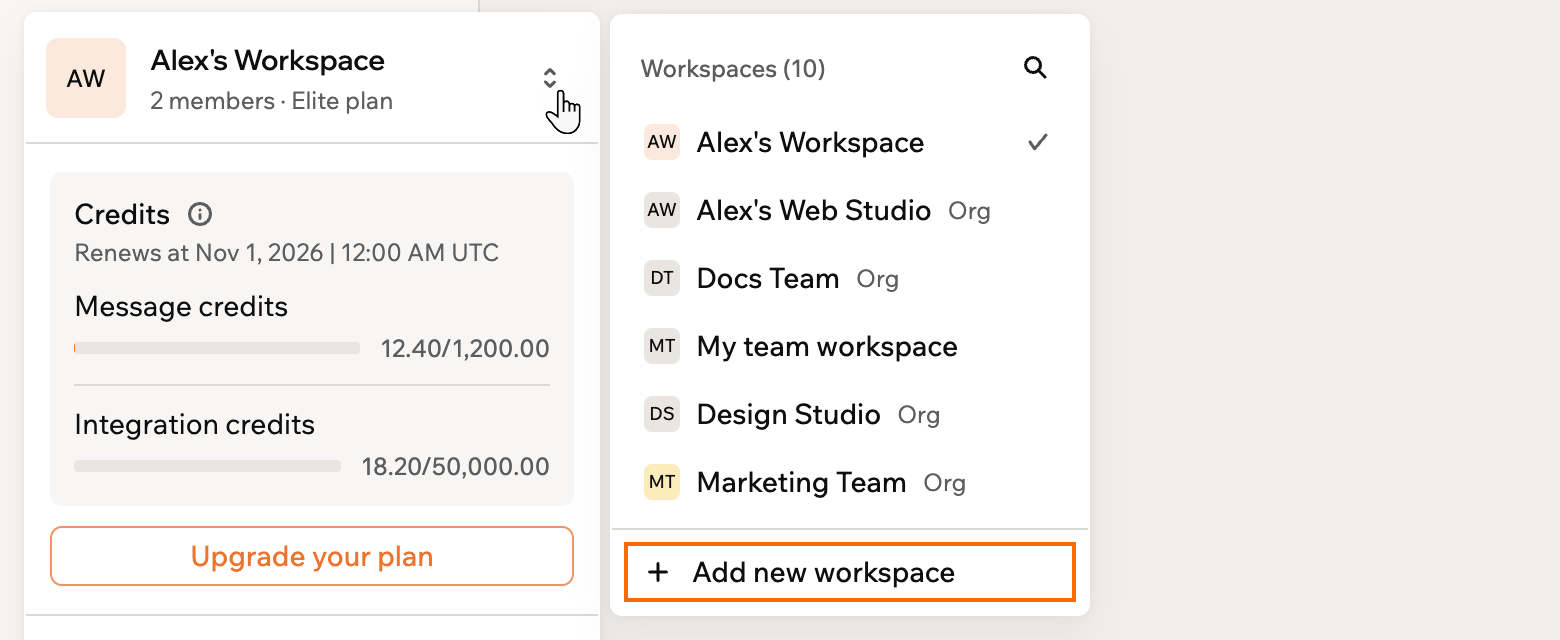
Creating a new workspace in your Base44 account
Workspace members
Invite members to your workspaces so you can build and manage apps together. Roles control what each person can see and do.Inviting members
You can invite as many members as you want to a workspace. This applies on every plan, including Free. When you invite someone, you choose the role that matches what you want them to do in that workspace. Members you invite do not need their own paid plan. They use the plan and credits of the workspace they join when they build or edit apps there. To invite a member:- Click your workspace name at the bottom left of your account.
- Click Settings.
- Click Members and groups.
- Click Invite Members, then click Invite by email.
Assigning roles
All plans include 3 roles: Owner, Editor, and Viewer. Enterprise plans (Business or Enterprise) have a 4th role: Admin.
Owners, Admins, and Editors consume credits when they build or use apps in ways that trigger messages or integrations. Viewers can also consume credits if the app they are viewing uses credit-based features, such as AI-driven components or integrations.
To update a member’s role:
- Click your workspace name at the bottom left of your account.
- Click Settings.
- Click Members and groups.
- Click the member’s current role and choose a new one.
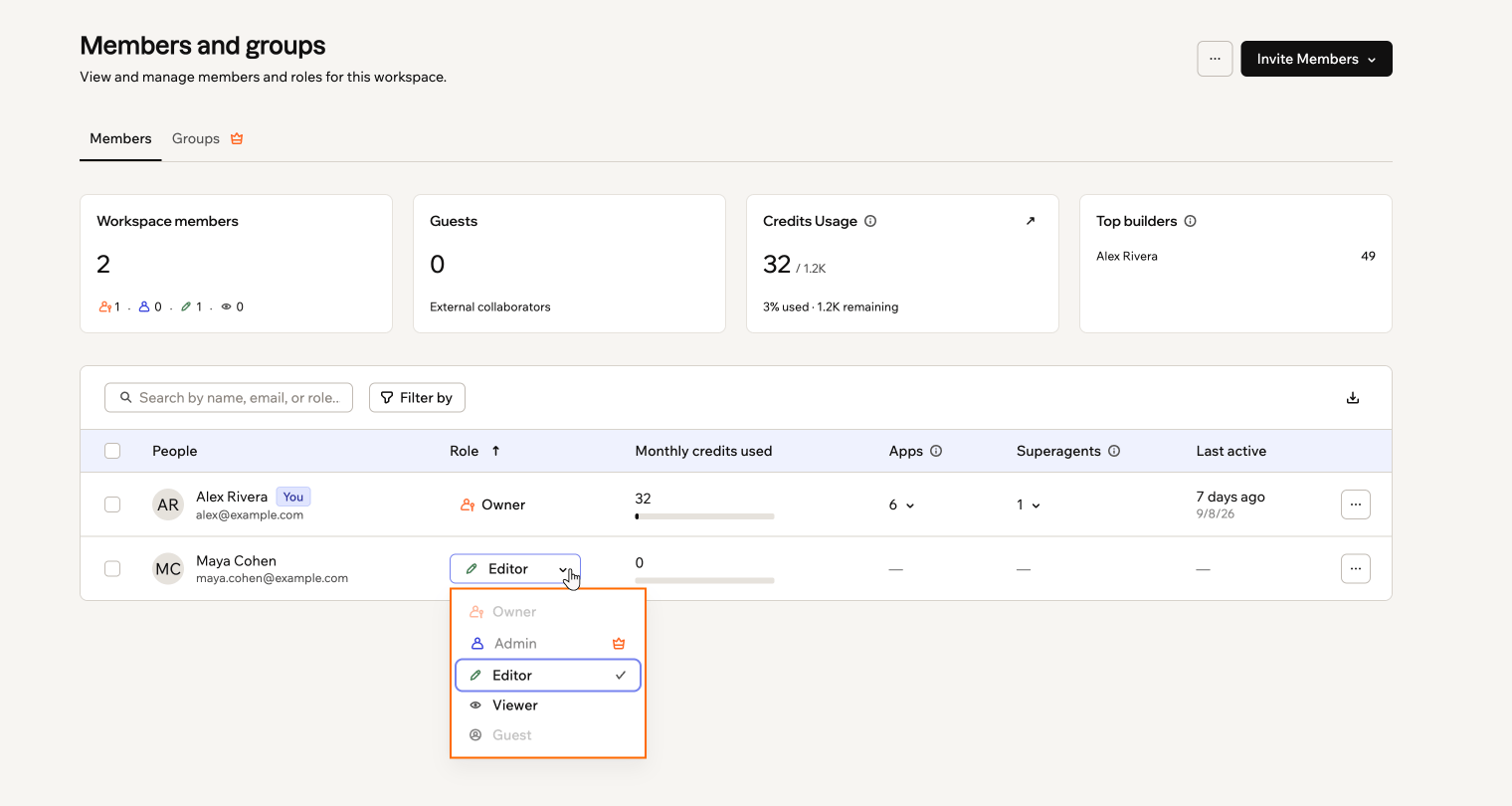
Changing a member's role in your workspace
Apps and ownership
Apps live inside workspaces and always use the plan and credits of the workspace owner.- When you create an app, it is attached to the workspace you are working in at that time.
- You can move an app to another workspace you belong to. See Moving an app between workspaces for the requirements.
- Members with the right role can then work on and manage that app alongside you.
FAQs
Click a question below to learn more about how the model works.Do members need their own paid plan?
Do members need their own paid plan?
No. Members use the plan and credits of the workspace owner for each workspace they join.You can invite an unlimited number of members without buying separate plans or seats. When they build or edit apps in a workspace, their activity uses credits from that workspace’s shared pool.
Do backend functions cost credits?
Do backend functions cost credits?
Yes. Backend functions are available on the Builder plan and higher, and they are part of the usage model.When a backend function runs and calls an integration, that call uses integration credits. For example, a backend function that sends a request to a large language model or another Base44 integration consumes integration credits from that workspace’s shared pool. See Credits for what each built-in integration costs.
Can I move apps between workspaces?
Can I move apps between workspaces?
Yes. See Moving an app between workspaces for who can move an app and what’s required.
Do I own the applications I create on Base44?
Do I own the applications I create on Base44?
Yes. All applications and content you generate through Base44 belong to you. Base44 does not claim ownership of anything you create. You can use, modify, distribute, or sell the applications and content you build in any way that suits you.
Can I create private apps on the Free plan?
Can I create private apps on the Free plan?
No. On the Free plan, you can only build public apps. If you want to create private apps that are only visible to the collaborators you choose, you need to upgrade that workspace to a paid plan.