

Overview
Your trust matters to us. Keeping your account secure and your data private is at the heart of Base44. From advanced encryption and transparent ownership to GDPR compliance, Base44 gives you powerful tools and clear controls to stay in charge of your information. You have control over your data, clear ownership of your work, and peace of mind knowing your privacy is a priority.Protecting your personal information
Base44 puts privacy and security first. Robust authentication tools and best-in-class encryption secure your account and any data you store or process in the platform.- Your personal account information and access permissions are protected with strong security protocols.
- User management and authentication systems are built in, using industry-standard encryption and security practices to protect your data and your app users’ information.
- Industry-standard methods secure both your account and your workspace, so your projects and personal details remain private.
- Base44 is compliant with SOC 2 Type II. This independent audit reviews how Base44 protects your data and systems. Because the full report contains sensitive security details, it is shared only under a non-disclosure agreement (NDA). To review Base44’s security, privacy, and compliance practices or request a copy of the SOC 2 report, go to the Base44 Trust Center and click Get Access to request the SOC report. A security specialist will contact you to continue the process.
- Base44 is ISO 27001 certified. ISO 27001 is an international standard for managing information security and privacy controls in an information security management system. This certification confirms that Base44 follows a repeatable, audited process to protect data across people, processes, and technology. See the certification here.
Recognizing legitimate Base44 emails
When your app sends emails, Base44 uses specific domains so you can confirm that messages are legitimate.- Emails sent by apps built on Base44 use the
base44-apps.comdomain and its subdomains (for example,url1234.base44-apps.com). These messages come from your apps and workflows. - Emails sent directly by Base44, such as account notifications or billing updates, use the
base44.comdomain. - Check that links in Base44-related emails point to
base44.comorbase44-apps.comdomains before you click them.
Reporting abuse and misuse
If you see suspicious behavior or messages that look abusive or unsafe, you can report them so Base44 can investigate.- If you suspect a malicious or abusive app, or you receive an email that you believe violates Base44 policies, forward the message or report it to
abuse@base44.com. This address is the correct contact for security, misuse, and abuse reports. - Do not send support or product questions to
app@base44.com. This address is not monitored and only sends automatic replies. - For details on what counts as misuse, how Base44 investigates abuse, and what you can expect after sending a report, see the Base44 misuse policy.
Your data choices and controls
Learn how to access your personal information, request account deletion, and manage data stored in Base44.- Deleting your Base44 account: To permanently delete your account, follow the Requesting account deletion guide.
- Deleting your app data: Click Dashboard in your app editor, click Settings in the left menu, then scroll to Danger Zone. Click Delete App to take your app offline and remove it from your workspace.
- If you would like a copy of the personal data that Base44 holds about you, email your request to compliance@base44.com from the email associated with your account.
AI model training
Whether Base44 can use your workspace data to train AI models depends on your plan.- Enterprise: your data is not used to train AI models. The exclusion is built in and applies automatically as soon as your workspace is on Enterprise.
- All other plans, including Business: your data can be used to train AI models.
There is no opt-out setting to find or switch on. On Enterprise the exclusion is automatic and needs no action from you.
Data storage locations and compliance
Base44 is committed to privacy and data protection. For the most up-to-date information on data privacy, including GDPR and our DPA, please review our Terms of Service and Data Processing Agreement. Understanding where your data lives and how Base44 fulfills privacy regulations:- By default, your app data is stored in the United States. On an Enterprise plan (Business or Enterprise), you can choose to store it in the EU or the UK instead. See Changing your workspace data residency.
- All of our vendors who receive personal information from Base44 are bound by strict data processing agreements, which govern the transfer of data to the US, and where applicable, the use of approved transfer mechanisms like adequacy, Standard Contractual Clauses (SCCs), or subscription to the Data Privacy Framework (DPF).
- Base44 backs up platform data regularly and keeps each backup for a set period. You can find the full backup and data retention schedule in the Base44 Trust Center, under “What is your data retention policy?” If you’re on the Elite or Enterprise plan, you can also restore your own app data with Backup & Restore.
Changing your workspace data residency
On an Enterprise plan (Business or Enterprise), you can choose to store your app data in EU or UK clusters instead of the default US region. Here’s where each type of data is stored when you choose the EU or UK:Who and what it applies to:
- Workspaces created before October 1, 2026 can also do this on the Elite plan.
- This setting applies to apps created after April 16, 2026. Apps created before that date stay in the US.
- A change applies only to apps you create after you save it. Your existing apps stay in their current region, but you can move an app to a different region.
- Data residency controls where your data is stored, not where it is processed. When your app runs, requests may be handled by Base44 services in another region before the result is saved to your chosen region.
- Click your workspace name at the bottom left and click Settings.
- Click Overview.
- Under Data hosting, choose a region from the Data residency list.
- Click Save to confirm the change.
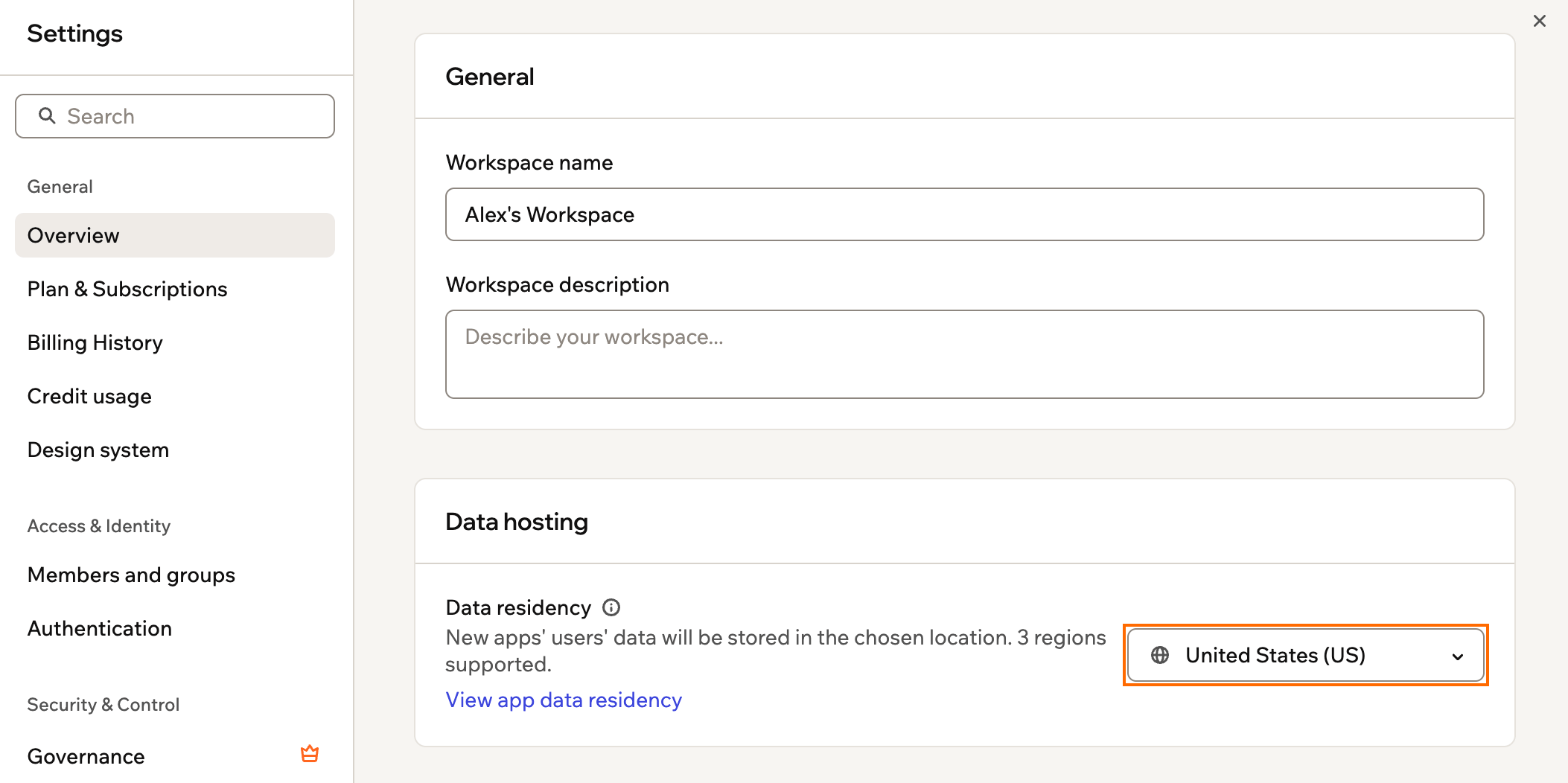
Choosing your workspace data residency
Viewing your apps’ data residency
Each app keeps the region it was created in, so apps in the same workspace can store their data in different places. You can check where every app’s data is stored from your workspace settings. To view your apps’ data residency:- Click your workspace name at the bottom left and click Settings.
- Click Overview.
- Under Data hosting, click View app data residency.
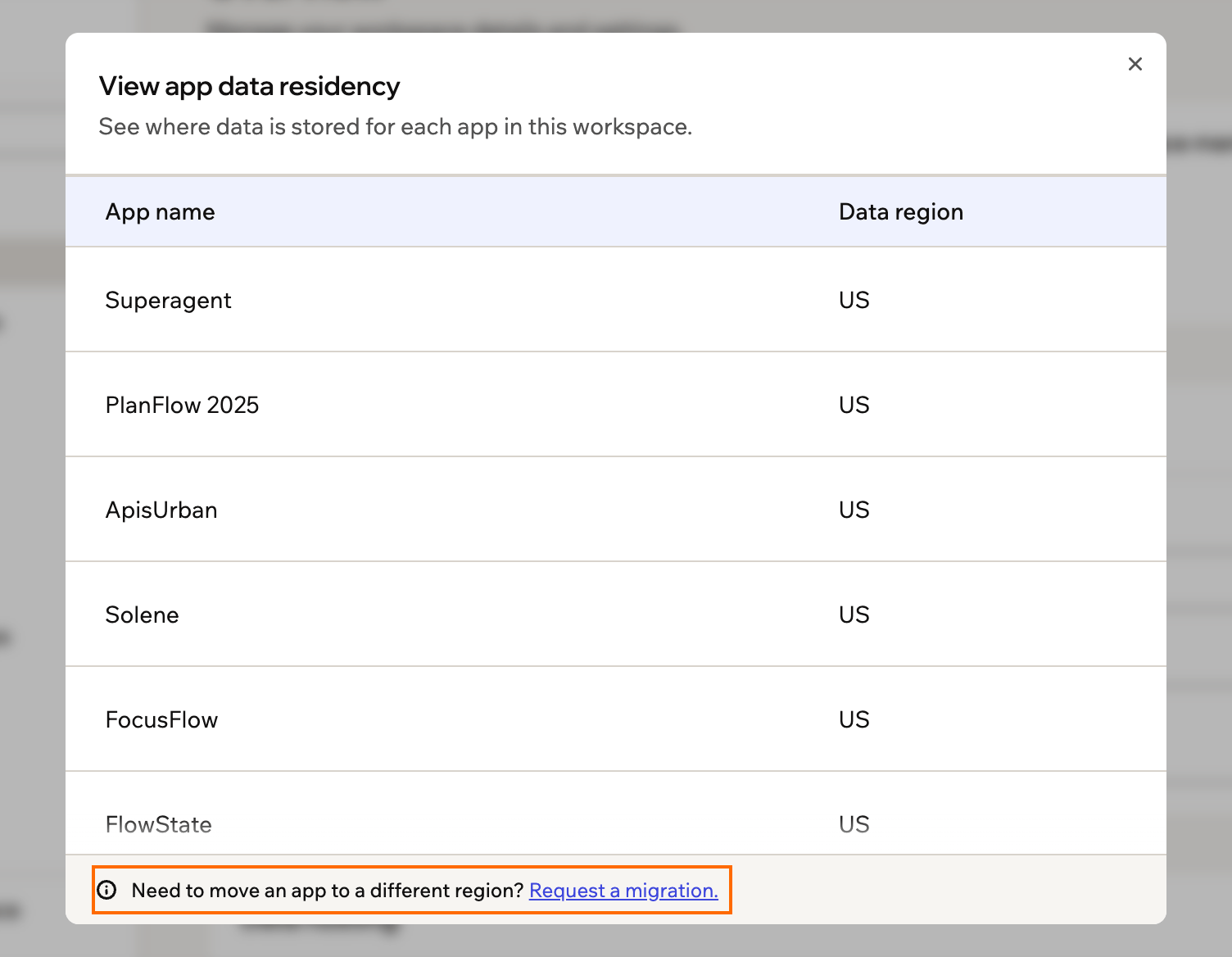
Checking where your apps store data
Moving an app to a different region
To move an existing app to another region, you can ask Base44 to migrate its data for you, or clone the app into the new region yourself. To request a migration:- Click your workspace name at the bottom left and click Settings.
- Click Overview.
- Under Data hosting, click View app data residency.
- Click Request a migration.
- In the support conversation that opens, add the region you want and the apps to move, then send it.
- Update your workspace data residency setting first (see above).
- Clone your app. The clone is created in your workspace’s current data residency region.
- In the original app, go to the dashboard and export your data.
- In the cloned app, go to the dashboard and import the exported data.
Account and app ownership
You always retain ownership of your account and any apps you create on the Base44 platform.- According to the Base44 Terms of Service, ownership of an app belongs to the person who created the app on the platform.
- If you need access to an app, you should request access directly from the current owner. Base44 does not grant access to an app against the creator’s will or participate in any ownership disputes. If another individual currently owns the app, you must resolve the dispute directly with them.
- If you believe your access to an app is being unlawfully restricted, you should seek advice from a local legal adviser to understand your options. If you receive a court order granting you access, Base44 is happy to cooperate after receipt of the order.
Legacy contacts
A legacy contact is a person you choose to receive ownership of your account if you pass away. Base44 handles this carefully and in line with applicable laws and regulations.Appointing a legacy contact
Appoint your legacy contact in advance so Base44 knows who should receive your account.Your legacy contact needs their own Base44 account, registered with the email address you provide. If they do not have one yet, ask them to sign up first.
- Your legacy contact’s full name.
- Your legacy contact’s email address.
- Your full name, exactly as it appears on a valid form of identification (national ID card, driver’s license, or passport).
Transferring an account after death
If an account owner passes away, Base44 helps transfer their account to the legacy contact they appointed. To transfer an account, the legacy contact should contact Customer Care and send us the following:- Death certificate: A valid death certificate for the deceased account owner.
- Proof of identity: A valid government-issued ID (national ID card, driver’s license, or passport) with a name that matches the legacy contact on record.
Country and region availability
Base44 is not available everywhere. As a U.S.-based company, we comply with requirements issued by the U.S. Office of Foreign Assets Control (OFAC). These regulations prohibit us from providing services to certain individuals, entities, or jurisdictions that appear on OFAC sanctions lists. The following countries and regions are restricted:- Iran
- North Korea
- Syria
- Cuba
- The region of Crimea
- The so-called Donetsk People’s Republic
- The so-called Luhansk People’s Republic
- You cannot register for or use Base44 services, including Base44 sites.
- You cannot connect domains with the following extensions to Base44 (by pointing or name servers):
- Cuba: .cu
- Iran: .ir, .xn—mgba3a4f16a (ایران.)
- North Korea: .kp
- Syria: .sy, .xn—ogbpf8fl (سورية.)