

What you can do
Bring your Google Analytics data into your app.Show traffic trends
Show visits, top pages, and traffic sources over time in a dashboard inside your app.
Analyze user behavior
Look at engagement and conversion funnels to see where visitors drop off.
Build regular reports
Generate weekly reports with traffic and engagement data for your team.
Track campaigns
Compare how your marketing campaigns perform using your Analytics data.
Connecting Google Analytics
Choose how people connect: one shared account for your whole app, or each person’s own account.- App user connector
Connect one Google account, and everyone who uses your app shares it and its Analytics data.To add a shared Google Analytics connector:
- Click Connectors in your workspace sidebar.
- Click Add connector.
- Search for Google Analytics and click it.
- Select Shared connector, then click Next.
- Enter a Connection name.
- In Who can access, choose Apps and Super agent, Apps only, or Super agent only. Apps and Super agent is selected by default.
-
Choose the scopes your app needs under Permissions:
- Read-only: Your app can view your Analytics data and settings. This is the default.
- Read & write: Your app can also change your Analytics account and property settings.
- Custom: Select the optional permissions your app needs. Required permissions stay selected.
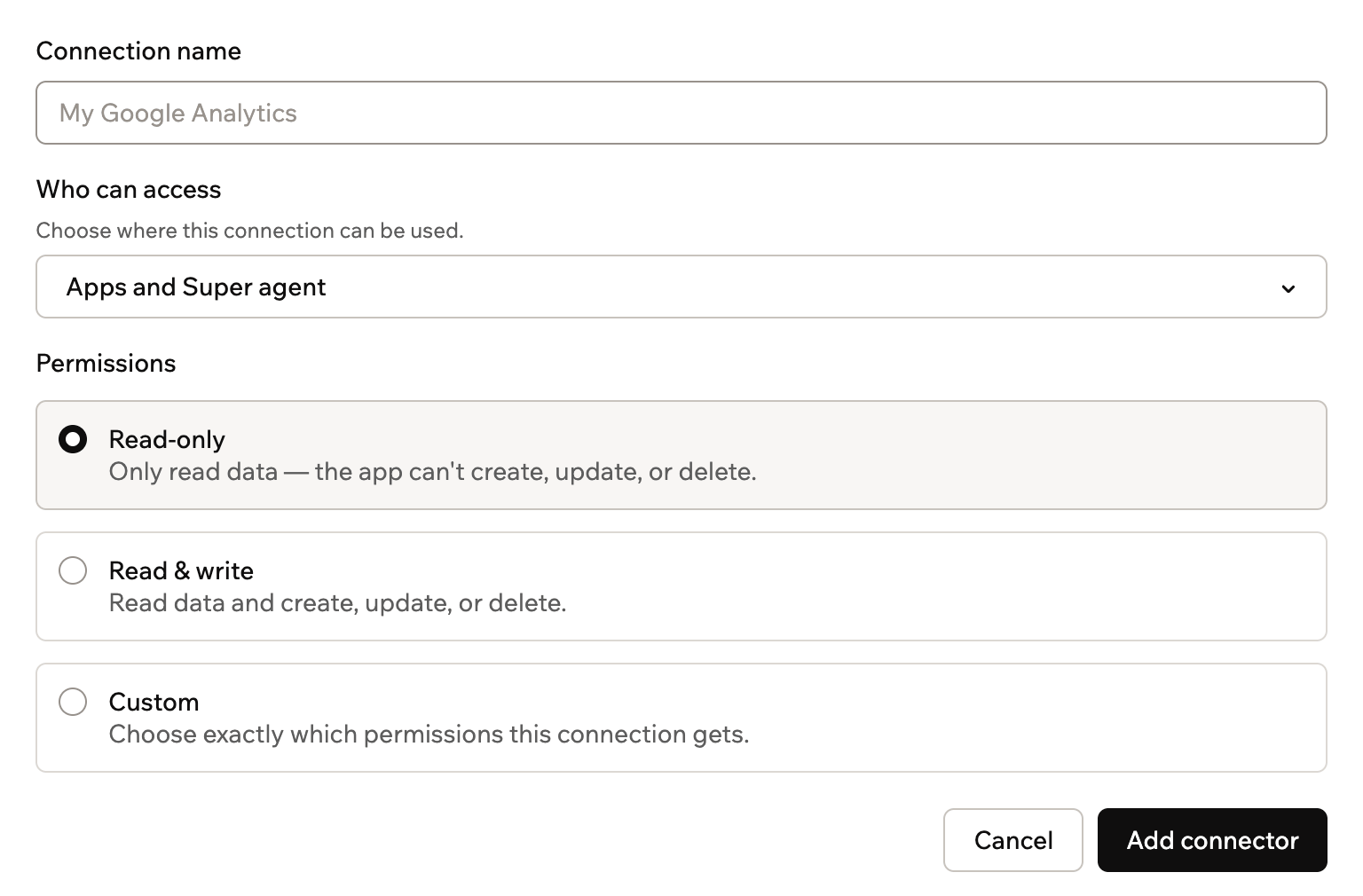
Setting up a shared Google Analytics connector
- Click Add connector.
- Sign in with the Google account that has access to your Analytics properties.
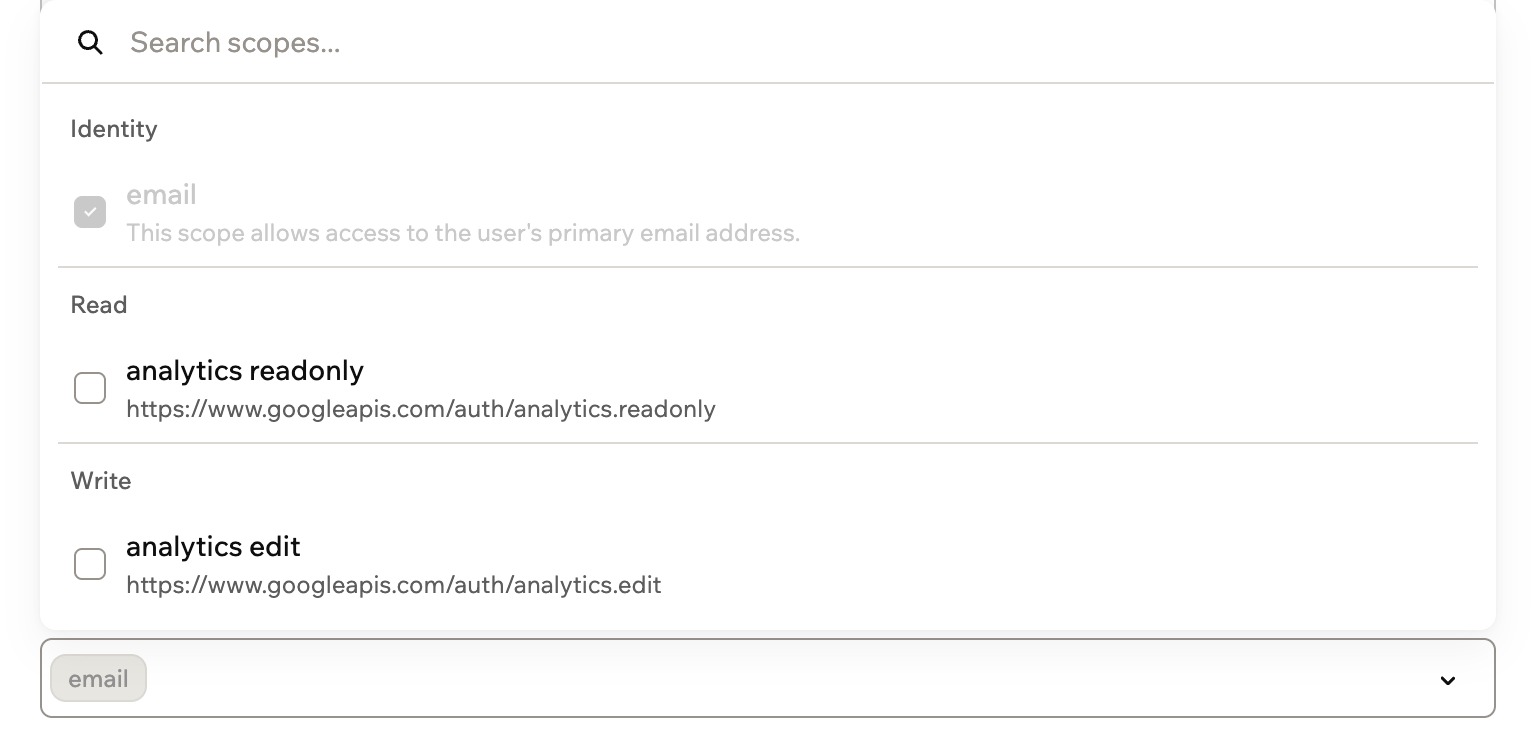
Scopes and permissions
Scopes control what your app can do in Google Analytics. You choose them when you set up a connector.1
Base44 adds
Base44 always includes this scope. You see it locked under Custom for a shared connector, or under Scopes for an app user connector.
email: Identify the Google account that connects
2
You configure
Choose a permission option for a shared connector, or select scopes for an app user connector. Google Analytics scope names start with
https://www.googleapis.com/auth/:analytics.readonly: View your Analytics data and settingsanalytics.edit: Edit your Analytics account and property settings
Access: Your app sees the Analytics accounts and properties the connected Google account can access.
Using backend functions
Once Google Analytics is connected, your backend functions can retrieve an access token and call the Google Analytics Data API directly. Base44 handles sign-in and keeps the token up to date for you.- For a shared connection, use
getConnection()to retrieve the token. - For an app user connection, use
getCurrentAppUserConnection()so each request uses the signed-in person’s token.
analyticsdata.googleapis.com and pass the token in the Authorization header:
Shared connectors
Configure, deploy, and call a shared connection from a backend function.
App user connectors
Retrieve a per-user token and call the API as the signed-in person.
Troubleshooting
Check the connection, the Google account, and its scopes if Google Analytics stops working in your app.The connection needs to be reconnected
The connection needs to be reconnected
If Google Analytics access is lost or expires, the connection shows a Reconnect this connection section. For a shared connector, reconnect it and sign in with the same Google account. Every app that uses it works again. For an app user connector, each person reconnects their own account from inside your app.
My Analytics data isn't showing up
My Analytics data isn't showing up
Check that the Google account you connected has access to the property you want, and that your app uses that property’s ID. A new property can take a while to collect data, so compare the same date range in Google Analytics.
My app can't change Analytics settings
My app can't change Analytics settings
Your app needs the
analytics.edit scope to change account and property settings.- For a shared connector, permissions are set when you add the connection. Click Add another connector on the Google Analytics connector page and choose Read & write for the new connection.
- For an app user connector, open it on the Google Analytics connector page, add
analytics.editto its scopes, and click Save Changes. People who already connected keep their earlier access until they connect again.
Some people can't connect their own Google account
Some people can't connect their own Google account
Your OAuth client starts in testing mode, where only approved test users can connect. Before opening access more broadly, move your OAuth app to production and complete any verification Google requires.
Connecting fails with a redirect URI error
Connecting fails with a redirect URI error
Copy the Callback URL from the Add Google Analytics Connection form and add it exactly to the authorized redirect URIs in your Google Cloud OAuth client.
FAQs
Which Google Analytics role does the account need?
Which Google Analytics role does the account need?
Connect a Google account with at least the Viewer role on the properties you want to show. To let your app change account or property settings, the account needs the Editor role.
Can my app use more than one property?
Can my app use more than one property?
Yes. If the connected Google account has access to several properties, name the one you want in the AI chat, or ask for a way to switch between them.
Can I use Google Analytics and Google Search Console together?
Can I use Google Analytics and Google Search Console together?
Yes. Add each connector separately, then ask the AI chat to combine traffic from Google Analytics with search performance from Google Search Console in one dashboard.