

You need the Enterprise plan to restrict workspace creation. It isn’t included in the Business plan. It is off until an owner or admin turns it on.
Turning on the restriction
The switch stays unavailable until at least one domain is verified, and if you remove your last verified domain it turns off on its own.Before you begin:
- Your workspace is on the Enterprise plan. The Business plan doesn’t include this.
- At least one email domain is verified. See Setting up your workspace domain.
- You are an owner or admin of the workspace.
- Click your workspace name at the bottom left of your account.
- Click Settings.
- Click Authentication.
- Under Verified Domains, turn on Restrict workspace creation.
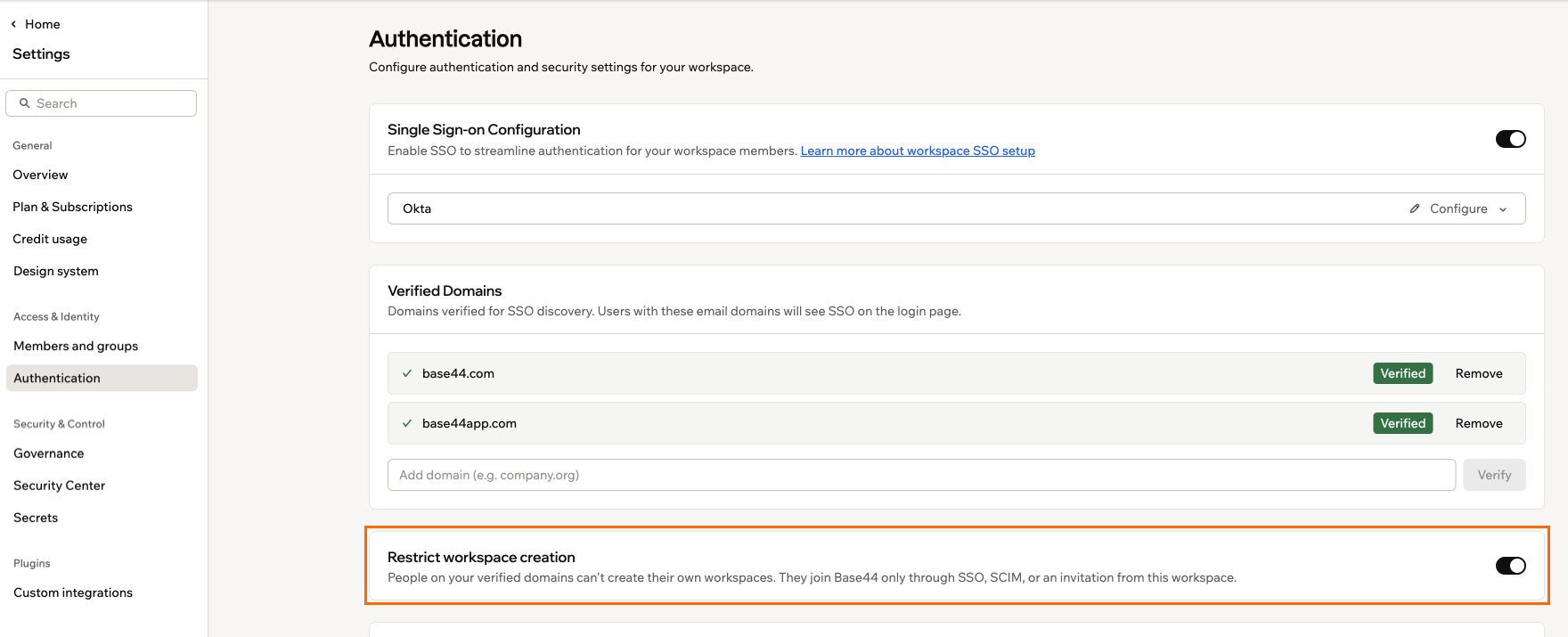
Restrict workspace creation, turned on below the workspace's verified domains
Understanding what changes
The restriction covers 2 things: who can sign up on your domain, and who can create new workspaces. It applies from the moment you turn it on, and it follows the domain rather than the workspace, so it reaches every account on that domain.This setting governs new accounts and new workspaces. It does not change how your existing members sign in, so if you also want everyone using the same company account, see requiring SSO for all workspace members.
Managing accounts without a personal workspace
An account created after you claim the domain exists only through your company’s workspaces. There is no personal workspace to fall back on, so losing the last company workspace leaves the account with nowhere to be, and it is disabled.When an account is disabled
That happens when an admin removes the person from their last workspace, when SCIM deactivates them, or when they leave their last workspace themselves. At their next sign-in they are told the account is disabled and to ask an administrator to invite them again.An account created for an invitation that was never accepted is asked to accept it before anything else, and can only accept or sign out. If the invitation lapses, the account is disabled at the next sign-in.
Restoring access
Access comes back on its own as soon as something admits the account again, whether that is a SCIM re-add, a sign-in through SSO with access to a workspace, or a fresh invitation from an admin. There is no separate action to re-enable an account, and none is needed. An account belonging to no workspace is disabled again at its next sign-in, so inviting or provisioning the person is always the way back in.Sharing a domain between workspaces
More than one workspace can verify the same email domain, and any of them can admit an account on it. That means removing someone from one workspace does not lock them out of your company. They keep access through any other workspace they belong to, and their account is only disabled once they belong to none.Reviewing the audit log
Your workspace audit log records the setting itself and everything it does to accounts. If a security review asks when you started governing your domain, or why a particular person lost access, this is where the answer is.- Turning the restriction on or off appears as a workspace settings change.
- Each account it disables or restores appears with the reason it happened.
Troubleshooting
Choose the problem you are seeing:A new person cannot sign up
A new person cannot sign up
This is the restriction working. Their email domain is claimed by your workspace, so they cannot create an account on their own.They sign in with your SSO instead, or you invite or provision them.
Someone cannot create a workspace
Someone cannot create a workspace
On a claimed domain, only people who administer a workspace that verified it can create workspaces.An owner or admin of that workspace creates the workspace for them.
Someone is told their account is disabled
Someone is told their account is disabled
The account belongs to no workspace, either because it lost its last one or because its invitation lapsed.Invite or provision the person again, and the account comes back when they sign in.
Someone cannot get past a screen asking them to accept an invitation
Someone cannot get past a screen asking them to accept an invitation
The account was created for an invitation that was never accepted, so there is nothing else it can reach yet.They accept the invitation, or sign out. If the invitation has already lapsed, send a new one.
FAQs
Here are some common questions about restricting workspace creation.Does this affect people who already have a Base44 account?
Does this affect people who already have a Base44 account?
Partly. They keep the personal workspace they already have, and how they sign in does not change. What they lose is the ability to create new workspaces, which applies to everyone on the claimed domain regardless of when they joined.
What happens to someone on my domain who is not part of my company?
What happens to someone on my domain who is not part of my company?
The restriction follows the email domain, so anyone signing up with an address on it is covered. If people outside your organization use addresses on your domain, they are refused sign-up along with everyone else, and need an invitation from you.
Can I still create workspaces myself?
Can I still create workspaces myself?
Yes, as long as you administer a workspace that verified the domain. Owners and admins of the claiming workspace are unaffected.