> ## Documentation Index
> Fetch the complete documentation index at: https://docs.base44.com/llms.txt
> Use this file to discover all available pages before exploring further.
# Working with sub-agents
> Complete complex requests faster by splitting work into smaller tasks that run in parallel.
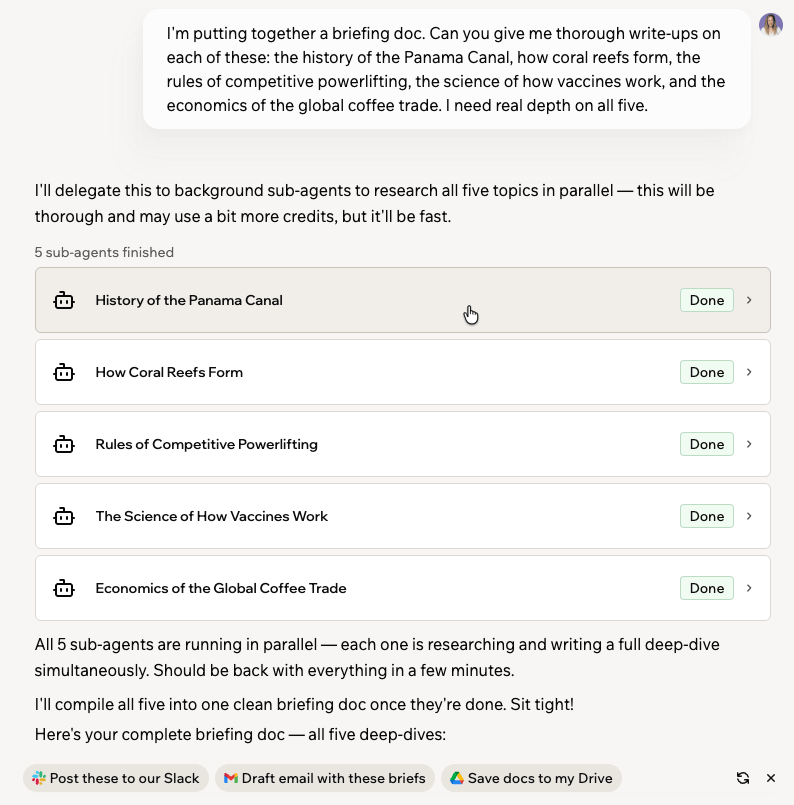
Sub-agents let your Superagent handle complex requests by working on multiple tasks at the same time. While those tasks run in the background, you can continue chatting with your Superagent.
 ***
## Using sub-agents
Your Superagent uses sub-agents when a request can be completed faster by working on independent tasks at the same time.
* Research multiple topics.
* Explore a large workspace.
* Analyze large files or datasets.
* Complete several independent tasks at the same time.
When your Superagent delegates work, it lets you know before getting started.
While sub-agents are running, you can:
* Continue chatting with your Superagent.
* Follow each task in the task panel.
* Expand a completed task to view its results.
* Click the stop icon at the message input to stop the work. Any work the sub-agents already finished is kept.
You can also ask your Superagent not to use sub-agents, and it works on your request inline instead.
Running several sub-agents at the same time can use more credits because your Superagent completes multiple parts of your request in parallel.
***
## Getting your results
When all sub-agents finish, your Superagent combines their work into a single response. You receive one answer instead of separate responses from each sub-agent.
Sub-agents don't automatically save their work. The results appear in your Superagent chat. To keep them, ask your Superagent to save or export them. For example, you can prompt your Superagent to save the results in a connected tool like Google Docs or Google Sheets.
***
## FAQs
Your Superagent decides. It uses sub-agents when splitting a request into independent tasks completes it faster. You can ask it not to use them when you send your request.
Yes. Click the stop icon at the message input. Any work the sub-agents already finished is kept and stays available in your chat.
Your Superagent combines the work into a single response in your chat. The results stay in your conversation. To keep them, ask your Superagent to save or export them.
Yes. You can continue chatting with your Superagent while sub-agents work in the background, and follow each task in the task panel.
Sub-agents are available to app owners using Superagents in the Base44 web builder.
***
## Using sub-agents
Your Superagent uses sub-agents when a request can be completed faster by working on independent tasks at the same time.
* Research multiple topics.
* Explore a large workspace.
* Analyze large files or datasets.
* Complete several independent tasks at the same time.
When your Superagent delegates work, it lets you know before getting started.
While sub-agents are running, you can:
* Continue chatting with your Superagent.
* Follow each task in the task panel.
* Expand a completed task to view its results.
* Click the stop icon at the message input to stop the work. Any work the sub-agents already finished is kept.
You can also ask your Superagent not to use sub-agents, and it works on your request inline instead.
Running several sub-agents at the same time can use more credits because your Superagent completes multiple parts of your request in parallel.
***
## Getting your results
When all sub-agents finish, your Superagent combines their work into a single response. You receive one answer instead of separate responses from each sub-agent.
Sub-agents don't automatically save their work. The results appear in your Superagent chat. To keep them, ask your Superagent to save or export them. For example, you can prompt your Superagent to save the results in a connected tool like Google Docs or Google Sheets.
***
## FAQs
Your Superagent decides. It uses sub-agents when splitting a request into independent tasks completes it faster. You can ask it not to use them when you send your request.
Yes. Click the stop icon at the message input. Any work the sub-agents already finished is kept and stays available in your chat.
Your Superagent combines the work into a single response in your chat. The results stay in your conversation. To keep them, ask your Superagent to save or export them.
Yes. You can continue chatting with your Superagent while sub-agents work in the background, and follow each task in the task panel.
Sub-agents are available to app owners using Superagents in the Base44 web builder.