> ## Documentation Index
> Fetch the complete documentation index at: https://docs.base44.com/llms.txt
> Use this file to discover all available pages before exploring further.
# Submitting your app to Launchpad
> Submit your app to Launchpad for a chance to win credits, get featured, and reach more people in the Base44 community.
[Launchpad](https://app.base44.com/launchpad/) showcases public, published apps built with Base44. Submit your app so the Base44 community can discover it, try it, and vote for it.
Top apps can win credits and get featured on Launchpad, giving your app another way to reach potential users, testers, and supporters.
 Browse submitted apps, vote for your favorites, and see what the Base44 community is building.
***
## About Launchpad
Launchpad is a community space for apps built with Base44. Submit your public, published app to reach potential users, testers, and supporters. People can browse submitted apps, vote for their favorites, and help them climb the leaderboard.
You can submit one app every 30 days. If your app is approved, it appears on Launchpad where people can discover, try, and vote for it.
Put your app in front of people browsing apps built by the Base44 community.
Share your Launchpad listing with your network and bring more people to your app.
Top apps can win credits and get featured on Launchpad.
When a round ends, submitted apps move to **All Apps**. Winning apps also appear in the Winners gallery.
***
## Submitting your app
Choose the public app you want to submit, review its security scan, add your launch details, upload screenshots or a short demo video, and submit it to Launchpad.
Browse submitted apps, vote for your favorites, and see what the Base44 community is building.
***
## About Launchpad
Launchpad is a community space for apps built with Base44. Submit your public, published app to reach potential users, testers, and supporters. People can browse submitted apps, vote for their favorites, and help them climb the leaderboard.
You can submit one app every 30 days. If your app is approved, it appears on Launchpad where people can discover, try, and vote for it.
Put your app in front of people browsing apps built by the Base44 community.
Share your Launchpad listing with your network and bring more people to your app.
Top apps can win credits and get featured on Launchpad.
When a round ends, submitted apps move to **All Apps**. Winning apps also appear in the Winners gallery.
***
## Submitting your app
Choose the public app you want to submit, review its security scan, add your launch details, upload screenshots or a short demo video, and submit it to Launchpad.
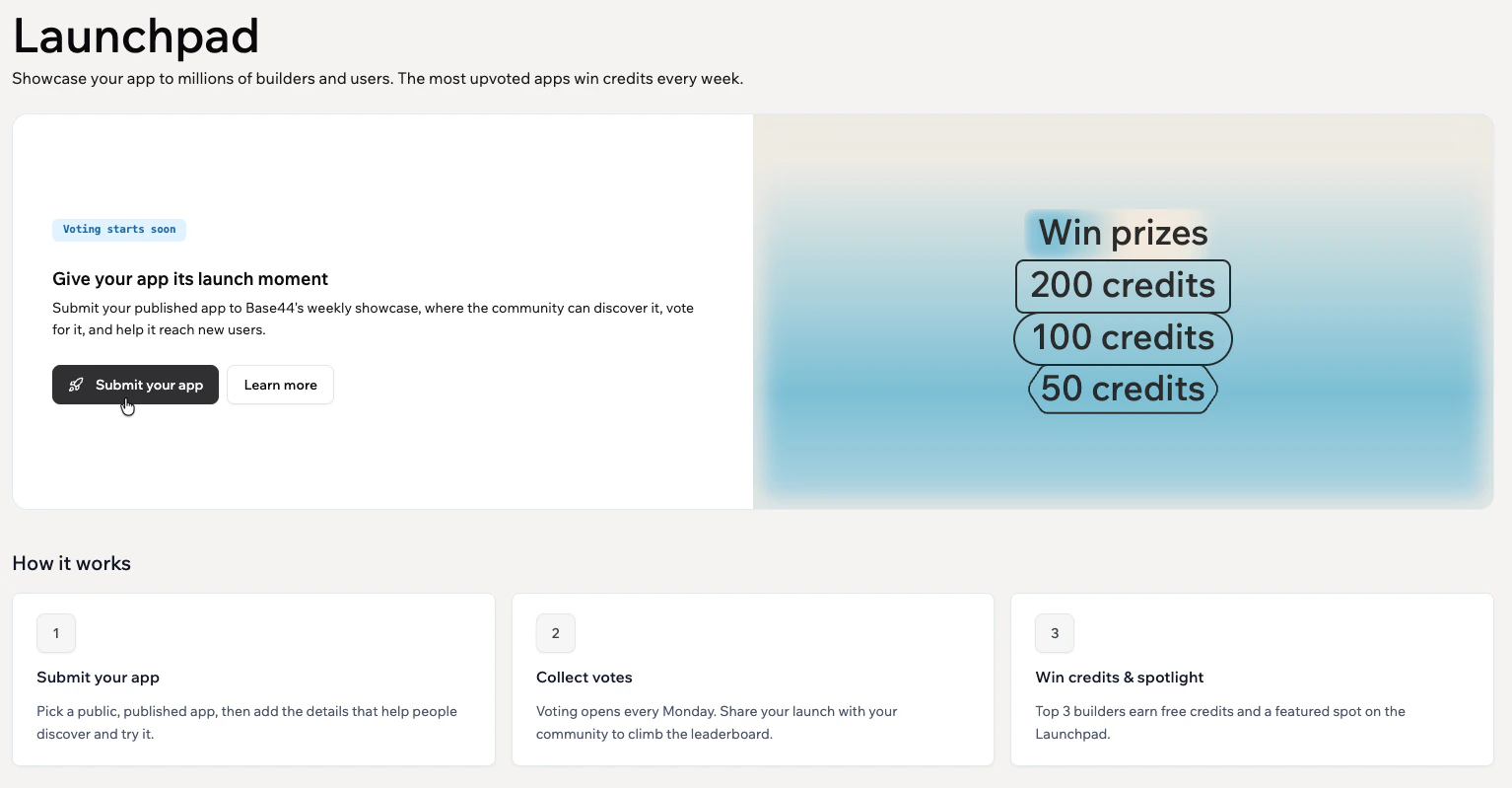 **To submit your app to Launchpad:**
1. Log in to [Base44](https://app.base44.com).
2. Go to **Community** in the sidebar.
3. Click **Launchpad**.
4. Click **Submit your app**.
5. Choose the app you want to submit, then click **Continue**.
6. On the **Submit your app** page, complete the following sections:
* **Selected app:** Review the app you selected. Click **Select another app** to swap the app, or click **Manage app** to view your live app, edit your app logo, rename your app, or open your app settings.
* **Security scan:** Wait for the automatic security scan to finish. Click **Run security scan** to scan the app again after making changes.
* **Launch details:** Select up to 3 categories, enter a short **Tagline**, and add a **Description** that explains what your app does and why people should try it. Click **Improve with AI** to refine your description, then click **Preview your Launchpad card** to review how your app appears on Launchpad.
* **Showcase your app:** Upload up to 5 screenshots or a short demo video. Supported video formats are MP4 and WebM, up to 50 MB. Drag items to reorder. For screenshots, use images that are at least 1280 x 720 pixels.
* **Terms & Conditions:** Click **Read** to review the Launchpad Terms of Service.
7. Click **Submit**.
After you submit, your app is sent for review. If approved, it appears on Launchpad. You can edit or withdraw your submission while it is pending.
***
## Preparing a standout Launchpad submission
Think of your Launchpad submission as a way to grow your app's reach and make a strong first impression. A clear value, strong screenshots, and a simple sharing plan can help more people understand your app and vote.
Help people understand what your app does and why they should try it.
Use screenshots or a short demo video to show your app's best screens, key flow, or strongest outcome.
Share your listing so more people can try your app and vote.
Use these tips to make your submission stronger:
* **Choose accurate categories:** Select the categories that best match your app so people can find it.
* **Tell the story:** Use your description to explain who the app is for, why you built it, and what makes it different.
* **Use content you have rights to:** Make sure your app details, screenshots, and submitted materials are yours or that you have permission to use them.
Open your app in the editor and ask the AI chat to help prepare your Launchpad submission.
```text wrap theme={null}
Help me prepare my Launchpad submission. Write a clear tagline, a strong description, 3 category suggestions, screenshot ideas or a short demo video walkthrough, and a short message I can share when my app goes live. My app is: [describe your app].
```
***
## Sharing your app
Once your app is live on Launchpad, share your listing to help more people discover, try, and vote for your app.
When sharing your app, include:
* What your app does.
* Who it helps.
* Why you built it.
* A direct link to your Launchpad listing.
* A clear ask to try the app and vote.
***
## FAQs
Click a question below to learn more about submitting apps to Launchpad.
You can submit apps that are public, published, and built with Base44.
You can submit one app every 30 days. After submitting, you can submit another app 30 days after your last submission.
Your app is sent for review. If approved, it appears on Launchpad.
Yes. Open **My Submissions** from your Launchpad profile to see all your submissions in one place. You can edit details or withdraw a pending submission from there. Apps you have already submitted are hidden from the submission picker so you do not accidentally submit them again.
Review the message shown in Launchpad, update your app or submission details, then submit it again.
Anyone can view Launchpad, but people need to sign in to [Base44](https://app.base44.com) to vote for apps.
Top apps can win credits, earn a featured spot on Launchpad, and reach more people in the Base44 community.
The Base44 team applies prize credits after winners are confirmed and announced. Once awarded, the credits appear in your account.
Base44 scans your app before submission to check for security issues.
Review the issues shown in the scan, fix them in your app, then run the security scan again. Apps with unresolved security issues may not be listed on Launchpad.
Yes. Share your listing with your network and relevant communities. Do not use bots, fake accounts, automated scripts, or other vote manipulation methods.
Submitted apps move to **All Apps**. Winning apps are featured in the Winners gallery.
**To submit your app to Launchpad:**
1. Log in to [Base44](https://app.base44.com).
2. Go to **Community** in the sidebar.
3. Click **Launchpad**.
4. Click **Submit your app**.
5. Choose the app you want to submit, then click **Continue**.
6. On the **Submit your app** page, complete the following sections:
* **Selected app:** Review the app you selected. Click **Select another app** to swap the app, or click **Manage app** to view your live app, edit your app logo, rename your app, or open your app settings.
* **Security scan:** Wait for the automatic security scan to finish. Click **Run security scan** to scan the app again after making changes.
* **Launch details:** Select up to 3 categories, enter a short **Tagline**, and add a **Description** that explains what your app does and why people should try it. Click **Improve with AI** to refine your description, then click **Preview your Launchpad card** to review how your app appears on Launchpad.
* **Showcase your app:** Upload up to 5 screenshots or a short demo video. Supported video formats are MP4 and WebM, up to 50 MB. Drag items to reorder. For screenshots, use images that are at least 1280 x 720 pixels.
* **Terms & Conditions:** Click **Read** to review the Launchpad Terms of Service.
7. Click **Submit**.
After you submit, your app is sent for review. If approved, it appears on Launchpad. You can edit or withdraw your submission while it is pending.
***
## Preparing a standout Launchpad submission
Think of your Launchpad submission as a way to grow your app's reach and make a strong first impression. A clear value, strong screenshots, and a simple sharing plan can help more people understand your app and vote.
Help people understand what your app does and why they should try it.
Use screenshots or a short demo video to show your app's best screens, key flow, or strongest outcome.
Share your listing so more people can try your app and vote.
Use these tips to make your submission stronger:
* **Choose accurate categories:** Select the categories that best match your app so people can find it.
* **Tell the story:** Use your description to explain who the app is for, why you built it, and what makes it different.
* **Use content you have rights to:** Make sure your app details, screenshots, and submitted materials are yours or that you have permission to use them.
Open your app in the editor and ask the AI chat to help prepare your Launchpad submission.
```text wrap theme={null}
Help me prepare my Launchpad submission. Write a clear tagline, a strong description, 3 category suggestions, screenshot ideas or a short demo video walkthrough, and a short message I can share when my app goes live. My app is: [describe your app].
```
***
## Sharing your app
Once your app is live on Launchpad, share your listing to help more people discover, try, and vote for your app.
When sharing your app, include:
* What your app does.
* Who it helps.
* Why you built it.
* A direct link to your Launchpad listing.
* A clear ask to try the app and vote.
***
## FAQs
Click a question below to learn more about submitting apps to Launchpad.
You can submit apps that are public, published, and built with Base44.
You can submit one app every 30 days. After submitting, you can submit another app 30 days after your last submission.
Your app is sent for review. If approved, it appears on Launchpad.
Yes. Open **My Submissions** from your Launchpad profile to see all your submissions in one place. You can edit details or withdraw a pending submission from there. Apps you have already submitted are hidden from the submission picker so you do not accidentally submit them again.
Review the message shown in Launchpad, update your app or submission details, then submit it again.
Anyone can view Launchpad, but people need to sign in to [Base44](https://app.base44.com) to vote for apps.
Top apps can win credits, earn a featured spot on Launchpad, and reach more people in the Base44 community.
The Base44 team applies prize credits after winners are confirmed and announced. Once awarded, the credits appear in your account.
Base44 scans your app before submission to check for security issues.
Review the issues shown in the scan, fix them in your app, then run the security scan again. Apps with unresolved security issues may not be listed on Launchpad.
Yes. Share your listing with your network and relevant communities. Do not use bots, fake accounts, automated scripts, or other vote manipulation methods.
Submitted apps move to **All Apps**. Winning apps are featured in the Winners gallery.