> ## Documentation Index
> Fetch the complete documentation index at: https://docs.base44.com/llms.txt
> Use this file to discover all available pages before exploring further.
# Sending emails from your app
> Choose the best way to send emails from your Base44 app.
When you [create an app with AI](https://base44.com/ai-app-builder) in Base44, you can choose how to send emails, from quick transactional messages to scheduled campaigns. You can use Base44 built-in emails or send from a custom email domain for branded messages. For more control, you can connect an external email provider such as Resend, use another external integration, or connect your own email service. You can also combine any of these options with automations to send emails on a schedule or when something changes in your data.
 ***
## Base44 built-in emails
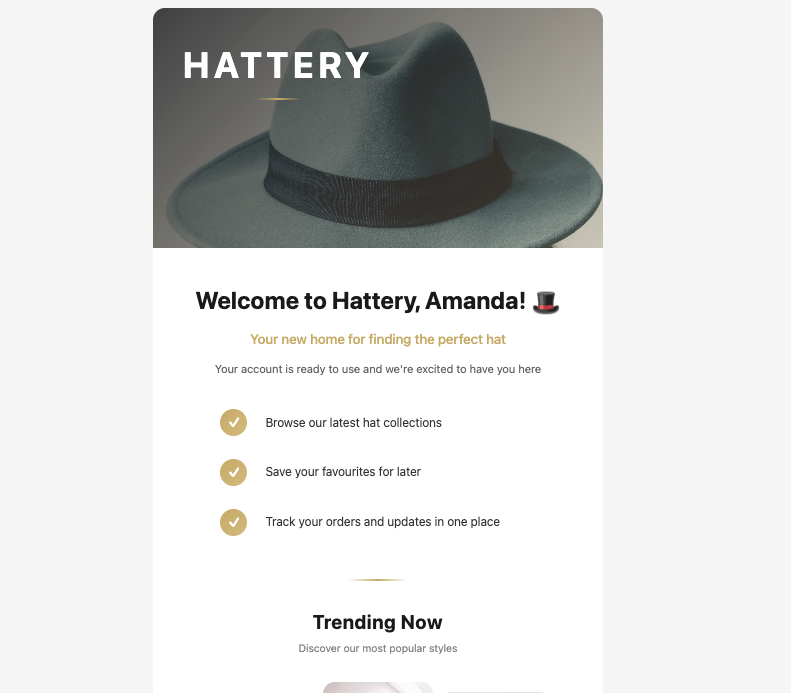
Base44's built-in `SendEmail` integration comes preinstalled in every app and does not require a paid plan, extra setup, or API keys. It lets you send transactional emails to people who have signed up to your app, customize the sender name that appears in their inbox, and include plain text or rich HTML content in the email body.
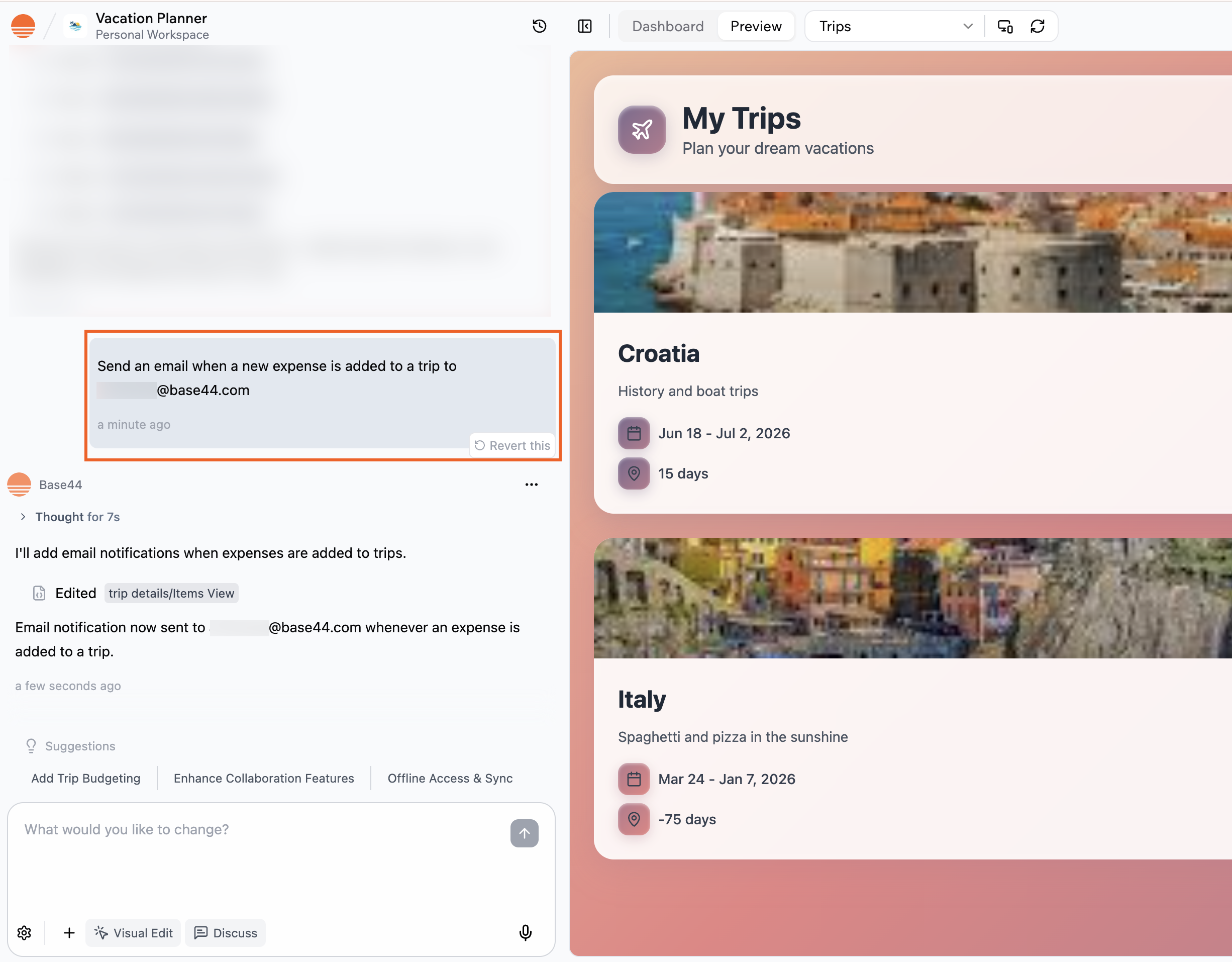
You can ask the AI chat to set this up for you, for example by saying `When someone signs up, send them a welcome email`. Base44 calls the built-in email integration, which you can edit and test using the AI chat or from **Code** in your dashboard.
***
## Base44 built-in emails
Base44's built-in `SendEmail` integration comes preinstalled in every app and does not require a paid plan, extra setup, or API keys. It lets you send transactional emails to people who have signed up to your app, customize the sender name that appears in their inbox, and include plain text or rich HTML content in the email body.
You can ask the AI chat to set this up for you, for example by saying `When someone signs up, send them a welcome email`. Base44 calls the built-in email integration, which you can edit and test using the AI chat or from **Code** in your dashboard.
 **Notes:**
* Built-in emails are only for sending emails to people who are registered users of your app and do not support external email addresses or file attachments. To email external recipients, use an external email provider or integration.
* If you want built-in emails to come from a branded address instead of a generic sender, you can connect a custom email domain so messages send from an address like [support@your-domain.com](mailto:support@your-domain.com). See more below.
* Standard emails that use the default sending domain consume 1 integration credit per email, while emails sent from a custom email domain consume 2 integration credits.
***
## Resend external integration
Resend is an external email delivery service that you connect to Base44. When you use Resend, emails are sent through your own Resend account rather than Base44’s built-in email delivery.
**Note:** Resend is an external service, and Base44 does not provide support for issues related to Resend.
The Resend integration connects your app to Resend, a dedicated email service for more advanced or higher volume email flows. With Resend you can send emails to any address, use richer templates and layouts, improve deliverability with domain authentication, and track performance in the Resend dashboard. It is a good fit for important transactional emails such as password reset links or order confirmations, as well as newsletters, lifecycle campaigns, and other outbound email from your own domain.
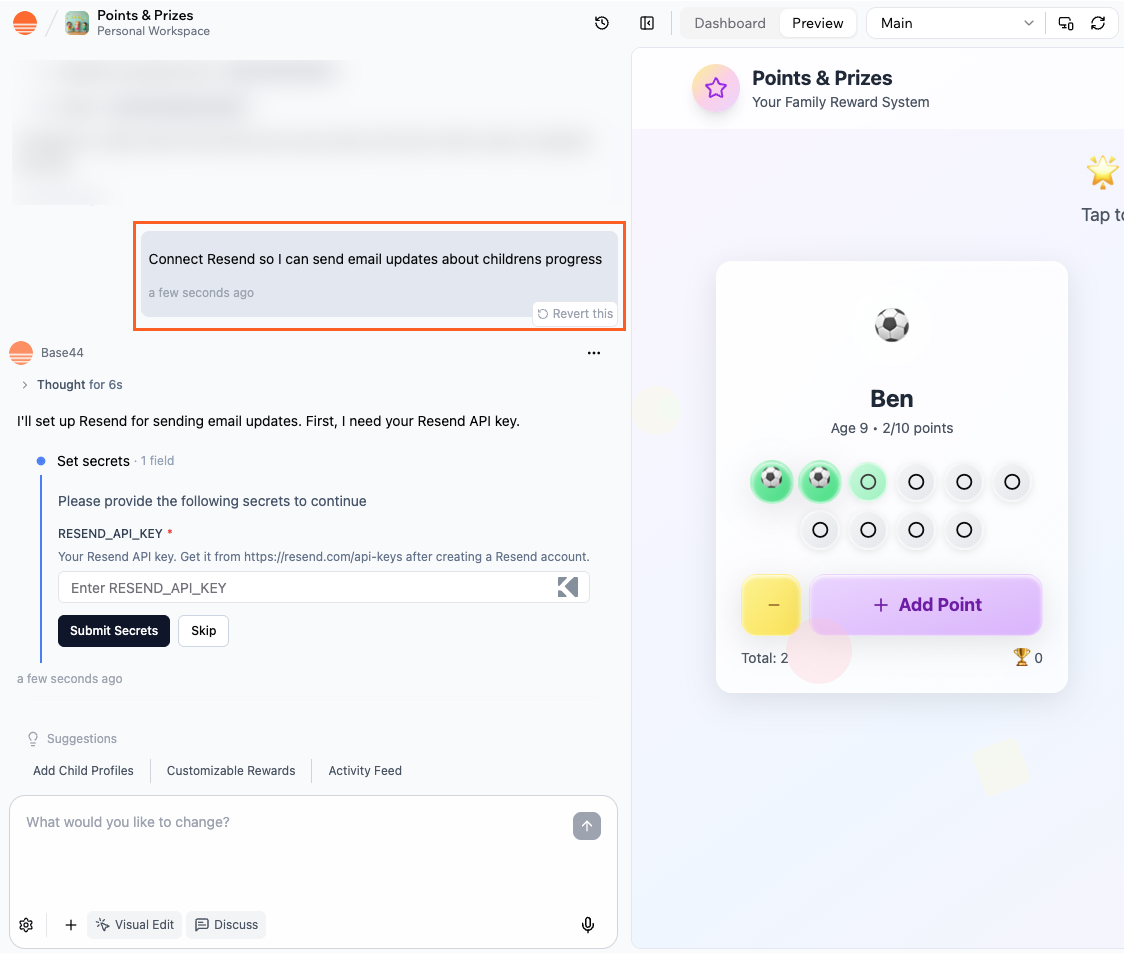
You connect Resend through the integrations catalog and add your API key, then describe the email flows you want in the AI chat. You can ask the AI to use Resend for specific events (for example, when someone subscribes or completes a purchase), and generate the backend functions that call the Resend integration.
Learn more about [setting up the Resend integration](/Integrations/Resend-integration)
**Note:** The Resend integration is available on the Builder plan and above.
**Notes:**
* Built-in emails are only for sending emails to people who are registered users of your app and do not support external email addresses or file attachments. To email external recipients, use an external email provider or integration.
* If you want built-in emails to come from a branded address instead of a generic sender, you can connect a custom email domain so messages send from an address like [support@your-domain.com](mailto:support@your-domain.com). See more below.
* Standard emails that use the default sending domain consume 1 integration credit per email, while emails sent from a custom email domain consume 2 integration credits.
***
## Resend external integration
Resend is an external email delivery service that you connect to Base44. When you use Resend, emails are sent through your own Resend account rather than Base44’s built-in email delivery.
**Note:** Resend is an external service, and Base44 does not provide support for issues related to Resend.
The Resend integration connects your app to Resend, a dedicated email service for more advanced or higher volume email flows. With Resend you can send emails to any address, use richer templates and layouts, improve deliverability with domain authentication, and track performance in the Resend dashboard. It is a good fit for important transactional emails such as password reset links or order confirmations, as well as newsletters, lifecycle campaigns, and other outbound email from your own domain.
You connect Resend through the integrations catalog and add your API key, then describe the email flows you want in the AI chat. You can ask the AI to use Resend for specific events (for example, when someone subscribes or completes a purchase), and generate the backend functions that call the Resend integration.
Learn more about [setting up the Resend integration](/Integrations/Resend-integration)
**Note:** The Resend integration is available on the Builder plan and above.
 ***
## Automated emails
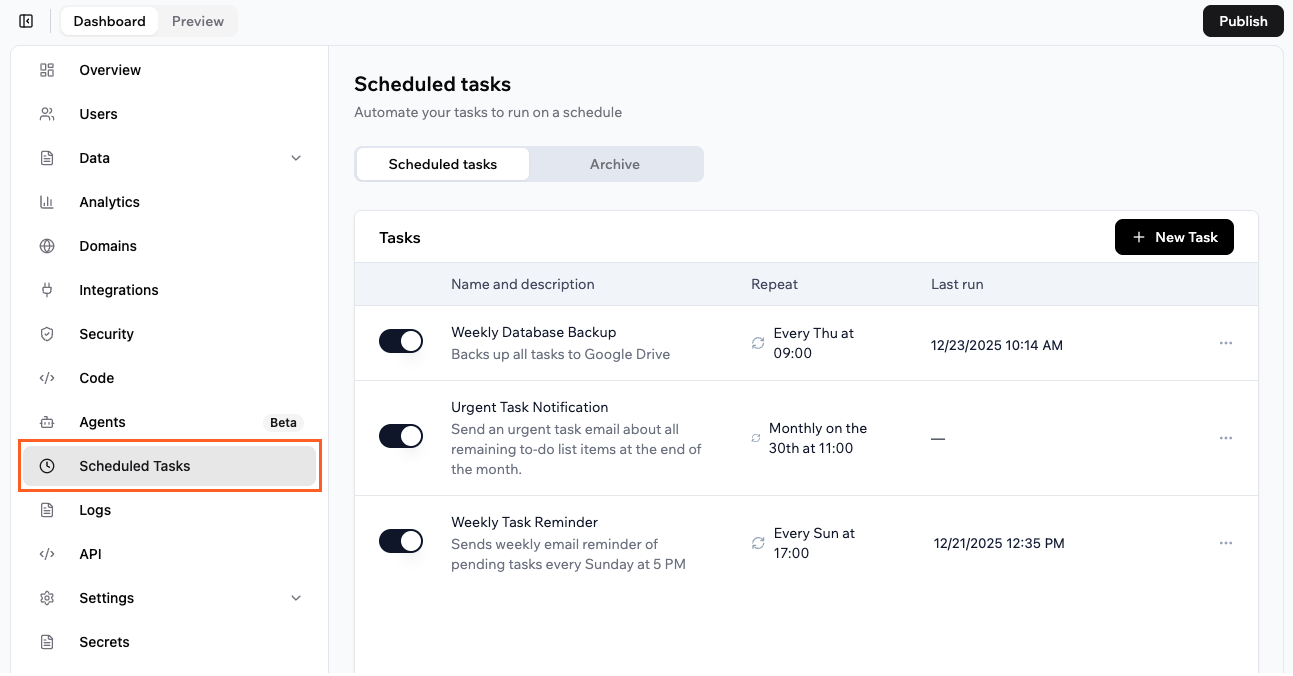
Automations in Base44 let you send emails automatically at specific times and dates or when something changes in your data. You can use them to delay a follow up message a few days after signup, send weekly or monthly summary emails, or turn many small notifications into a single daily digest.
For time based flows, use **scheduled automations**. Each scheduled automation runs a backend function at the times you choose, so you control both the email content and the exact send pattern.
For event based flows, use **data event automations**. These watch your data for events like records being created, updated, or deleted, then run a backend function right away. This is useful for things like order confirmations, signup welcomes, or status change alerts that should send as soon as something happens.
You can use automations with both built-in emails and the Resend integration. Automations control when emails are sent, so you choose whichever email option fits each flow and still decide the exact timing or trigger.
To create an automation for email, you can ask the AI chat to create an automation for you, or you can set one up directly from **Automations** in your app's dashboard.
Learn more about [creating automations for your app](/Building-your-app/Creating-automations)
**Note:** Automations are available on the Builder plan and above.
***
## Automated emails
Automations in Base44 let you send emails automatically at specific times and dates or when something changes in your data. You can use them to delay a follow up message a few days after signup, send weekly or monthly summary emails, or turn many small notifications into a single daily digest.
For time based flows, use **scheduled automations**. Each scheduled automation runs a backend function at the times you choose, so you control both the email content and the exact send pattern.
For event based flows, use **data event automations**. These watch your data for events like records being created, updated, or deleted, then run a backend function right away. This is useful for things like order confirmations, signup welcomes, or status change alerts that should send as soon as something happens.
You can use automations with both built-in emails and the Resend integration. Automations control when emails are sent, so you choose whichever email option fits each flow and still decide the exact timing or trigger.
To create an automation for email, you can ask the AI chat to create an automation for you, or you can set one up directly from **Automations** in your app's dashboard.
Learn more about [creating automations for your app](/Building-your-app/Creating-automations)
**Note:** Automations are available on the Builder plan and above.
 ***
## Emails from custom domains
With the Base44 built-in email service, you can send emails from your own domain (for example, [support@your-domain.com](mailto:support@your-domain.com)) instead of [no-reply@base44-apps.com](mailto:no-reply@base44-apps.com) for all built-in email types.
To use this, you need your app to be connected to a custom domain. Each app can connect one custom email domain, and you cannot set multiple sender addresses on the same domain.
**Notes:**
* Custom domain emails are available on the Builder plan and above.
* Emails sent from a custom email domain consume 2 integration credits.
Learn how to [send emails from a custom domain](https://docs.base44.com/Setting-up-your-app/Sending-emails-from-a-custom-domain)
***
## Additional email providers
You are not limited to Resend. If you already use another email provider that exposes an HTTP API, you can connect it to your Base44 app. One option is to call the provider directly from backend functions, using secrets to store API keys and other credentials. This gives you full control over the payload without creating a reusable catalog integration.
Another option is to wrap the provider in a custom integration so it appears in your private catalog. You can then reuse that integration across multiple apps or share it with your workspace without repeating the setup each time. This approach is helpful when your team already relies on a specific provider, when you need features that only that provider offers, or when you want consistent email behavior across many apps built on Base44.
Learn more about [external integrations](https://docs.base44.com/Integrations/Using-integrations#external-integrations) and creating your [own custom integrations](/documentation/integrations/using-custom-integrations)
**Note:** External and custom integrations are available on the Builder plan and above.
***
## FAQs
Click a question below to learn more about sending emails from your app.
Built-in emails are best when you want a quick way to send transactional messages to people who already signed up with your app and you do not need advanced templates or analytics.
The Resend integration is a better choice when you need to email any address, send from your own domain at scale, or depend on a dedicated email platform for templates, deliverability, and tracking.
Yes. You do not need to choose a single email approach for your entire app. Many apps use built-in emails for low volume or early product flows, rely on Resend for external recipients and higher value transactional or marketing emails, use automations for delayed sequences, reminders, and recurring messages, and reserve custom domains for any communication that carries their brand.
Some teams also connect a separate in house or specialist provider through backend functions or custom integrations for specific cases. This mix lets you move individual flows to more advanced options as your needs grow without having to rework your whole app at once.
Yes, in an indirect way. The Zapier integration lets your app send data to Zapier, and then Zapier can trigger emails through tools such as Gmail, Outlook, or its own email actions. This is useful when you already automate workflows in Zapier and want your Base44 app to be another trigger. For details, see the [Zapier integration guide](/Integrations/Zapier-integration).
You do not need a custom domain to start sending emails. Adding a custom domain becomes more important when you care about consistent branding, higher deliverability, or larger sending volumes.
The built-in email function (`SendEmail`) is only for sending internal notifications to people who are registered users of your app. You cannot send emails with `SendEmail` to external recipients who do not have an account.
**If you need to email external recipients, you can:**
* Use the Resend integration: This email service lets you send messages to any email address, not just registered users. It is available on the Builder plan and above.
* Connect another email provider: You can integrate an external email provider with your backend functions by using their API.
**Note:** If you buy a custom domain through Base44, you can change the sender name and email address for messages sent through `SendEmail`, but recipients still need to be registered users.
***
## Emails from custom domains
With the Base44 built-in email service, you can send emails from your own domain (for example, [support@your-domain.com](mailto:support@your-domain.com)) instead of [no-reply@base44-apps.com](mailto:no-reply@base44-apps.com) for all built-in email types.
To use this, you need your app to be connected to a custom domain. Each app can connect one custom email domain, and you cannot set multiple sender addresses on the same domain.
**Notes:**
* Custom domain emails are available on the Builder plan and above.
* Emails sent from a custom email domain consume 2 integration credits.
Learn how to [send emails from a custom domain](https://docs.base44.com/Setting-up-your-app/Sending-emails-from-a-custom-domain)
***
## Additional email providers
You are not limited to Resend. If you already use another email provider that exposes an HTTP API, you can connect it to your Base44 app. One option is to call the provider directly from backend functions, using secrets to store API keys and other credentials. This gives you full control over the payload without creating a reusable catalog integration.
Another option is to wrap the provider in a custom integration so it appears in your private catalog. You can then reuse that integration across multiple apps or share it with your workspace without repeating the setup each time. This approach is helpful when your team already relies on a specific provider, when you need features that only that provider offers, or when you want consistent email behavior across many apps built on Base44.
Learn more about [external integrations](https://docs.base44.com/Integrations/Using-integrations#external-integrations) and creating your [own custom integrations](/documentation/integrations/using-custom-integrations)
**Note:** External and custom integrations are available on the Builder plan and above.
***
## FAQs
Click a question below to learn more about sending emails from your app.
Built-in emails are best when you want a quick way to send transactional messages to people who already signed up with your app and you do not need advanced templates or analytics.
The Resend integration is a better choice when you need to email any address, send from your own domain at scale, or depend on a dedicated email platform for templates, deliverability, and tracking.
Yes. You do not need to choose a single email approach for your entire app. Many apps use built-in emails for low volume or early product flows, rely on Resend for external recipients and higher value transactional or marketing emails, use automations for delayed sequences, reminders, and recurring messages, and reserve custom domains for any communication that carries their brand.
Some teams also connect a separate in house or specialist provider through backend functions or custom integrations for specific cases. This mix lets you move individual flows to more advanced options as your needs grow without having to rework your whole app at once.
Yes, in an indirect way. The Zapier integration lets your app send data to Zapier, and then Zapier can trigger emails through tools such as Gmail, Outlook, or its own email actions. This is useful when you already automate workflows in Zapier and want your Base44 app to be another trigger. For details, see the [Zapier integration guide](/Integrations/Zapier-integration).
You do not need a custom domain to start sending emails. Adding a custom domain becomes more important when you care about consistent branding, higher deliverability, or larger sending volumes.
The built-in email function (`SendEmail`) is only for sending internal notifications to people who are registered users of your app. You cannot send emails with `SendEmail` to external recipients who do not have an account.
**If you need to email external recipients, you can:**
* Use the Resend integration: This email service lets you send messages to any email address, not just registered users. It is available on the Builder plan and above.
* Connect another email provider: You can integrate an external email provider with your backend functions by using their API.
**Note:** If you buy a custom domain through Base44, you can change the sender name and email address for messages sent through `SendEmail`, but recipients still need to be registered users.