> ## Documentation Index
> Fetch the complete documentation index at: https://docs.base44.com/llms.txt
> Use this file to discover all available pages before exploring further.

# White Label Overview

> Offer app building inside your own platform, under your brand, to your own users.

export const ContactSales = ({cta = 'Contact sales'}) => {
  const PORTAL_ID = '146561033';
  const FORM_GUID = 'c3d900a7-609f-4e04-8d95-cb6f91ea0545';
  const FIELD_MAP = {
    firstName: 'firstname',
    lastName: 'lastname',
    email: 'email',
    role: 'jobtitle',
    discuss: 'description'
  };
  const FALLBACK_HREF = 'https://base44.com/enterprise';
  const CARD_TITLE = 'White labelling needs an enterprise plan and a short onboarding call';
  const [open, setOpen] = useState(false);
  const [values, setValues] = useState({
    firstName: '',
    lastName: '',
    email: '',
    role: '',
    discuss: ''
  });
  const [errors, setErrors] = useState({});
  const [status, setStatus] = useState('idle');
  const firstFieldRef = useRef(null);
  const configured = Boolean(FORM_GUID);
  useEffect(() => {
    const onEsc = e => {
      if (e.key === 'Escape' && open) setOpen(false);
    };
    document.addEventListener('keydown', onEsc);
    return () => document.removeEventListener('keydown', onEsc);
  }, [open]);
  useEffect(() => {
    if (open && firstFieldRef.current) firstFieldRef.current.focus();
  }, [open]);
  useEffect(() => {
    document.body.classList.toggle('cs-modal-open', open);
    return () => document.body.classList.remove('cs-modal-open');
  }, [open]);
  const set = key => e => {
    setValues(v => ({
      ...v,
      [key]: e.target.value
    }));
    setErrors(x => ({
      ...x,
      [key]: undefined
    }));
  };
  const validate = () => {
    const next = {};
    if (!values.firstName.trim()) next.firstName = 'Required';
    if (!values.lastName.trim()) next.lastName = 'Required';
    if (!values.email.trim()) next.email = 'Required'; else if (!(/^[^@\s]+@[^@\s.]+\.[^@\s]+$/).test(values.email.trim())) next.email = 'Enter a valid work email';
    if (!values.role.trim()) next.role = 'Required';
    if (!values.discuss.trim()) next.discuss = 'Required';
    setErrors(next);
    return Object.keys(next).length === 0;
  };
  const submit = async e => {
    e.preventDefault();
    if (status === 'sending' || !configured) return;
    if (!validate()) return;
    setStatus('sending');
    try {
      const res = await fetch(`https://api-eu1.hsforms.com/submissions/v3/integration/submit/${PORTAL_ID}/${FORM_GUID}`, {
        method: 'POST',
        headers: {
          'Content-Type': 'application/json'
        },
        body: JSON.stringify({
          fields: Object.entries(FIELD_MAP).map(([key, name]) => ({
            objectTypeId: '0-1',
            name,
            value: values[key].trim()
          })),
          context: {
            pageUri: window.location.href,
            pageName: document.title
          }
        })
      });
      if (!res.ok) throw new Error(`HubSpot returned ${res.status}`);
      setStatus('done');
    } catch (err) {
      setStatus('error');
    }
  };
  return <>
      <style>{`
        .cs-card {
          display: block;
          width: 100%;
          text-align: left;
          border: 1px solid rgba(0,0,0,0.1);
          border-radius: 12px;
          padding: 18px 20px;
          background: var(--background, #fff);
          cursor: pointer;
          font-family: inherit;
          transition: border-color 0.15s, box-shadow 0.15s;
          margin: 20px 0;
        }
        .cs-card:hover {
          border-color: rgba(0,0,0,0.22);
          box-shadow: 0 2px 10px rgba(0,0,0,0.06);
        }
        html.dark .cs-card {
          background: #1c1d20 !important;
          border-color: rgba(255,255,255,0.12) !important;
        }
        html.dark .cs-card:hover { border-color: rgba(255,255,255,0.28) !important; }

        .cs-card-title { font-weight: 600; font-size: 15px; color: var(--gray-12, #111); }
        html.dark .cs-card-title { color: rgba(255,255,255,0.9) !important; }
        .cs-card-cta { margin-top: 6px; font-size: 14px; color: #f38f46; font-weight: 500; }

        .cs-overlay {
          position: fixed;
          inset: 0;
          background: rgba(0,0,0,0.22);
          backdrop-filter: blur(1px);
          -webkit-backdrop-filter: blur(1px);
          z-index: 9999;
          display: flex;
          align-items: center;
          justify-content: center;
          padding: 24px;
        }
        html.dark .cs-overlay { background: rgba(0,0,0,0.6); }

        .cs-modal {
          background: var(--background, #fff);
          border: 1px solid rgba(0,0,0,0.1);
          border-radius: 16px;
          max-width: 560px;
          width: 100%;
          max-height: min(90vh, 800px);
          box-shadow: 0 12px 32px rgba(0,0,0,0.12);
          overflow-y: auto;
          overscroll-behavior: contain;
          padding: 28px;
        }
        html.dark .cs-modal {
          background: #1c1d20 !important;
          border-color: rgba(255,255,255,0.12) !important;
        }

        .cs-head { display: flex; align-items: flex-start; justify-content: space-between; gap: 16px; }
        .cs-title { font-size: 22px; font-weight: 650; line-height: 1.25; color: var(--gray-12, #111); }
        html.dark .cs-title { color: rgba(255,255,255,0.92) !important; }
        .cs-blurb { margin-top: 10px; font-size: 14px; line-height: 1.55; color: var(--gray-10, #666); }
        html.dark .cs-blurb { color: rgba(255,255,255,0.5) !important; }

        .cs-close {
          background: none; border: none; cursor: pointer; font-size: 17px;
          line-height: 1; padding: 4px; color: var(--gray-10, #666); flex-shrink: 0;
        }
        html.dark .cs-close { color: rgba(255,255,255,0.5) !important; }

        .cs-grid { display: grid; grid-template-columns: 1fr 1fr; gap: 14px; margin-top: 22px; }
        @media (max-width: 560px) { .cs-grid { grid-template-columns: 1fr; } }
        .cs-full { grid-column: 1 / -1; }

        .cs-label { display: block; font-size: 13px; font-weight: 550; margin-bottom: 6px; color: var(--gray-12, #111); }
        html.dark .cs-label { color: rgba(255,255,255,0.8) !important; }

        .cs-input, .cs-textarea {
          width: 100%; box-sizing: border-box;
          border: 1px solid rgba(0,0,0,0.16); border-radius: 8px;
          padding: 9px 11px; font-size: 14px; font-family: inherit;
          background: transparent; color: inherit;
        }
        .cs-textarea { min-height: 88px; resize: vertical; }
        .cs-input:focus, .cs-textarea:focus { outline: 2px solid #f38f46; outline-offset: -1px; border-color: transparent; }
        html.dark .cs-input, html.dark .cs-textarea { border-color: rgba(255,255,255,0.16) !important; }
        /* Needs to outrank "html.dark .cs-input" (0,2,1), which also carries
           !important — otherwise the dark base border wins and an invalid
           field never turns red. */
        .cs-input.cs-input-err,
        .cs-textarea.cs-input-err,
        html.dark .cs-input.cs-input-err,
        html.dark .cs-textarea.cs-input-err { border-color: #d64545 !important; }
        .cs-err { margin-top: 5px; font-size: 12px; color: #d64545; }

        .cs-submit {
          margin-top: 22px; width: 100%;
          background: #111; color: #fff; border: none; border-radius: 8px;
          padding: 11px 18px; font-size: 15px; font-weight: 600;
          font-family: inherit; cursor: pointer; transition: opacity 0.15s;
        }
        .cs-submit:hover { opacity: 0.87; }
        .cs-submit[disabled] { opacity: 0.55; cursor: default; }
        html.dark .cs-submit { background: #fff !important; color: #111 !important; }

        .cs-notice {
          margin-top: 20px;
          padding: 10px 12px;
          border: 1px solid rgba(0,0,0,0.12);
          border-radius: 8px;
          font-size: 13px;
          line-height: 1.5;
          color: var(--gray-10, #666);
        }
        html.dark .cs-notice {
          border-color: rgba(255,255,255,0.16) !important;
          color: rgba(255,255,255,0.6) !important;
        }

        .cs-foot { margin-top: 14px; font-size: 13px; color: var(--gray-10, #666); }
        html.dark .cs-foot { color: rgba(255,255,255,0.45) !important; }
        .cs-note { margin-top: 18px; font-size: 14px; line-height: 1.55; }

        body.cs-modal-open .mdx-content {
          container-type: normal !important;
          isolation: auto !important;
        }
      `}</style>

      <button type="button" className="cs-card" onClick={() => setOpen(true)}>
        <div className="cs-card-title">{CARD_TITLE}</div>
        <div className="cs-card-cta">{cta} ››</div>
      </button>

      {open && <div className="cs-overlay" onClick={() => setOpen(false)} role="dialog" aria-modal="true" aria-label="Contact sales">
          <div className="cs-modal" onClick={e => e.stopPropagation()}>
            <div className="cs-head">
              <div className="cs-title">
                {status === 'done' ? "Thanks, we'll be in touch" : 'Talk to us about white label'}
              </div>
              <button type="button" className="cs-close" onClick={() => setOpen(false)} aria-label="Close contact sales form">
                ✕
              </button>
            </div>

            {status === 'done' ? <p className="cs-note">
                Our enterprise team will reach out within 24 hours.
              </p> : <>
                <div className="cs-blurb">
                  Tell us about your platform and what you're planning. White label needs
                  an enterprise plan and a short onboarding call.
                </div>

                <form onSubmit={submit} noValidate>
                  <div className="cs-grid">
                    {[['firstName', 'First name', 'Enter your first name'], ['lastName', 'Last name', 'Enter your last name'], ['email', 'Work email', 'Enter your email'], ['role', 'Your role', 'Enter your role']].map(([key, label, placeholder], i) => <div key={key}>
                        <label className="cs-label" htmlFor={`cs-${key}`}>{label}*</label>
                        <input id={`cs-${key}`} ref={i === 0 ? firstFieldRef : undefined} className={['cs-input', errors[key] ? 'cs-input-err' : ''].filter(Boolean).join(' ')} type={key === 'email' ? 'email' : 'text'} placeholder={placeholder} value={values[key]} onChange={set(key)} aria-invalid={Boolean(errors[key])} />
                        {errors[key] && <div className="cs-err">{errors[key]}</div>}
                      </div>)}

                    <div className="cs-full">
                      <label className="cs-label" htmlFor="cs-discuss">What would you like to discuss?*</label>
                      <textarea id="cs-discuss" className={['cs-textarea', errors.discuss ? 'cs-input-err' : ''].filter(Boolean).join(' ')} placeholder="Write something…" value={values.discuss} onChange={set('discuss')} aria-invalid={Boolean(errors.discuss)} />
                      {errors.discuss && <div className="cs-err">{errors.discuss}</div>}
                    </div>
                  </div>

                  {!configured && <div className="cs-notice">
                      This form isn't connected to a destination yet, so it can't be
                      submitted. In the meantime, reach us at{' '}
                      <a href={FALLBACK_HREF} target="_blank" rel="noreferrer">base44.com/enterprise</a>.
                    </div>}

                  <button type="submit" className="cs-submit" disabled={status === 'sending' || !configured}>
                    {status === 'sending' ? 'Sending…' : 'Talk to Sales'}
                  </button>

                  {status === 'error' && <div className="cs-err" style={{
    marginTop: 12
  }}>
                      That didn't go through. Try again, or email us from{' '}
                      <a href={FALLBACK_HREF} target="_blank" rel="noreferrer">base44.com/enterprise</a>.
                    </div>}

                  <div className="cs-foot">
                    No long sales process. Our enterprise team reaches out within 24 hours.
                  </div>
                </form>
              </>}
          </div>
        </div>}
    </>;
};

<Note>
  White label is currently in beta, and so is the [Apps API](/developers/references/apps-api/get-started/overview) it runs on. Endpoints, fields, and behavior can still change. Your onboarding contact is the fastest route for anything you hit.
</Note>

You can offer app building as a feature of your own platform, white labeled under your own brand. In your platform's own interface, your users describe an app or feature they want, and Base44 builds it behind the scenes to run inside your platform.

Your users can build any type of web app, and how it's used is up to you. It can become a widget in a dashboard, an app published to a marketplace, an internal tool, or anything else that fits your platform.

Skills teach the agent your conventions, a design system decides what every app looks like, and custom instructions give each app the platform-specific context it needs. Together, they shape every app your users build.

One enterprise workspace backs the whole integration, so everything you configure there is ready to use across every app your users create.

<ContactSales cta="Contact sales" />

## Try the reference integration

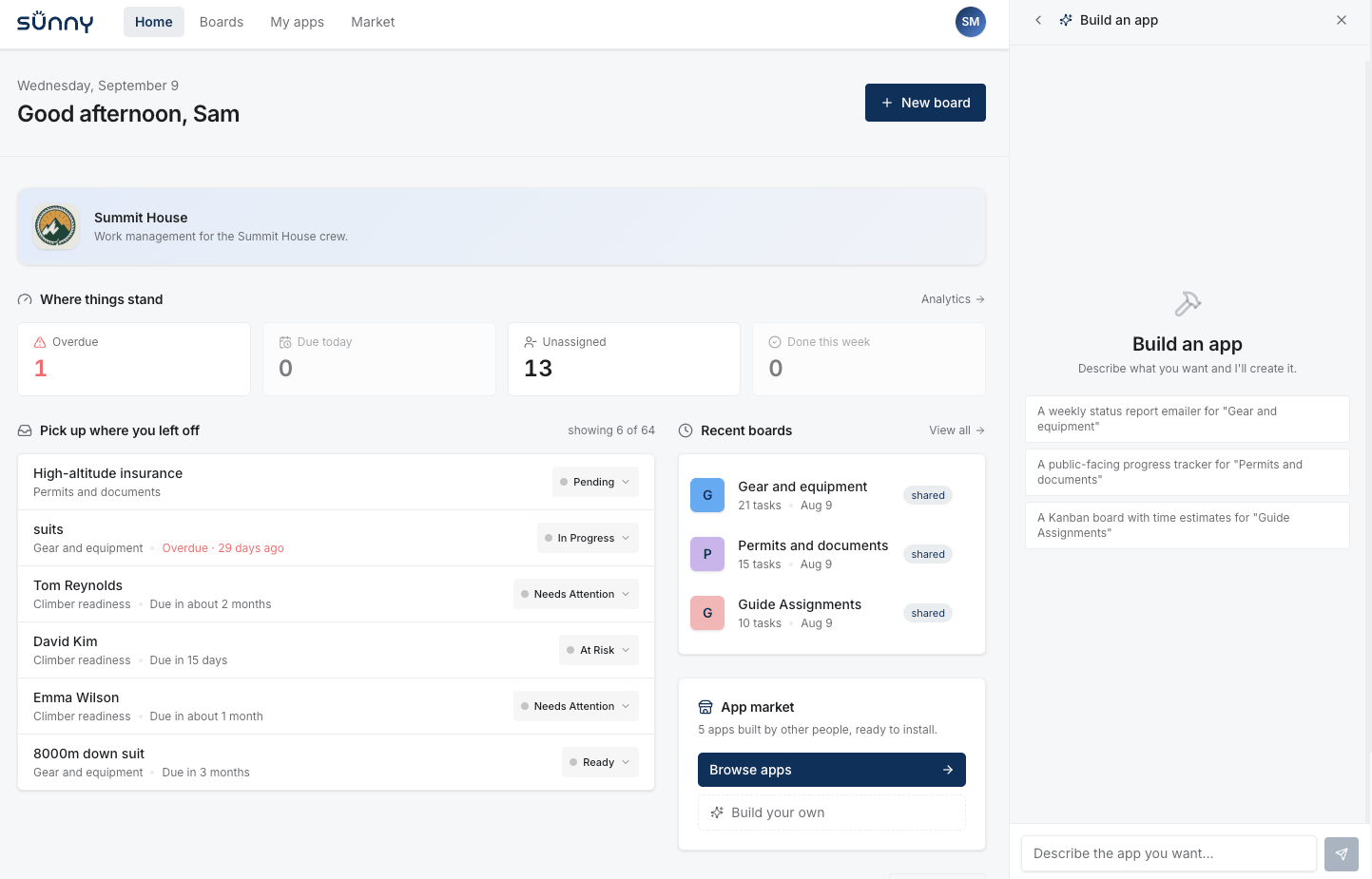
We built **Sunny**, a reference integration, so you can see a working deployment for yourself. It's a task-management platform with a chat panel where members describe the tool they want and Base44 builds it behind the scenes. The navigation, the URL, and the sign-in are all **Sunny**'s, so nothing gives away that Base44 is running underneath.

A member opens **Build an app**, describes what they need, and Base44 builds it against Sunny's own data and design system. They can then publish a finished tool to Sunny's app market, where other members find and install it.

<Frame caption="Sunny's dashboard, with the assistant panel open to build a new app">
  <img src="https://mintcdn.com/base44/SV-h3KMETVO1ZE95/developers/white-label/assets/sunny-dashboard.png?fit=max&auto=format&n=SV-h3KMETVO1ZE95&q=85&s=8c0be62ecd996ae3b2e610758e74586a" alt="Sunny's dashboard, with the assistant panel open to build a new app" width="1443" height="925" data-path="developers/white-label/assets/sunny-dashboard.png" />
</Frame>

<CardGroup cols={2}>
  <Card title="Try it" icon="arrow-up-right-from-square" href="https://sunny44.com">
    See Sunny running live at sunny44.com
  </Card>

  <Card title="Read the code" icon="github" href="https://github.com/base44/base44-platform-starter">
    See exactly how the integration works, end to end
  </Card>
</CardGroup>

## Where to start

An integration comes together in three stages. First you get the account and credential your integration builds with. Then you configure your brand and tools in Base44. Then you build the experience into your own platform.

| Stage       | What it covers                                                                          | Where                     |
| :---------- | :-------------------------------------------------------------------------------------- | :------------------------ |
| Credentials | The account that owns your users' apps, and the key that creates them.                  | Your backend              |
| Configure   | Your brand, and the skills and tools the agent builds with.                             | Base44 workspace settings |
| Build       | The app-building experience in your platform, from the first prompt to a published app. | Your platform             |

## See also

* [Setup checklist](/developers/white-label/setup-checklist): Everything you need to do to get an integration running
* [Tenancy and credentials](/developers/white-label/tenancy-and-credentials): The account that owns your users' apps, and the key that creates them
* [The build turn](/developers/white-label/the-build-turn): The six calls your product wraps to create, watch, and ship an app