> ## Documentation Index
> Fetch the complete documentation index at: https://docs.base44.com/llms.txt
> Use this file to discover all available pages before exploring further.

> ## Agent Instructions
> Internal links on these pages omit the .md extension. Append .md to a docs page URL, or send an Accept: text/markdown header, to get that page as markdown.

# Base44 Developer Platform

> Erstelle und veröffentliche Full-Stack-Apps mit einem verwalteten Backend, das für KI-Agenten entwickelt wurde.

<div className="docs-home">
  <div className="home-hero">
    <div className="home-hero-inner">
      <span className="home-eyebrow"><i className="dot" /> Apps mit Code erstellen</span>
      <h1 className="home-title">Developer Platform</h1>
      <p className="home-lead-strong">Erstelle und veröffentliche Full-Stack-Apps mit einem verwalteten Backend, das für KI-Agenten entwickelt wurde.</p>
    </div>

    <div className="home-cta-row">
      <a className="home-btn home-btn-primary" href="/developers/backend/quickstart/quickstart-with-ai">Loslegen</a>
      <a className="home-btn home-btn-ghost" href="/developers/references/sdk/getting-started/overview">SDK-Referenz</a>
    </div>
  </div>

  <div className="home-section">
    <span className="home-eyebrow"><i className="dot" /> Loslegen</span>
    <h2 className="home-section-title">Wähle einen Startpunkt</h2>
    <p className="home-section-sub">Wähle ein Tool oder einen Bereich zum Einsteigen.</p>

    <div className="home-pillars" style={{ gridTemplateColumns: "repeat(2, 1fr)" }}>
      <a className="pillar pillar-orange" href="/developers/backend/overview/introduction">
        <div className="pillar-ic">
          <svg viewBox="0 0 24 24" fill="none" stroke="#fff" strokeWidth="2" strokeLinecap="round" strokeLinejoin="round" aria-hidden="true">
            <rect x="2" y="2" width="20" height="8" rx="2" ry="2" />

            <rect x="2" y="14" width="20" height="8" rx="2" ry="2" />

            <path d="M6 6h.01M6 18h.01" />
          </svg>
        </div>

        <h3>Backend-Plattform</h3>
        <p>Verwaltetes Backend für KI-Agenten. Daten, Funktionen, Auth und Hosting.</p>
      </a>

      <a className="pillar pillar-blue" href="/developers/references/sdk/getting-started/overview">
        <div className="pillar-ic">
          <svg viewBox="0 0 24 24" fill="none" stroke="#fff" strokeWidth="2" strokeLinecap="round" strokeLinejoin="round" aria-hidden="true">
            <path d="M4 6L2 12L4 18" />

            <path d="M20 6L22 12L20 18" />

            <path d="M9 6L15 18" />
          </svg>
        </div>

        <h3>SDK</h3>
        <p>Greife auf Base44-Dienste aus deinem eigenen Frontend- oder Backend-Code zu.</p>
      </a>

      <a className="pillar pillar-green" href="/developers/references/cli/get-started/overview">
        <div className="pillar-ic">
          <svg viewBox="0 0 24 24" fill="none" stroke="#fff" strokeWidth="2" strokeLinecap="round" strokeLinejoin="round" aria-hidden="true">
            <path d="M4 17L10 11L4 5" />

            <path d="M12 19H20" />
          </svg>
        </div>

        <h3>CLI</h3>
        <p>Erstelle und verwalte Backend-Projekte über die Kommandozeile.</p>
      </a>

      <a className="pillar pillar-orange" href="/developers/references/apis/overview">
        <div className="pillar-ic">
          <svg viewBox="0 0 24 24" fill="none" stroke="#fff" strokeWidth="2" strokeLinecap="round" strokeLinejoin="round" aria-hidden="true">
            <path d="M9 2v5M15 2v5" />

            <path d="M8 7h8v4a4 4 0 0 1-8 0V7z" />

            <path d="M12 15v4" />
          </svg>
        </div>

        <h3>APIs</h3>
        <p>Verwalte Base44-Apps und -Workspaces per REST-API.</p>
      </a>
    </div>
  </div>

  <div className="home-section">
    <h2 className="home-section-title">Backend-Plattform</h2>
    <p>Dasselbe Backend, das den App-Editor von Base44 antreibt, verfügbar als eigenständiger Dienst. Baue mit jedem Frontend-Framework, während Base44 sich kümmert um:</p>

    <ul>
      <li><strong><a href="/developers/backend/resources/entities/overview">Datenmanagement</a></strong>: Speichere und frage Daten mit flexiblen Schemas und Echtzeit-Updates ab</li>
      <li><strong><a href="/developers/backend/resources/backend-functions/overview">Backend-Funktionen</a></strong>: Eigene serverseitige Logik in einer sicheren Laufzeitumgebung</li>
      <li><strong><a href="/developers/backend/resources/agents/overview">KI-Agenten</a></strong>: Definiere KI-Assistenten mit eigenen Tools und Datenberechtigungen</li>
      <li><strong><a href="/developers/references/sdk/docs/type-aliases/integrations">Integrationen</a></strong>: Vorgefertigte Verbindungen zu KI, E-Mail, Dateispeicher und mehr</li>
      <li><strong><a href="/developers/references/sdk/docs/interfaces/auth">Authentifizierung</a></strong>: Eingebauter Login, Social Auth und Session-Handling</li>
      <li><strong><a href="/developers/references/cli/commands/deploy">Hosting</a></strong>: Deployen mit einem einzigen Befehl, automatisches HTTPS inklusive</li>
    </ul>
  </div>

  <div className="home-section">
    <span className="home-eyebrow"><i className="dot" /> Quickstart</span>
    <h2 className="home-section-title">Loslegen</h2>
    <p className="home-section-sub">Lass einen KI-Coding-Agenten dein Projekt einrichten, oder richte es selbst mit der CLI ein und baue dann mit KI weiter.</p>

    <Tabs>
      <Tab title="KI einrichten lassen">
        Installiere [Base44 Skills](/developers/backend/overview/skills), damit dein Coding-Agent bei der Base44-Entwicklung helfen kann:

        ```bash theme={null}
        npx skills add base44/skills -g
        ```

        Öffne dann dein KI-Coding-Tool und probiere einen Prompt wie diesen:

        *"Create a new Base44 project for a task management app with users, tasks with due dates and priority levels, and team assignments. Add authentication and deploy it."*

        Dein Agent installiert die CLI, erstellt das Projekt, definiert Entities, schreibt Code und deployt. [Mehr über Skills erfahren >](/developers/backend/overview/skills)

        <Note>Du wirst möglicherweise während der Einrichtung aufgefordert, dich bei Base44 zu authentifizieren.</Note>
      </Tab>

      <Tab title="Selbst einrichten">
        Um selbst ein Backend-Projekt einzurichten, führe die folgenden Befehle aus:

        <CodeGroup>
          ```bash Get started theme={null}
          npm install -g base44@latest  # CLI installieren
          base44 login                  # Authentifizieren
          base44 create                 # Projekt erstellen
          ```
        </CodeGroup>

        Dein Projekt kommt mit [Base44 Skills](/developers/backend/overview/skills) vorinstalliert. Öffne das Projekt mit deinem KI-Coding-Tool und beschreibe, was du als Nächstes bauen möchtest, oder erkunde die Dokumentation, um zu verstehen, wie dein Projekt aufgebaut ist und was du bauen kannst.

        Oder starte mit einer unserer Vorlagen:

        <CardGroup cols={3}>
          <Card title="Ein reines Backend-Projekt erstellen" icon="server" iconType="light" href="/developers/backend/quickstart/quickstart-backend-only" />

          <Card title="Ein Projekt mit React erstellen" icon="react" href="/developers/backend/quickstart/quickstart-with-react" />

          <Card title="Beispiel-Apps ansehen" icon="arrow-up-right-from-square" iconType="light" href="https://github.com/base44/apps-examples" />
        </CardGroup>
      </Tab>
    </Tabs>
  </div>

  <div className="home-section">
    <h2 className="home-section-title">Deine App entwickeln und debuggen</h2>

    <Tabs>
      <Tab title="Code-Tab">
        <div class="tab-columns">
          <div class="tab-text">
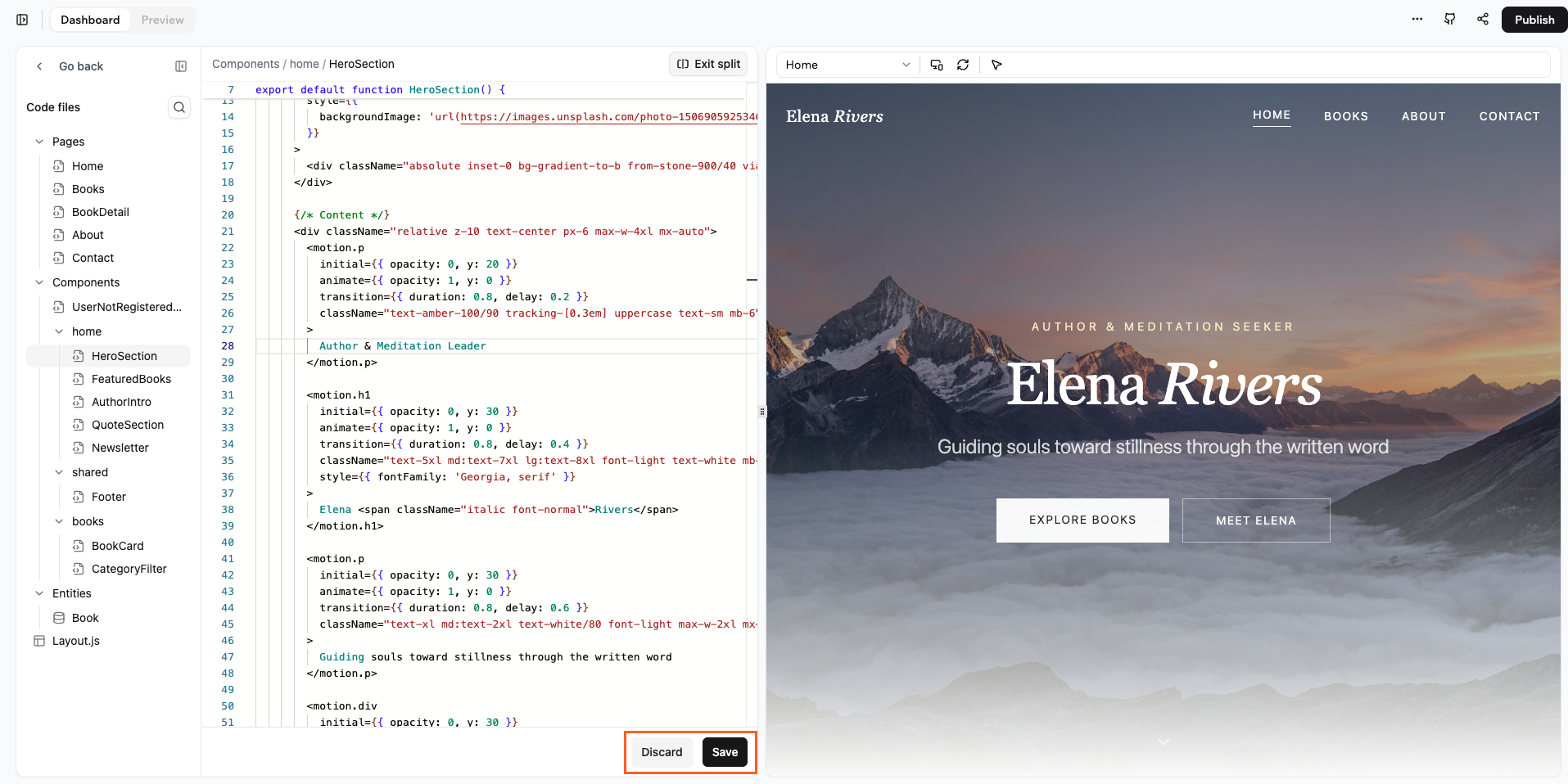
            <h3 style={{ marginTop: 0 }}>Direkt in deinem Code arbeiten</h3>

            Der Code-Tab lässt dich den Quellcode deiner App direkt ansehen und bearbeiten. So hast du Kontrolle über die Funktionalität, das Design und das Verhalten deiner App und siehst Änderungen sofort.

            <br />

            [Mehr erfahren >](/developers/app-code/editor/code-tab)
          </div>

          <div class="tab-visual">
            <Frame caption="Die Oberfläche des Code-Tabs">
              <img src="https://mintcdn.com/base44/1XKVITb5fS-y3pOa/images/codeer.png?fit=max&auto=format&n=1XKVITb5fS-y3pOa&q=85&s=29e3b670194b271d568701c159e3e77d" alt="Die Oberfläche des Code-Tabs" width="1915" height="958" data-path="images/codeer.png" />
            </Frame>
          </div>
        </div>
      </Tab>

      <Tab title="Activity Monitor">
        <div class="tab-columns">
          <div class="tab-text">
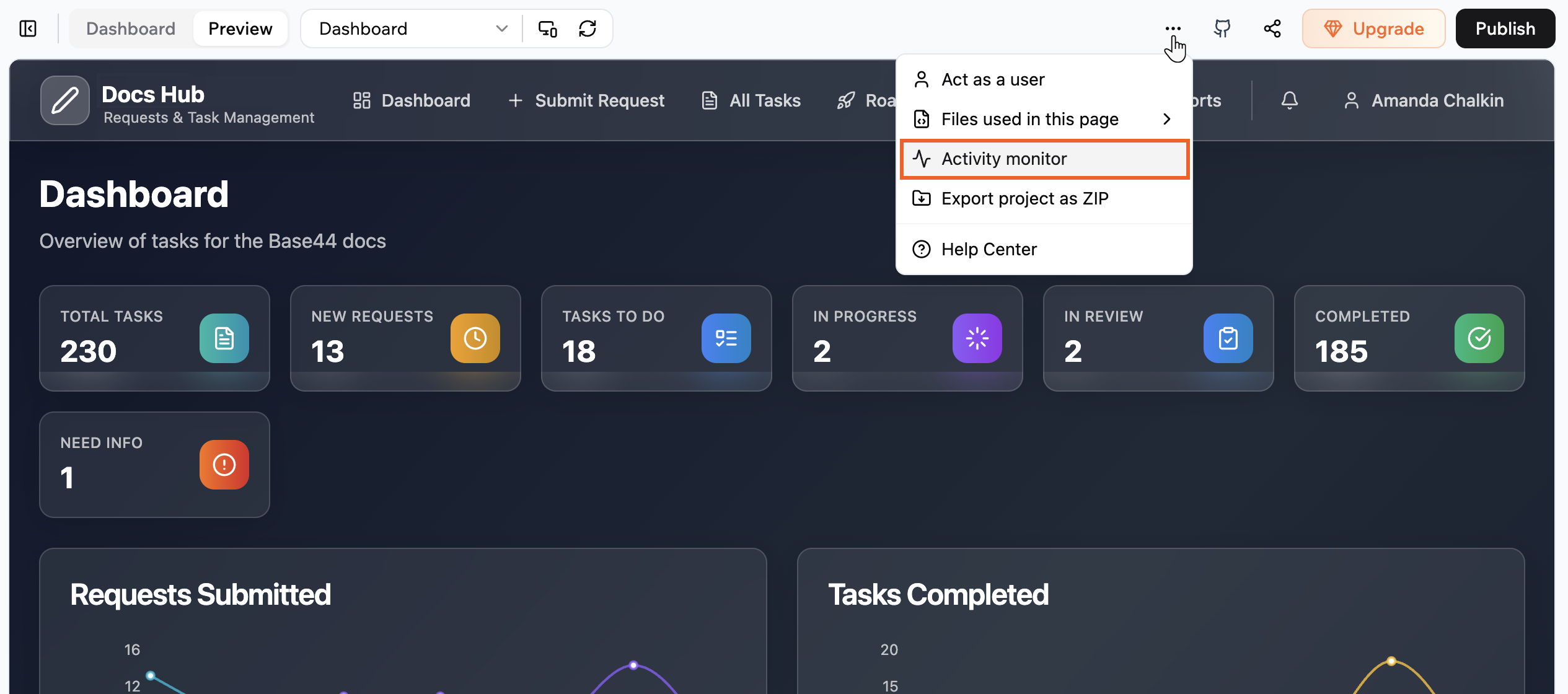
            <h3 style={{ marginTop: 0 }}>API-Anfragen debuggen und überwachen</h3>

            Der Activity Monitor zeigt jede Anfrage, die deine App in der Vorschau macht. Prüfe, welche Endpunkte aufgerufen werden, sieh Statuscodes und Timing und untersuche Anfrage- und Antwortdetails, um Probleme zu debuggen.

            <br />

            [Mehr erfahren >](/developers/app-code/editor/activity-monitor)
          </div>

          <div class="tab-visual">
            <Frame caption="Der Activity Monitor">
              <img src="https://mintcdn.com/base44/sBFooTVX9PqzuSkM/images/activitymontior.png?fit=max&auto=format&n=sBFooTVX9PqzuSkM&q=85&s=fa6d4999b690a782ecdebbf74881b255" alt="Der Activity Monitor" width="2530" height="1120" data-path="images/activitymontior.png" />
            </Frame>
          </div>
        </div>
      </Tab>

      <Tab title="GitHub-Integration">
        <div class="tab-columns">
          <div class="tab-text">
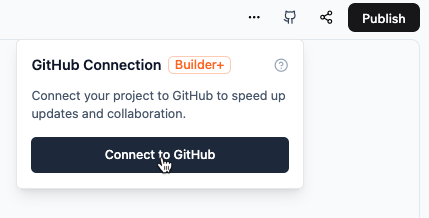
            <h3 style={{ marginTop: 0 }}>Deine App mit GitHub verbinden</h3>

            Verbinde deine App mit GitHub, um Code in deiner lokalen Entwicklungsumgebung oder in Base44 zu schreiben und beide synchron zu halten.

            <br />

            [Mehr erfahren >](/developers/app-code/local-development/github)
          </div>

          <div class="tab-visual">
            <Frame caption="GitHub-2-Wege-Synchronisierung">
              <img src="https://mintcdn.com/base44/8-JwIy7QUSD-rZKI/images/ConnectGitHub.png?fit=max&auto=format&n=8-JwIy7QUSD-rZKI&q=85&s=4ec089fc2931c1bdfb98c4aca283182b" alt="GitHub-Verbindungsdialog" className="mx-auto" width="429" height="218" data-path="images/ConnectGitHub.png" />
            </Frame>
          </div>
        </div>
      </Tab>

      <Tab title="Projektstruktur">
        <div class="tab-columns">
          <div class="tab-text">
            <h3 style={{ marginTop: 0 }}>Die Dateiorganisation deiner App verstehen</h3>

            Base44-Apps sind Standard-React-Apps, die mit Vite gebaut werden. Dein Projekt enthält moderne Webentwicklungs-Tools und nahtlose Base44-Backend-Integration.

            <br />

            [Mehr erfahren >](/developers/app-code/overview/project-structure)
          </div>

          <div class="tab-visual">
            <Frame caption="Projekt-Dateistruktur">
              <div style={{ backgroundColor: '#f1f5f9', padding: '1.25rem', borderRadius: '0.75rem', border: '1px solid #e2e8f0' }}>
                <Tree>
                  <Tree.Folder name="src" defaultOpen>
                    <Tree.Folder name="pages" />

                    <Tree.Folder name="components" />

                    <Tree.Folder name="api" />

                    <Tree.Folder name="hooks" />

                    <Tree.Folder name="lib" />

                    <Tree.Folder name="utils" />
                  </Tree.Folder>

                  <Tree.Folder name="entities" />

                  <Tree.Folder name="functions" />
                </Tree>
              </div>
            </Frame>
          </div>
        </div>
      </Tab>
    </Tabs>
  </div>

  <div className="home-section">
    <h2 className="home-section-title">MCP-Server</h2>
    <p>Base44 stellt zwei MCP-Server bereit: einen zum Erstellen und Verwalten von Backend-Projekten und einen zum Durchsuchen der Dokumentation.</p>

    ```json theme={null}
    {
      "mcpServers": {
        "base44": {
          "type": "http",
          "url": "https://app.base44.com/mcp"
        },
        "base44-docs": {
          "type": "http",
          "url": "https://docs.base44.com/mcp"
        }
      }
    }
    ```

    <ul>
      <li><strong><a href="/developers/backend/overview/mcp-server">Base44 MCP-Server</a></strong> (<code>app.base44.com/mcp</code>): Erstelle und verwalte Projekte, frage Projektdaten ab und bearbeite den Code einer App in ihrer Sandbox. Erfordert OAuth-Anmeldung.</li>
      <li><strong><a href="/developers/backend/overview/base44-docs-mcp">Docs-MCP-Server</a></strong> (<code>docs.base44.com/mcp</code>): Durchsuche die Base44-Dokumentation aus deinem KI-Tool. Keine Authentifizierung erforderlich.</li>
    </ul>
  </div>

  <div className="home-section">
    <h2 className="home-section-title">Entdecken</h2>

    <CardGroup cols={2}>
      <Card title="Generierten Code bearbeiten" icon="code" iconType="light" href="/developers/app-code/editor/code-tab" horizontal />

      <Card title="Eigenen Coding-Agenten mitbringen" icon="cloud" iconType="light" href="/developers/app-code/sandbox/bring-your-own-agent" horizontal />

      <Card title="Serverless-Funktionen hinzufügen" icon="function" iconType="light" href="/developers/backend/resources/backend-functions/overview" horizontal />

      <Card title="Datenmodelle definieren" icon="database" iconType="light" href="/developers/backend/resources/entities/overview" horizontal />

      <Card title="Ein Projekt deployen" icon="rocket" iconType="light" href="/developers/references/cli/commands/deploy" horizontal />

      <Card title="Nutzer-Authentifizierung" icon="key" iconType="light" href="/developers/references/sdk/docs/interfaces/auth" horizontal />

      <Card title="KI-Agenten konfigurieren" icon="robot" iconType="light" href="/developers/backend/resources/agents/overview" horizontal />
    </CardGroup>
  </div>
</div>


This documentation is built and hosted on [Mintlify](https://mintlify.com), a developer documentation platform.