> ## Documentation Index
> Fetch the complete documentation index at: https://docs.base44.com/llms.txt
> Use this file to discover all available pages before exploring further.
# ElevenLabs Integration
> Connect your Base44 app with ElevenLabs to create lifelike audio using state-of-the-art voice models for content, voiceovers, accessibility, and more
Note: ElevenLabs integration is available on the Builder plan and above. If you're on the Free plan, you'll need to upgrade your app to use backend functions and payment features.
## Step-by-step setup
### Part 1: The ElevenLabs side
If you already have your ElevenLab secrets, you can skip ahead to "[Part 2 - The Base44 side](https://docs.base44.com/Integrations/Elevenlabs-integration#part-2%3A-the-base44-side)" setup
1. Sign in to ElevenLabs and go to: Profile → API Keys → Create key.
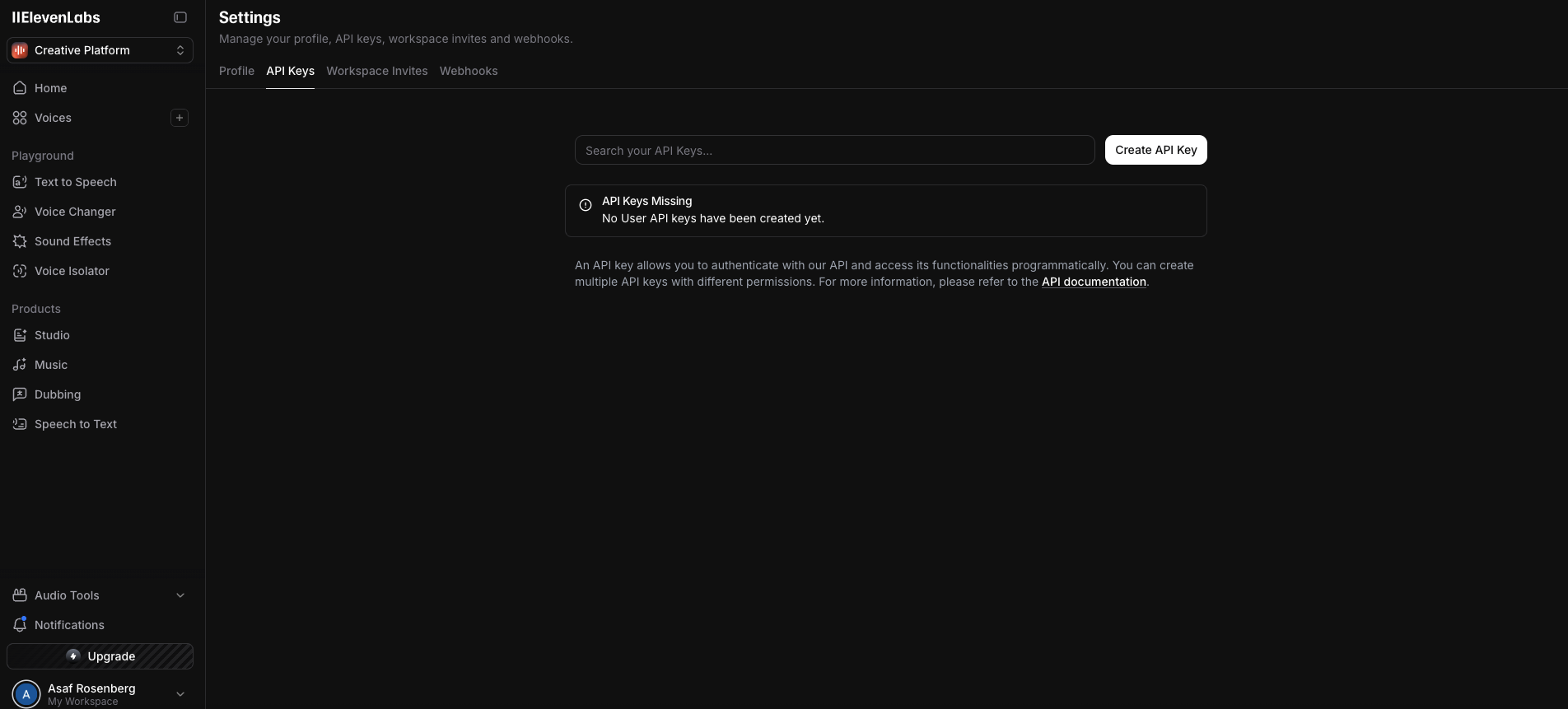 2. Copy and save the key somewhere secure, but also keep it handy as you’ll need to paste it into Base44 later.
3. While creating the key, turn on Restrict Key and choose which features this key can use:
2. Copy and save the key somewhere secure, but also keep it handy as you’ll need to paste it into Base44 later.
3. While creating the key, turn on Restrict Key and choose which features this key can use:
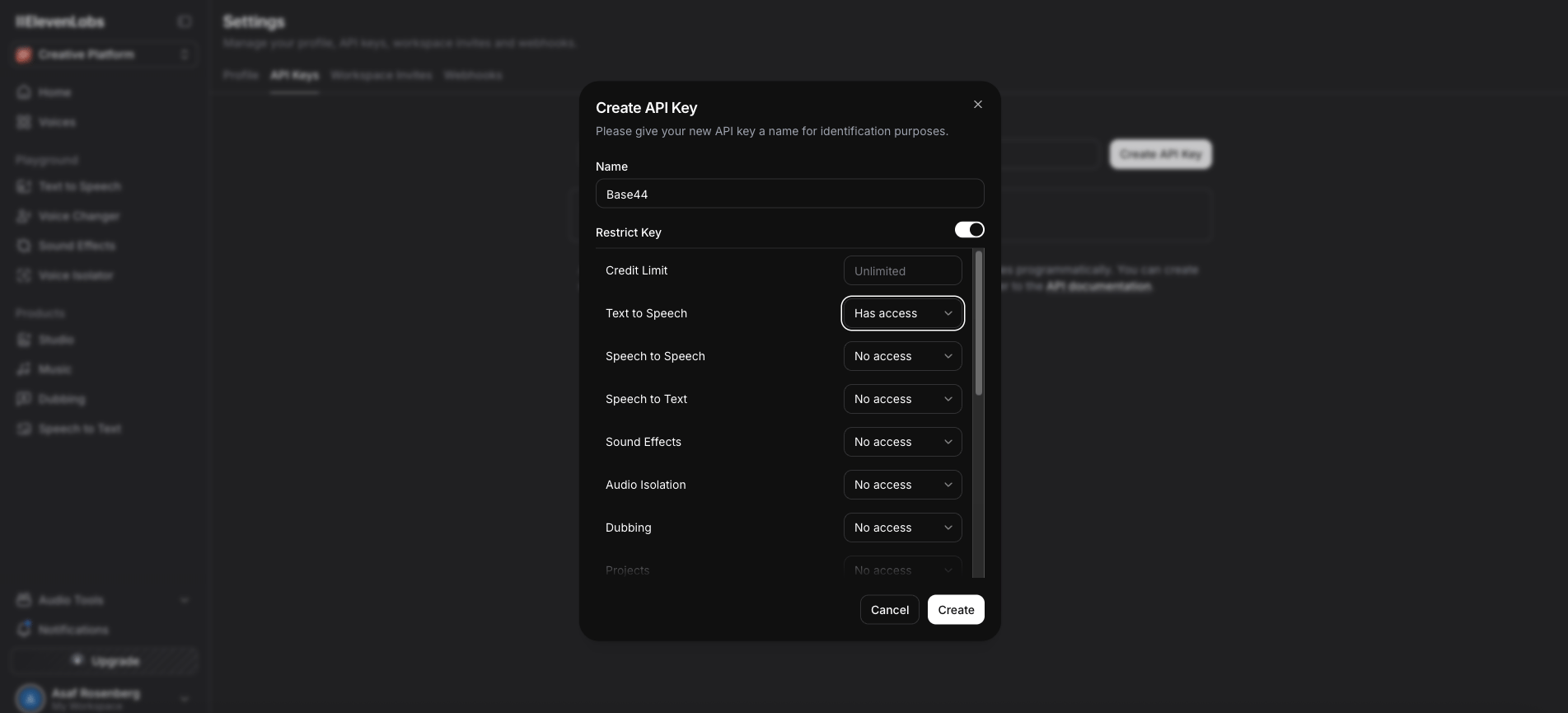 **At a minimum, enable Text to Speech.** Keep all other features set to “No access” unless you specifically plan to use them (e.g., Speech to Speech, Speech to Text, Sound Effects, Dubbing, etc.).
Set a **Credit Limit** for this key and scope it to a **Project** if you use projects.
**At a minimum, enable Text to Speech.** Keep all other features set to “No access” unless you specifically plan to use them (e.g., Speech to Speech, Speech to Text, Sound Effects, Dubbing, etc.).
Set a **Credit Limit** for this key and scope it to a **Project** if you use projects.
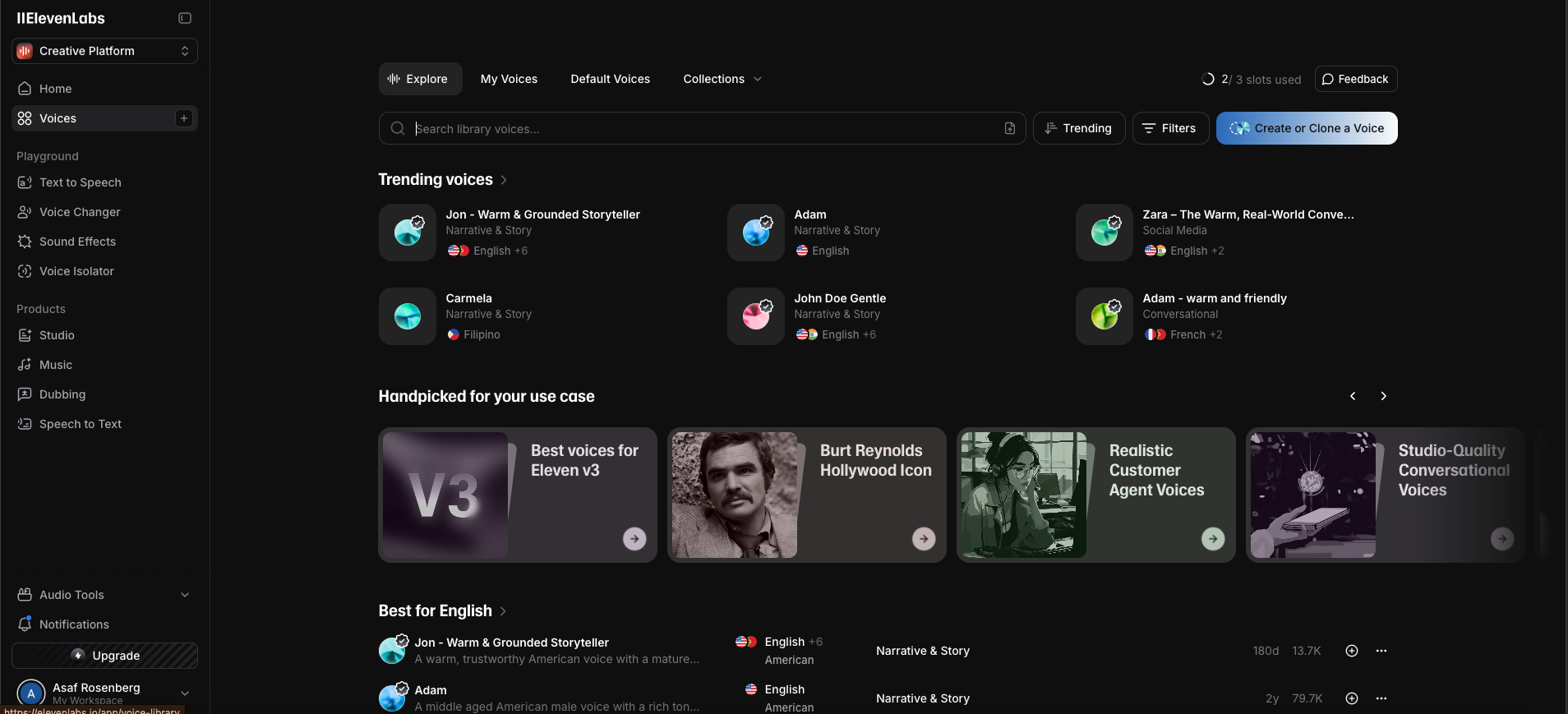 You can pick any voice available to your account whether it's stock/public voices, your own custom or cloned voices, or shared/community voices.
Tip: Add the voice to *My Voices*, then copy its Voice ID (for example: `Bella EXAVITQu4vr4xnSDxMaL`). If you want users to switch voices, store multiple Voice IDs and display them in a dropdown.
Important: Each API request uses your ElevenLabs credits. All billing happens directly with ElevenLabs, not through Base44.
### Part 2: The Base44 side
Once you have your ElevenLabs API keys, there are two ways to use this integration in Base44.
Click the option below to expand and view the instructions.
This option uses our ready-made integration, available in the[ integrations catalog](https://app.base44.com/integrations-catalog)
1. Head over to Base44 and click on Integrations.
You can pick any voice available to your account whether it's stock/public voices, your own custom or cloned voices, or shared/community voices.
Tip: Add the voice to *My Voices*, then copy its Voice ID (for example: `Bella EXAVITQu4vr4xnSDxMaL`). If you want users to switch voices, store multiple Voice IDs and display them in a dropdown.
Important: Each API request uses your ElevenLabs credits. All billing happens directly with ElevenLabs, not through Base44.
### Part 2: The Base44 side
Once you have your ElevenLabs API keys, there are two ways to use this integration in Base44.
Click the option below to expand and view the instructions.
This option uses our ready-made integration, available in the[ integrations catalog](https://app.base44.com/integrations-catalog)
1. Head over to Base44 and click on Integrations.
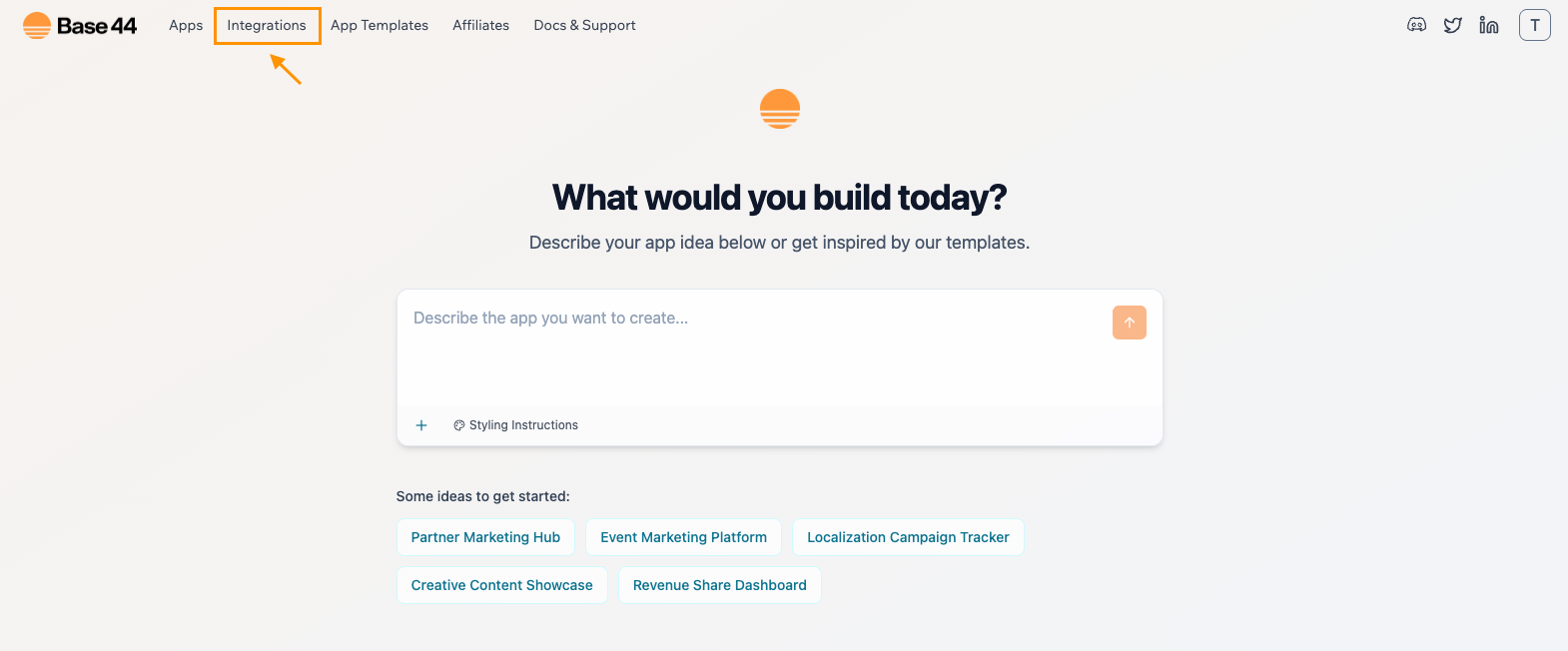 Make sure you're logged into Base44 to view the [Integrations catalog page](https://app.base44.com/integrations-catalog)
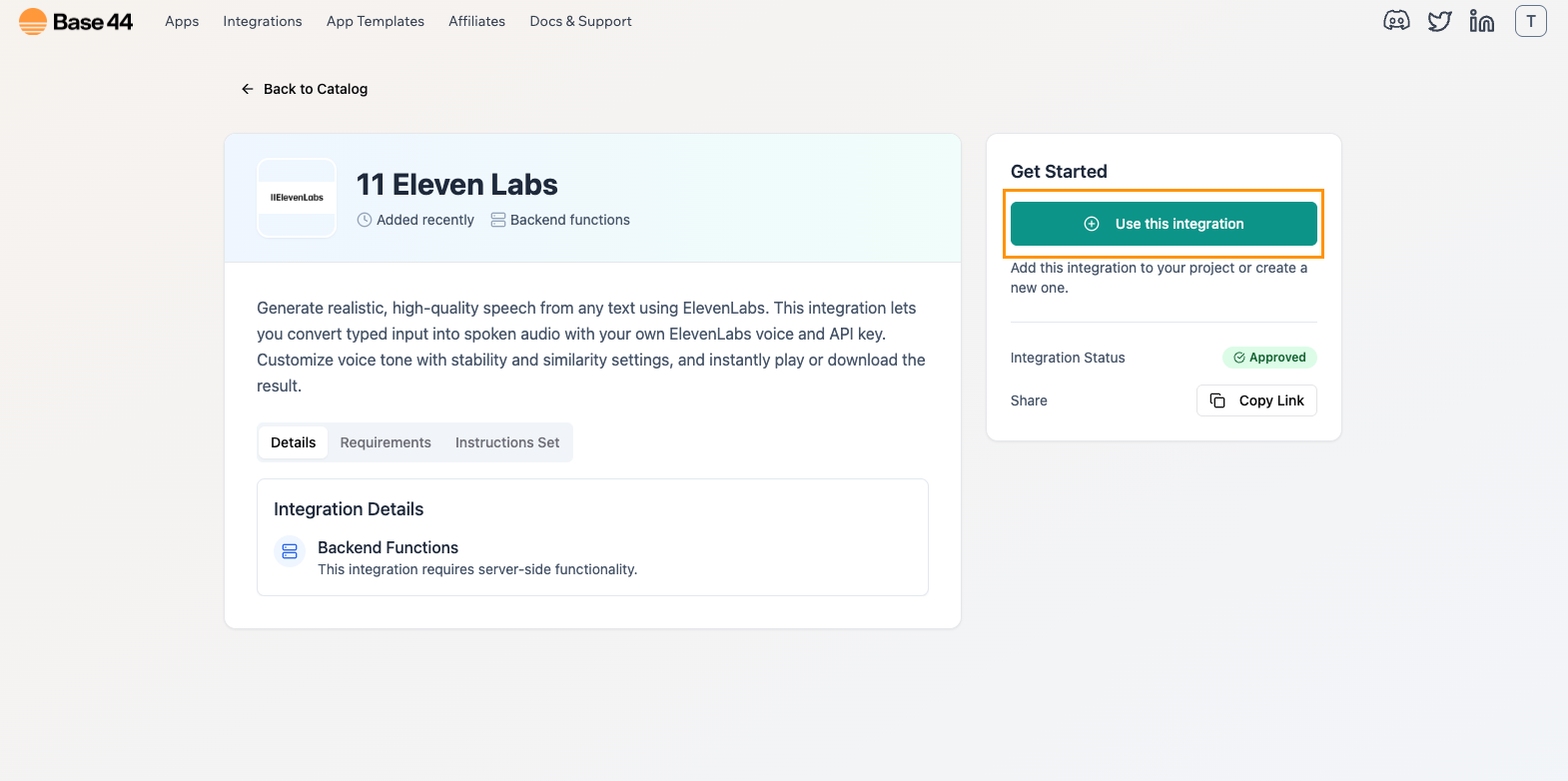
2. Select ElevenLabs and click on "Use this integration"
Make sure you're logged into Base44 to view the [Integrations catalog page](https://app.base44.com/integrations-catalog)
2. Select ElevenLabs and click on "Use this integration"
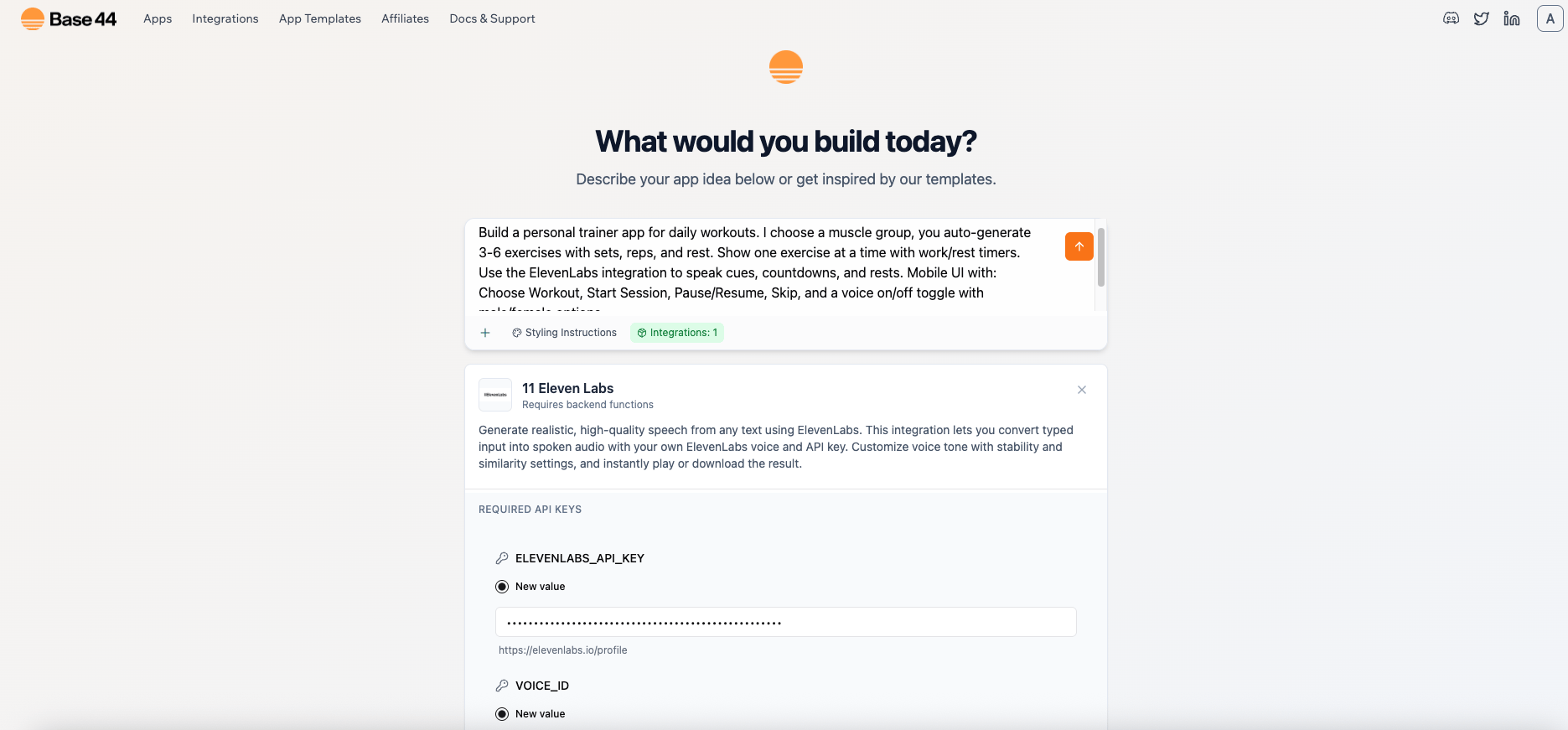
 3. When prompted, type out your prompt and paste your ELEVENLABS\_API\_KEY and VOICE\_ID. The integration will handle the backend wiring to ElevenLabs.
 You don’t need to manually activate backend functions. Ready-Made integrations enable them automatically.
1. In your app Dashboard, click on **App Settings** and [Enable Backend Functions](/Integrations/Using-integrations#activating-backend-functions).
2. Use the AI chat to connect ElevenLabs and add your secrets.
\*\*Let's use a training app as an example: \*\*
`Build a personal trainer app for daily workouts. I choose a muscle group, you auto-generate 3-6 exercises with sets, reps, and rest. Show one exercise at a time with work/rest timers.`
\*\*App prompt to conect ElevenLabs: \*\*
`Connect this app to ElevenLabs Text-to-Speech as an Instant integration. Ask me for ELEVENLABS_API_KEY and VOICE_ID and save them as Secrets. Create a backend function that calls ElevenLabs and returns MP3 as a Base44 data URL.`
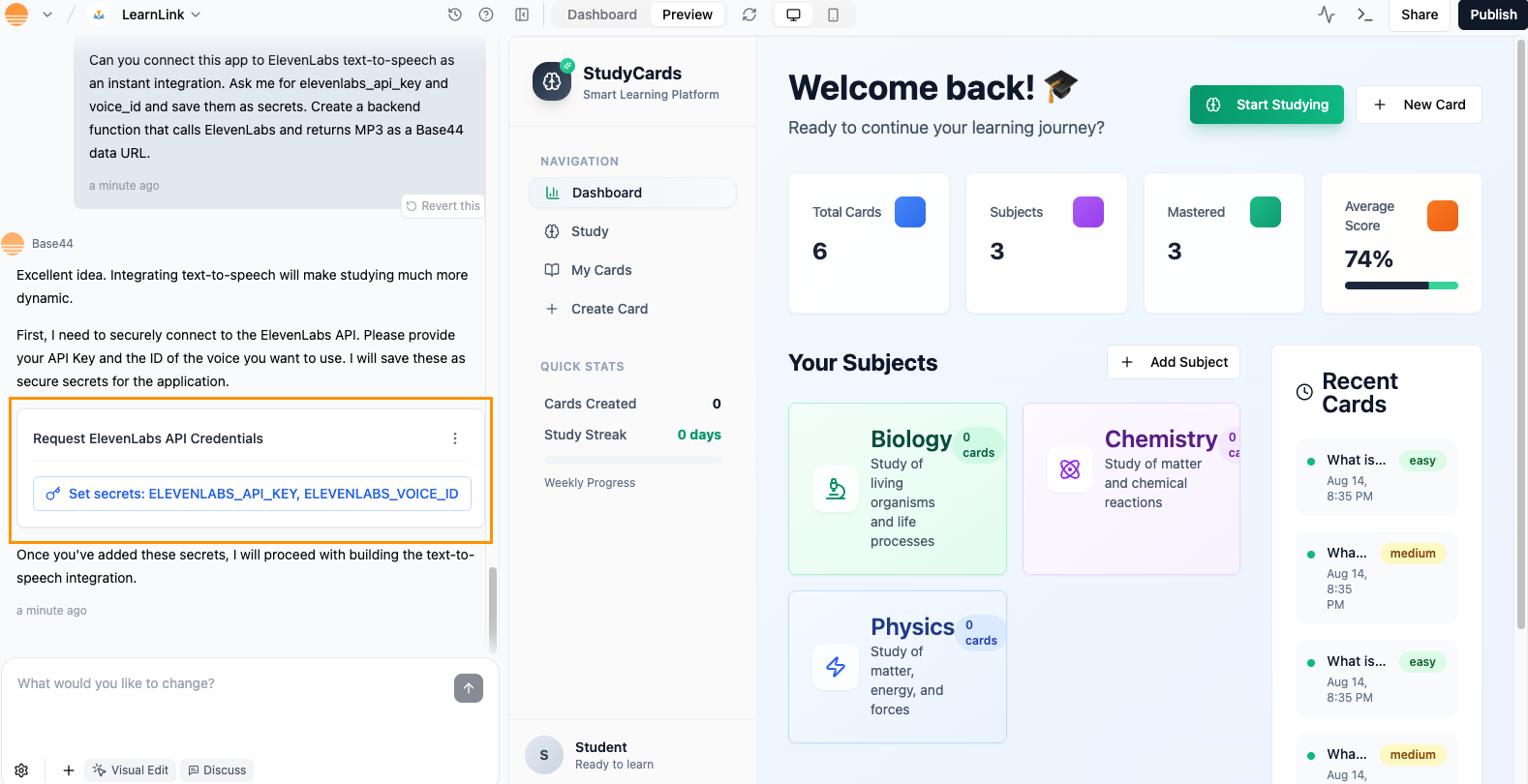
3. In the AI chat, click on "Set secrets" and paste your API key and voice ID.
You don’t need to manually activate backend functions. Ready-Made integrations enable them automatically.
1. In your app Dashboard, click on **App Settings** and [Enable Backend Functions](/Integrations/Using-integrations#activating-backend-functions).
2. Use the AI chat to connect ElevenLabs and add your secrets.
\*\*Let's use a training app as an example: \*\*
`Build a personal trainer app for daily workouts. I choose a muscle group, you auto-generate 3-6 exercises with sets, reps, and rest. Show one exercise at a time with work/rest timers.`
\*\*App prompt to conect ElevenLabs: \*\*
`Connect this app to ElevenLabs Text-to-Speech as an Instant integration. Ask me for ELEVENLABS_API_KEY and VOICE_ID and save them as Secrets. Create a backend function that calls ElevenLabs and returns MP3 as a Base44 data URL.`
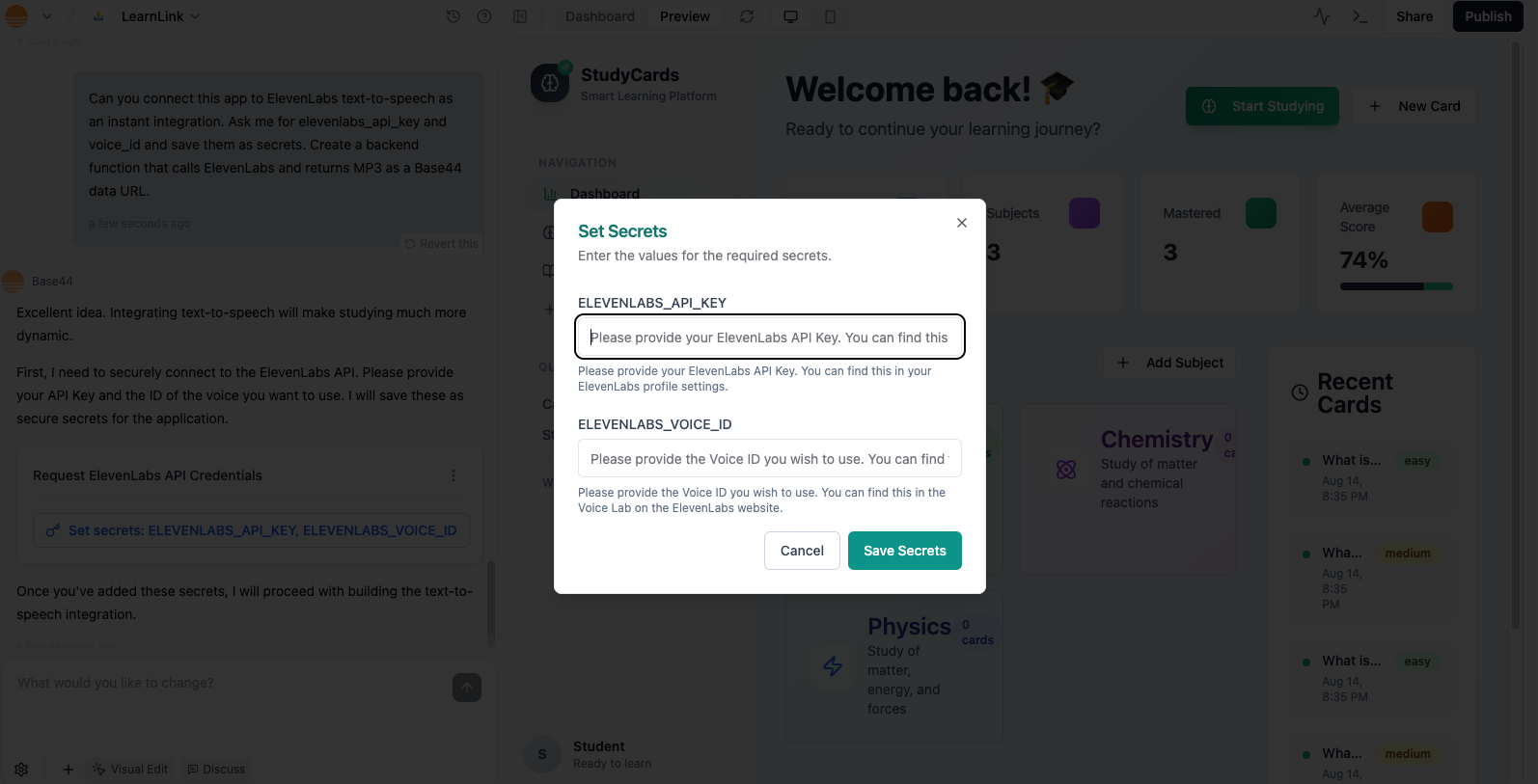
3. In the AI chat, click on "Set secrets" and paste your API key and voice ID.
 ## **Popular Use Cases for ElevenLabs in Base44 Apps**
* **Interactive Learning Tools** – Read lessons, quizzes, or language exercises aloud with natural voices.
* **Fitness & Wellness Coaches** – Deliver spoken workout instructions, meditation guides, or mindfulness prompts.
* **Accessibility Features** – Provide audio versions of on-screen text for visually impaired users.
* **Customer Support Bots** – Speak responses instead of only showing text, for a more human-like experience.
* **Storytelling & Audiobooks** – Narrate stories, podcasts, or news articles in engaging voices.
* **Games & Entertainment** – Add character voices, mission briefings, or dynamic commentary.
* **E-commerce Guides** – Give audio product descriptions, guided tours, or checkout instructions.
* **Event & Tour Apps** – Offer spoken directions, exhibit descriptions, or venue overviews.
* **Language Learning** – Model pronunciation and practice dialogues in different languages.
* **Custom Brand Voice** – Use a consistent cloned or custom voice for your app’s personality.
## FAQ
Yes. You must have an active ElevenLabs account with credits to process audio. All billing goes through ElevenLabs, not Base44.
Yes, each generation of audio via the API uses your ElevenLabs credits. The number of credits depends on the model and text length
Yes, but only on a **paid plan**. Free-plan accounts are **limited to non-commercial use**. Paid plans (starting with Starter) enable commercial usage
No. You can only create professional voice clones of **your own voice**, even with their permission. A verification process is required to confirm the voice belongs to you
Yes. The ElevenLabs API lets you modify elements like style, stability, similarity, and speed to make the audio sound more natural.
Paste them into the **Secrets** fields when configuring the integration. Base44 encrypts and securely stores secrets.
## **Popular Use Cases for ElevenLabs in Base44 Apps**
* **Interactive Learning Tools** – Read lessons, quizzes, or language exercises aloud with natural voices.
* **Fitness & Wellness Coaches** – Deliver spoken workout instructions, meditation guides, or mindfulness prompts.
* **Accessibility Features** – Provide audio versions of on-screen text for visually impaired users.
* **Customer Support Bots** – Speak responses instead of only showing text, for a more human-like experience.
* **Storytelling & Audiobooks** – Narrate stories, podcasts, or news articles in engaging voices.
* **Games & Entertainment** – Add character voices, mission briefings, or dynamic commentary.
* **E-commerce Guides** – Give audio product descriptions, guided tours, or checkout instructions.
* **Event & Tour Apps** – Offer spoken directions, exhibit descriptions, or venue overviews.
* **Language Learning** – Model pronunciation and practice dialogues in different languages.
* **Custom Brand Voice** – Use a consistent cloned or custom voice for your app’s personality.
## FAQ
Yes. You must have an active ElevenLabs account with credits to process audio. All billing goes through ElevenLabs, not Base44.
Yes, each generation of audio via the API uses your ElevenLabs credits. The number of credits depends on the model and text length
Yes, but only on a **paid plan**. Free-plan accounts are **limited to non-commercial use**. Paid plans (starting with Starter) enable commercial usage
No. You can only create professional voice clones of **your own voice**, even with their permission. A verification process is required to confirm the voice belongs to you
Yes. The ElevenLabs API lets you modify elements like style, stability, similarity, and speed to make the audio sound more natural.
Paste them into the **Secrets** fields when configuring the integration. Base44 encrypts and securely stores secrets.