> ## Documentation Index
> Fetch the complete documentation index at: https://docs.base44.com/llms.txt
> Use this file to discover all available pages before exploring further.
# Getting started as an enterprise workspace member
> Accept your invitation, sign in to your enterprise workspace, and start building and collaborating on apps.
Your enterprise workspace is a shared space where your team builds and collaborates on apps together. Depending on your role, you can build apps as an Editor or view apps you have been invited to as a Viewer. Learn how to join, what you can do, and where to get help.
***
## Accepting your invitation
Your workspace admin will send you an invitation by email. Invitation links are valid for 60 days.
**To join your workspace:**
1. Open the invitation email and click **Accept Invitation**.
2. Sign in to Base44 or create an account if you do not have one.
If your workspace uses Single Sign-On (SSO), you sign in with your company credentials instead of a Base44 password. Your admin can confirm which sign-in method to use. If SSO is enabled, you may be added to the workspace automatically the first time you sign in with no invite needed.
***
## Accessing your workspace
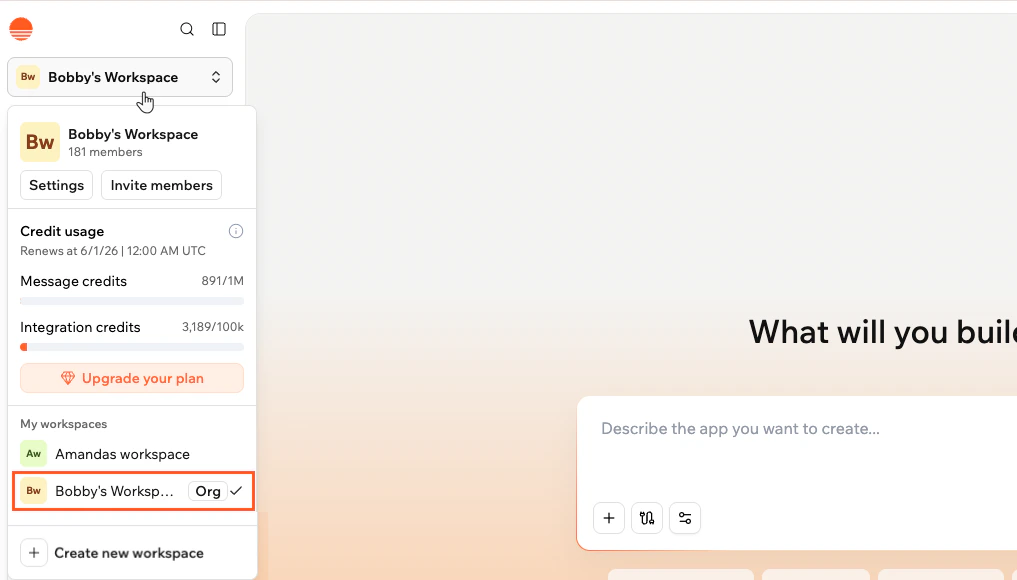
Once you have accepted your invitation, click your workspace name at the top left of Base44 and select your enterprise workspace from the menu.
 ***
## Understanding your role
Your role controls what you can see and do in the workspace.
| Role | What you can do |
| ---------- | ----------------------------------------------------------------------------------- |
| **Admin** | Manage members, settings, and workspace configuration. |
| **Editor** | Create new apps and collaborate on apps you are invited to. Uses workspace credits. |
| **Viewer** | View apps you are invited to. Cannot edit apps or use the AI chat. |
If you need a different level of access, contact your workspace admin.
Your admin may have set a monthly credit limit for your account. If you reach your limit before the end of the month, contact your admin to request an increase.
***
## Building and accessing apps
As an **Editor**, you can create new apps from the Base44 home screen and collaborate on apps that others invite you to. Each app you build or run uses credits from the shared workspace pool.
As a **Viewer**, you can only access apps that you have been specifically invited to collaborate on. Your admin or the app owner will send you an invitation to each app.
Once you have access to an app, it appears on your Base44 home screen.
***
## Using Superagents
If your workspace has Superagents enabled, you can create and interact with AI agents directly from the Base44 home screen. Select the **Superagents** tab to get started.
***
## Understanding your role
Your role controls what you can see and do in the workspace.
| Role | What you can do |
| ---------- | ----------------------------------------------------------------------------------- |
| **Admin** | Manage members, settings, and workspace configuration. |
| **Editor** | Create new apps and collaborate on apps you are invited to. Uses workspace credits. |
| **Viewer** | View apps you are invited to. Cannot edit apps or use the AI chat. |
If you need a different level of access, contact your workspace admin.
Your admin may have set a monthly credit limit for your account. If you reach your limit before the end of the month, contact your admin to request an increase.
***
## Building and accessing apps
As an **Editor**, you can create new apps from the Base44 home screen and collaborate on apps that others invite you to. Each app you build or run uses credits from the shared workspace pool.
As a **Viewer**, you can only access apps that you have been specifically invited to collaborate on. Your admin or the app owner will send you an invitation to each app.
Once you have access to an app, it appears on your Base44 home screen.
***
## Using Superagents
If your workspace has Superagents enabled, you can create and interact with AI agents directly from the Base44 home screen. Select the **Superagents** tab to get started.
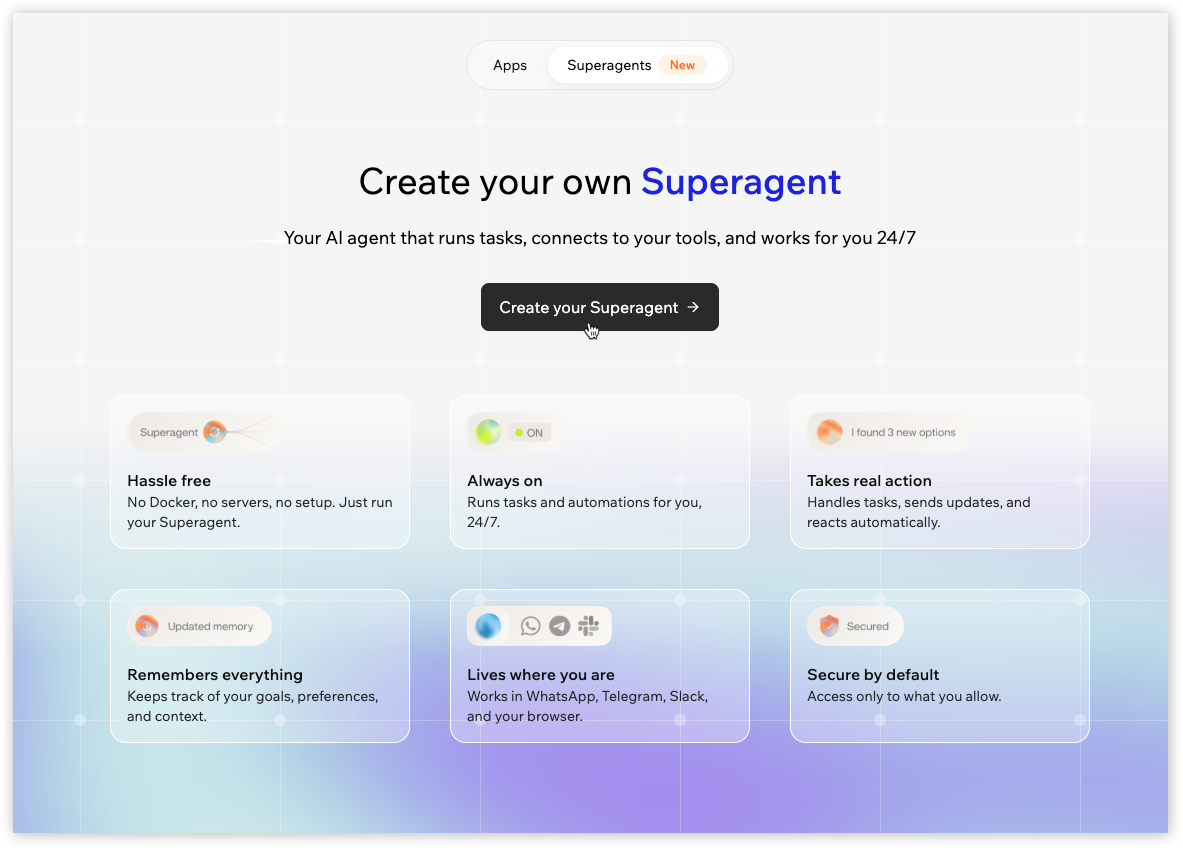 If you do not see the Superagents tab, your workspace admin may have disabled it for your organization.
***
## Getting help
If you run into issues or have questions, here are the best ways to get support.
* **Documentation:** Browse guides at [docs.base44.com](https://docs.base44.com)
* **Support:** Open a ticket from the Help menu inside Base44 for bugs, troubleshooting, or app-building questions
* **Your admin:** For workspace access, role changes, or credit limit increases, contact your workspace admin directly
***
## Next steps
Follow the quick start guide to create and launch your first Base44 app.
Learn how to create an AI agent that runs tasks and works for you around the clock.
Find support options and contact the Base44 team.
If you do not see the Superagents tab, your workspace admin may have disabled it for your organization.
***
## Getting help
If you run into issues or have questions, here are the best ways to get support.
* **Documentation:** Browse guides at [docs.base44.com](https://docs.base44.com)
* **Support:** Open a ticket from the Help menu inside Base44 for bugs, troubleshooting, or app-building questions
* **Your admin:** For workspace access, role changes, or credit limit increases, contact your workspace admin directly
***
## Next steps
Follow the quick start guide to create and launch your first Base44 app.
Learn how to create an AI agent that runs tasks and works for you around the clock.
Find support options and contact the Base44 team.