> ## Documentation Index
> Fetch the complete documentation index at: https://docs.base44.com/llms.txt
> Use this file to discover all available pages before exploring further.
# Creating and managing your Base44 profile
> Showcase your apps, track your progress, and build your reputation in Base44.
Create a Base44 profile to showcase the apps you've built, highlight your progress, and share your builder identity. Customize your profile with a cover image, profile photo, username, bio, links, and location, and feature your published apps.
Complete milestones to advance through levels, build your reputation, and show what you've achieved in Base44. You can also connect Base44 to LinkedIn from your profile to show your builder activity.
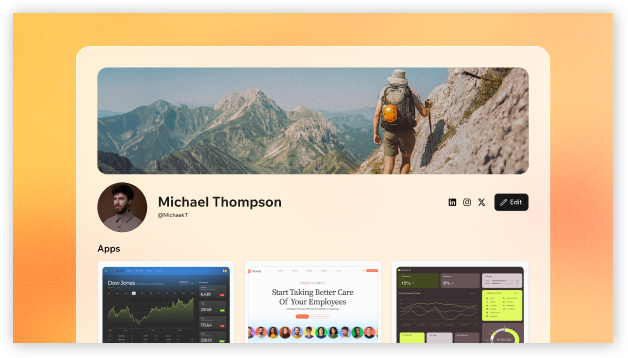 Your profile is public. Share only details you want people to see when they visit your profile.
***
## Setting up your profile
Start by adding the details you want to include, such as your bio, links, location, and apps. You can update your profile at any time.
**To set up your profile:**
1. Log in to [Base44](https://app.base44.com/).
2. Click your **profile icon**.
3. Click **View Profile**.
4. Click **Edit**.
5. Fill in any of the following:
* **Cover image:** Choose one of our custom gradients or upload your own banner image at the top of your profile. Use a wide image for best results.
* **Profile photo:** Your public profile photo.
* **Username:** Your Base44 handle, used in your profile URL.
* **Bio:** A short public bio about yourself, up to 750 characters.
* **Location:** Your geographic location.
* **Display your account email:** Choose whether to display your account email.
* **Social links:** Add links for **Instagram**, **LinkedIn**, **X**, and custom links.
6. Click **Choose from my apps** to select the apps you want to showcase, and then click **Save**.
7. Toggle **Show on profile** next to **Activity** to choose whether to display your activity heatmap.
8. Click **Save changes**.
Your profile is public. Share only details you want people to see when they visit your profile.
***
## Setting up your profile
Start by adding the details you want to include, such as your bio, links, location, and apps. You can update your profile at any time.
**To set up your profile:**
1. Log in to [Base44](https://app.base44.com/).
2. Click your **profile icon**.
3. Click **View Profile**.
4. Click **Edit**.
5. Fill in any of the following:
* **Cover image:** Choose one of our custom gradients or upload your own banner image at the top of your profile. Use a wide image for best results.
* **Profile photo:** Your public profile photo.
* **Username:** Your Base44 handle, used in your profile URL.
* **Bio:** A short public bio about yourself, up to 750 characters.
* **Location:** Your geographic location.
* **Display your account email:** Choose whether to display your account email.
* **Social links:** Add links for **Instagram**, **LinkedIn**, **X**, and custom links.
6. Click **Choose from my apps** to select the apps you want to showcase, and then click **Save**.
7. Toggle **Show on profile** next to **Activity** to choose whether to display your activity heatmap.
8. Click **Save changes**.
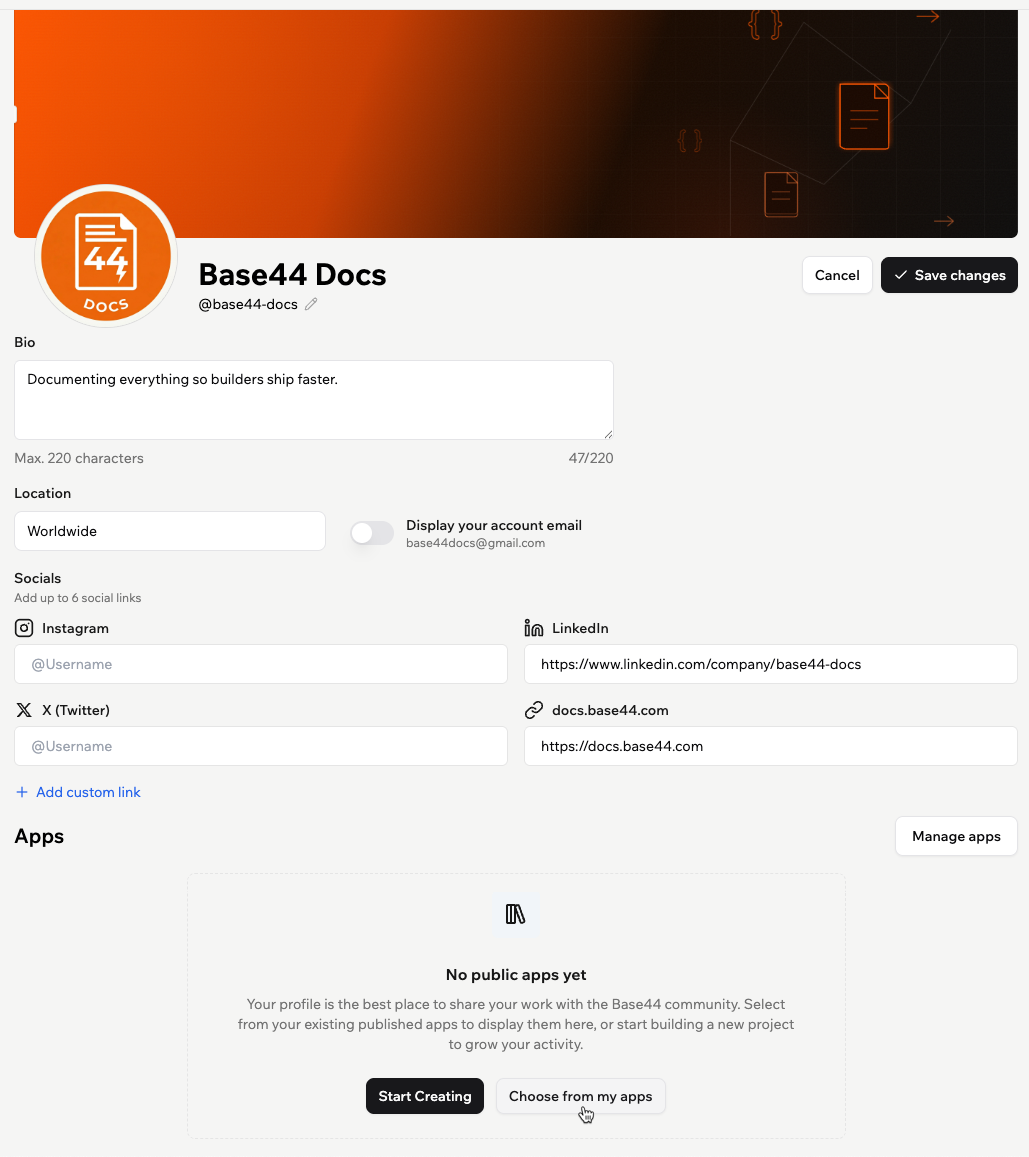 Only published apps appear for selection. You can still share your profile before adding apps, and add published apps later.
***
## Tracking your milestones
Your profile includes a **Milestones** tab that shows your badges, levels, and progress as you build in Base44. Complete milestones to advance through 5 levels: Explorer, Maker, Specialist, Architect, and Legend.
Milestones reflect actions and outcomes across Base44, such as creating your first app, publishing apps, earning your first sale, using Superagents, connecting integrations, getting real users, generating revenue, and reaching activity streaks.
Only published apps appear for selection. You can still share your profile before adding apps, and add published apps later.
***
## Tracking your milestones
Your profile includes a **Milestones** tab that shows your badges, levels, and progress as you build in Base44. Complete milestones to advance through 5 levels: Explorer, Maker, Specialist, Architect, and Legend.
Milestones reflect actions and outcomes across Base44, such as creating your first app, publishing apps, earning your first sale, using Superagents, connecting integrations, getting real users, generating revenue, and reaching activity streaks.
 ### Connecting Base44 to LinkedIn
You can connect Base44 to LinkedIn from the **Milestones** tab to show what you've achieved as a builder. Base44 appears as a connected app on your LinkedIn profile, with a capabilities summary based on your Base44 activity. Your Base44 details on LinkedIn update automatically as your Base44 progress changes.
### Connecting Base44 to LinkedIn
You can connect Base44 to LinkedIn from the **Milestones** tab to show what you've achieved as a builder. Base44 appears as a connected app on your LinkedIn profile, with a capabilities summary based on your Base44 activity. Your Base44 details on LinkedIn update automatically as your Base44 progress changes.
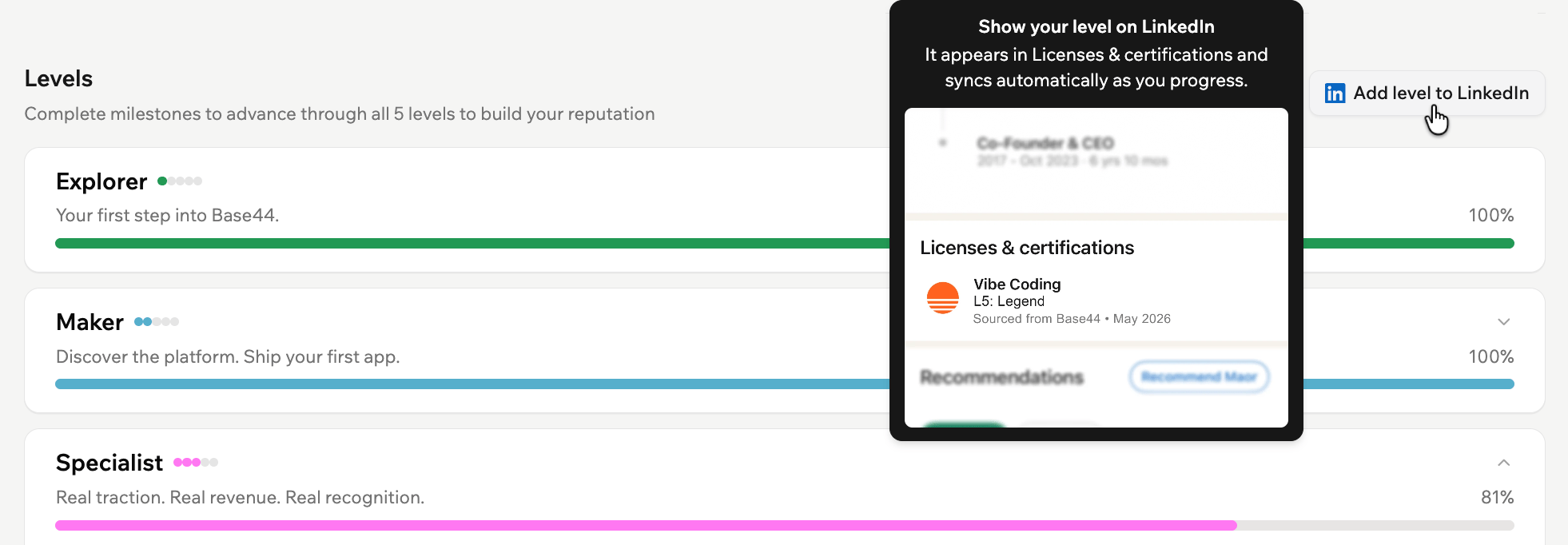 **To connect Base44 to LinkedIn:**
1. Click your **profile icon**.
2. Click **View Profile**.
3. Click the **Milestones** tab.
4. Click **Add level to LinkedIn**.
5. Sign in to LinkedIn and review the requested permissions.
6. Click **Allow**.
***
## Sharing your profile
Anyone with the link can view your profile without logging in to Base44.
**To copy your profile link:**
1. Go to your profile.
2. Click **View Profile**.
3. Copy the link from your browser's address bar.
Your profile includes:
* **Profile header:** Your cover image, profile photo, name, username, and level badge.
* **Bio:** Your short public bio.
* **Joined date:** The month and year you joined.
* **Displayed apps:** The apps you selected to showcase.
* **Activity section:** A heatmap of your activity in Base44.
* **Public links:** Your social and custom links.
* **Milestones:** Your badges, reputation level, and completed milestones.
***
## Managing your profile
You can update your profile at any time, including your bio, display name, username, displayed apps, and activity.
If you've joined the Partner Program, you can also manage your partner details from your profile. See [Managing your partner profile](/Community-and-support/partner-program#managing-your-partner-profile).
### Showcasing your apps
Choose which published apps to showcase on your profile. You can also reorder them to control how they appear.
**To manage your displayed apps:**
1. Click your **profile icon**.
2. Click **View Profile**.
3. Click **Manage apps**.
4. Select the published apps you want to show.
5. Click **Save**.
**To connect Base44 to LinkedIn:**
1. Click your **profile icon**.
2. Click **View Profile**.
3. Click the **Milestones** tab.
4. Click **Add level to LinkedIn**.
5. Sign in to LinkedIn and review the requested permissions.
6. Click **Allow**.
***
## Sharing your profile
Anyone with the link can view your profile without logging in to Base44.
**To copy your profile link:**
1. Go to your profile.
2. Click **View Profile**.
3. Copy the link from your browser's address bar.
Your profile includes:
* **Profile header:** Your cover image, profile photo, name, username, and level badge.
* **Bio:** Your short public bio.
* **Joined date:** The month and year you joined.
* **Displayed apps:** The apps you selected to showcase.
* **Activity section:** A heatmap of your activity in Base44.
* **Public links:** Your social and custom links.
* **Milestones:** Your badges, reputation level, and completed milestones.
***
## Managing your profile
You can update your profile at any time, including your bio, display name, username, displayed apps, and activity.
If you've joined the Partner Program, you can also manage your partner details from your profile. See [Managing your partner profile](/Community-and-support/partner-program#managing-your-partner-profile).
### Showcasing your apps
Choose which published apps to showcase on your profile. You can also reorder them to control how they appear.
**To manage your displayed apps:**
1. Click your **profile icon**.
2. Click **View Profile**.
3. Click **Manage apps**.
4. Select the published apps you want to show.
5. Click **Save**.
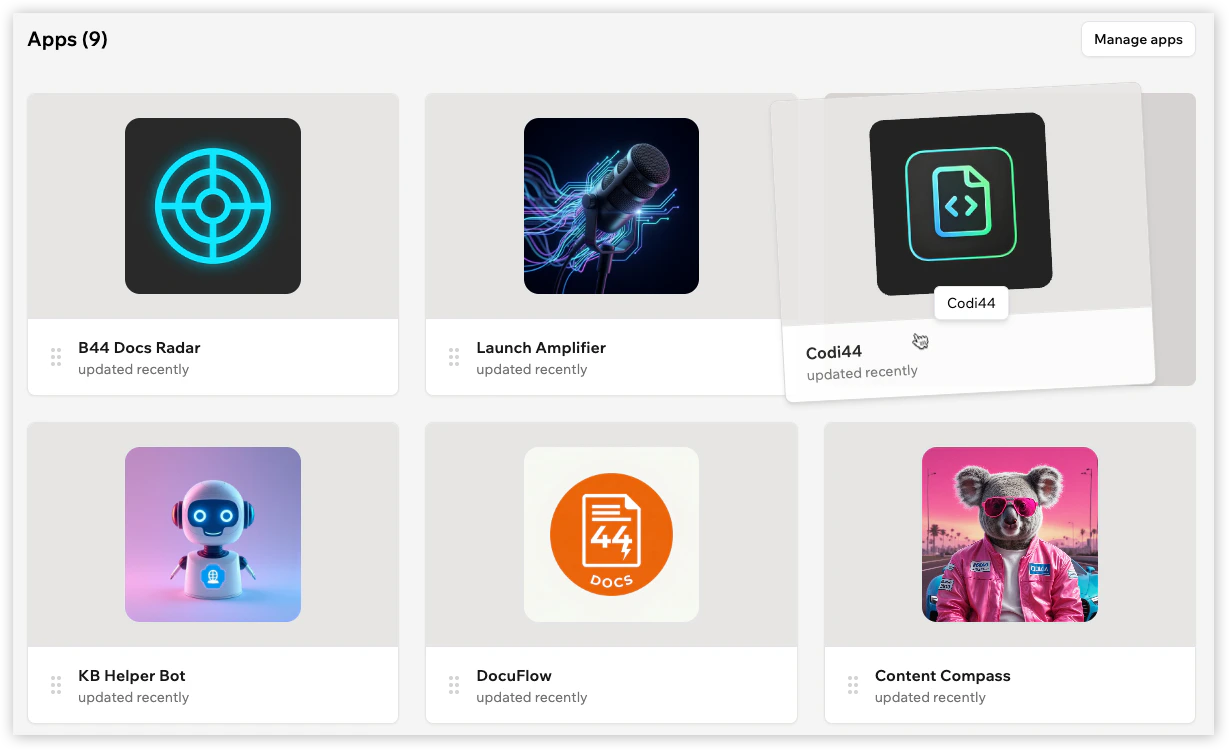 Drag and drop your apps to change the order they appear on your profile.
### Showing activity
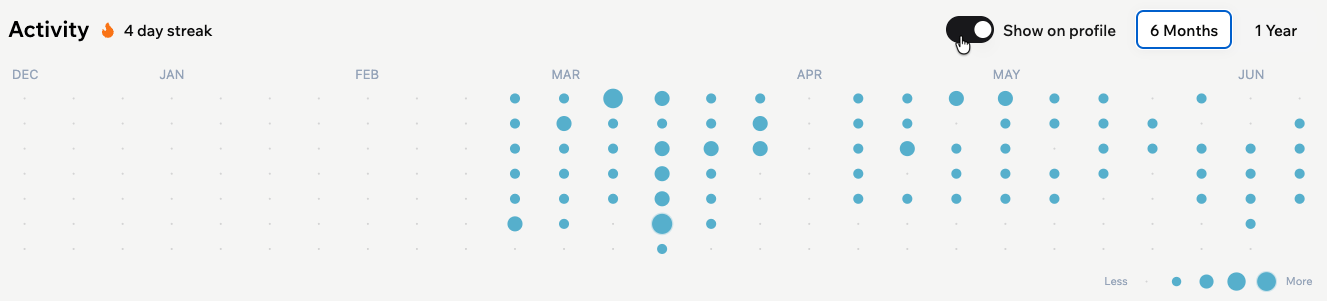
**Activity** includes your streak and a heatmap that reflects your building activity over the last 6 months. Choose whether to show your **Activity** on your profile, and whether to display **6 Months** or **1 Year**.
**To show or hide your activity:**
1. Click your **profile icon**.
2. Click **View Profile**.
3. Click **Edit**.
4. Scroll to **Activity**.
5. Toggle **Show on profile** on or off, then select **6 Months** or **1 Year** to choose how much activity to display.
6. Click **Save changes**.
Drag and drop your apps to change the order they appear on your profile.
### Showing activity
**Activity** includes your streak and a heatmap that reflects your building activity over the last 6 months. Choose whether to show your **Activity** on your profile, and whether to display **6 Months** or **1 Year**.
**To show or hide your activity:**
1. Click your **profile icon**.
2. Click **View Profile**.
3. Click **Edit**.
4. Scroll to **Activity**.
5. Toggle **Show on profile** on or off, then select **6 Months** or **1 Year** to choose how much activity to display.
6. Click **Save changes**.
 ### Updating your display name
Change the name shown at the top of your profile at any time.
**To update your display name:**
1. Click your **profile icon**.
2. Click **View Profile**.
3. Click **Edit**.
4. Click the **Edit** icon next to your name.
5. Enter a display name of up to 100 characters.
6. Click **Save changes**.
### Updating your username
Change your username from the profile editor. Your username is part of your public profile URL: `https://app.base44.com/@yourusername`.
Base44 checks availability before you can claim a new username. Once saved, your profile URL updates automatically.
**To change your username:**
1. Click your **profile icon**.
2. Click **View Profile**.
3. Click **Edit**.
4. Click the **Username** field.
5. Enter a username to check if it's available.
6. Click **Claim Username**.
7. Click **Save changes**.
### Updating your display name
Change the name shown at the top of your profile at any time.
**To update your display name:**
1. Click your **profile icon**.
2. Click **View Profile**.
3. Click **Edit**.
4. Click the **Edit** icon next to your name.
5. Enter a display name of up to 100 characters.
6. Click **Save changes**.
### Updating your username
Change your username from the profile editor. Your username is part of your public profile URL: `https://app.base44.com/@yourusername`.
Base44 checks availability before you can claim a new username. Once saved, your profile URL updates automatically.
**To change your username:**
1. Click your **profile icon**.
2. Click **View Profile**.
3. Click **Edit**.
4. Click the **Username** field.
5. Enter a username to check if it's available.
6. Click **Claim Username**.
7. Click **Save changes**.
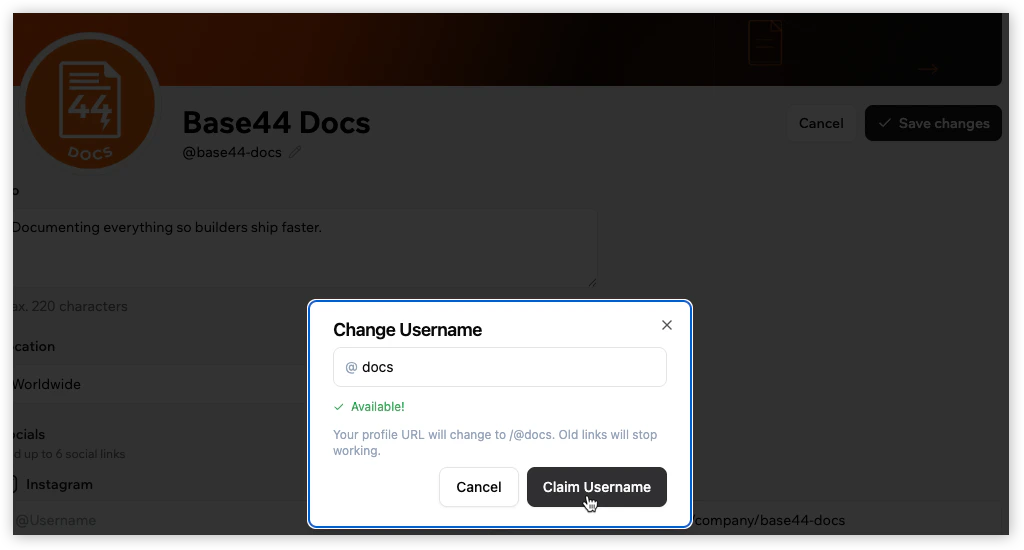 Changing your username also updates your profile URL.
***
## FAQs
Click a question below to learn more about your Base44 profile.
Yes. Your public profile is visible to anyone, including people who aren't logged in to Base44.
Yes. You can update your username from the profile editor. Changing your username also changes your public profile URL, and old links will stop working.
You can add a cover image, profile photo, username, bio, location, social links, custom links, and choose whether to display your account email.
Click **Manage apps** to choose which of your published apps appear on your public profile.
You can turn **Display your account email** on or off in the profile editor.
Your public profile can include an **Activity** section with your streak and a heatmap view of your activity in Base44. You can choose to show activity from the last **6 Months** or **1 Year**.
Yes. Go to your profile and click **Edit**. Scroll to **Activity** and toggle off **Show on profile**.
Milestones are achievements you complete as you build in Base44. They can include actions and outcomes like creating your first app, publishing apps, earning your first sale, using Superagents, connecting integrations, getting real users, generating revenue, and reaching activity streaks.
Levels show your progress as a Base44 builder. Complete milestones to advance through levels and build your reputation.
Base44 appears in the **Connected apps** section of your LinkedIn profile. LinkedIn shows a capabilities summary based on your Base44 activity.
After you connect Base44 to LinkedIn, your Base44 details on LinkedIn update automatically as your Base44 progress changes.
You can disconnect LinkedIn from **Account Settings** in Base44. Base44 is removed from your LinkedIn profile and no longer syncs as you progress.
Changing your username also updates your profile URL.
***
## FAQs
Click a question below to learn more about your Base44 profile.
Yes. Your public profile is visible to anyone, including people who aren't logged in to Base44.
Yes. You can update your username from the profile editor. Changing your username also changes your public profile URL, and old links will stop working.
You can add a cover image, profile photo, username, bio, location, social links, custom links, and choose whether to display your account email.
Click **Manage apps** to choose which of your published apps appear on your public profile.
You can turn **Display your account email** on or off in the profile editor.
Your public profile can include an **Activity** section with your streak and a heatmap view of your activity in Base44. You can choose to show activity from the last **6 Months** or **1 Year**.
Yes. Go to your profile and click **Edit**. Scroll to **Activity** and toggle off **Show on profile**.
Milestones are achievements you complete as you build in Base44. They can include actions and outcomes like creating your first app, publishing apps, earning your first sale, using Superagents, connecting integrations, getting real users, generating revenue, and reaching activity streaks.
Levels show your progress as a Base44 builder. Complete milestones to advance through levels and build your reputation.
Base44 appears in the **Connected apps** section of your LinkedIn profile. LinkedIn shows a capabilities summary based on your Base44 activity.
After you connect Base44 to LinkedIn, your Base44 details on LinkedIn update automatically as your Base44 progress changes.
You can disconnect LinkedIn from **Account Settings** in Base44. Base44 is removed from your LinkedIn profile and no longer syncs as you progress.