> ## Documentation Index
> Fetch the complete documentation index at: https://docs.base44.com/llms.txt
> Use this file to discover all available pages before exploring further.
# Joining the Base44 Partner Program
> Join the Base44 Partner Program and unlock tools for working with clients.
The Base44 Partner Program helps you turn Base44 building into client work. Join to set up your partner profile, manage client projects across workspaces, and grow your visibility as you complete milestones.
 You can join the Partner Program once you reach **Maker (Level 2)**.
Go to Base44 Partners and join the program.
***
## Joining the Partner Program
Once you reach **Maker (Level 2)**, you can join the program, set up your partner profile, and unlock tools for managing client projects.
**To join the Partner Program:**
1. Go to [Base44 Partners](https://app.base44.com/partners).
2. Click **Join as a Partner**.
3. On the Partner Program page, click **Join as a Partner** again.
4. In the **Join the Partner Program** dialog, click **Continue**.
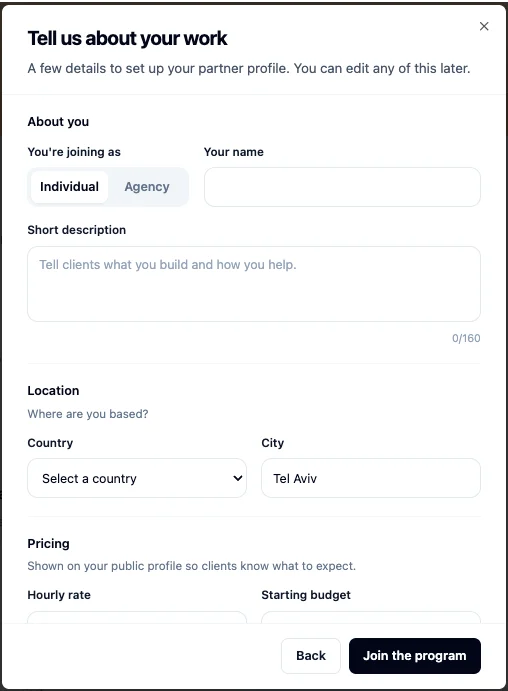
5. Set up your partner profile:
* Choose whether you are joining as an **Individual** or **Agency**.
* Add your name and short description.
* Set your location, pricing, services you offer, and languages.
6. Click **Join the program**.
You can join the Partner Program once you reach **Maker (Level 2)**.
Go to Base44 Partners and join the program.
***
## Joining the Partner Program
Once you reach **Maker (Level 2)**, you can join the program, set up your partner profile, and unlock tools for managing client projects.
**To join the Partner Program:**
1. Go to [Base44 Partners](https://app.base44.com/partners).
2. Click **Join as a Partner**.
3. On the Partner Program page, click **Join as a Partner** again.
4. In the **Join the Partner Program** dialog, click **Continue**.
5. Set up your partner profile:
* Choose whether you are joining as an **Individual** or **Agency**.
* Add your name and short description.
* Set your location, pricing, services you offer, and languages.
6. Click **Join the program**.
 By joining the Partner Program, you agree to the [Base44 Partner Terms of Use](https://app.base44.com/partners/terms).
***
## Using partner tools
When you join the Partner Program, you unlock tools for managing client work, setting up your partner profile, and growing your visibility on Base44.
Manage apps across client workspaces from one place.
Transfer a finished app to a client workspace when the project is complete.
Use your own Base44 credits while working in a client workspace.
Show your rate on your Base44 profile and let clients contact you.
Get access to selected new Base44 features before wider release.
Access partner-only webinars and guides for running client work.
***
## Unlocking more as you level up
Build your reputation as you complete milestones and grow your Base44 profile. As you reach higher levels, you unlock more ways to get discovered, build trust, and reach clients.
Public discovery benefits unlock when you reach **Specialist (Level 3)**.
Your public partner profile can appear in the Partner Directory, where clients can find you by service, language, and location.
Your Base44 profile shows a Verified Partner badge, helping clients recognize you as a Base44 Partner.
Go to your Base44 profile to see your current level. Open **Milestones** to check what you need to complete to reach the next level.
***
## Managing your partner profile
You can manage your partner profile from your [Base44 profile](/Community-and-support/user-profile) after joining the Partner Program. Update your profile to keep your bio, apps, services, pricing, response time, and contact details up to date. Keeping these details current helps your profile stay ready for client discovery.
Under **Work & rates**, you can control how your partner details appear:
* Turn on **Show on profile** to display your partner details on your public profile.
* Turn on **Open to new project requests** to show that you are available for client requests.
* Turn off **Open to new project requests** when you are not accepting new projects.
Your partner profile also includes a Reviews section. Once you have reviews, it shows your average rating and total number of reviews. Reviewers can also include an app you built for them with their review.
***
## FAQs
Click a question below to learn more about the Base44 Partner Program.
Base44 Builders who reach **Maker (Level 2)** can join the Partner Program.
Go to your [Base44 profile](/Community-and-support/user-profile) and open **Milestones**. You can see your current level and what you need to complete to reach the next level.
No. Once you reach **Maker (Level 2)**, you can join the Partner Program from Base44 Partners. You do not need approval to join.
No. You need to reach **Maker (Level 2)** before you can join the Partner Program.
No. You can join the Partner Program at **Maker (Level 2)**. Once you reach **Specialist (Level 3)**, your public partner profile can appear in the Partner Directory.
Once you reach **Specialist (Level 3)**, your Base44 profile shows a Verified Partner badge.
Yes. You can update your partner profile from your [Base44 profile](/Community-and-support/user-profile). Edit your bio, apps, services, pricing, response time, and availability.
Clients can contact you from your partner profile. When they click **Contact**, they fill out a short form with their project details and contact information. Base44 sends the request to you, and you continue the conversation directly from there.
No. Payments and agreements are managed directly between you and the client.
Yes. You can leave the Partner Program from your account settings. Leaving the Partner Program removes your partner abilities and benefits, including managing client apps, choosing credit consumption settings, and appearing in the Partner Directory.
**To leave the Partner Program:**
1. Click your **profile icon**.
2. Click **Account settings**.
3. Scroll to **Partner Settings**.
4. Click **Leave partner program**.
5. Review the confirmation dialog, then click **Leave program**.
You can rejoin the program at any time from the [Base44 Partners page](https://app.base44.com/partners).
By joining the Partner Program, you agree to the [Base44 Partner Terms of Use](https://app.base44.com/partners/terms).
***
## Using partner tools
When you join the Partner Program, you unlock tools for managing client work, setting up your partner profile, and growing your visibility on Base44.
Manage apps across client workspaces from one place.
Transfer a finished app to a client workspace when the project is complete.
Use your own Base44 credits while working in a client workspace.
Show your rate on your Base44 profile and let clients contact you.
Get access to selected new Base44 features before wider release.
Access partner-only webinars and guides for running client work.
***
## Unlocking more as you level up
Build your reputation as you complete milestones and grow your Base44 profile. As you reach higher levels, you unlock more ways to get discovered, build trust, and reach clients.
Public discovery benefits unlock when you reach **Specialist (Level 3)**.
Your public partner profile can appear in the Partner Directory, where clients can find you by service, language, and location.
Your Base44 profile shows a Verified Partner badge, helping clients recognize you as a Base44 Partner.
Go to your Base44 profile to see your current level. Open **Milestones** to check what you need to complete to reach the next level.
***
## Managing your partner profile
You can manage your partner profile from your [Base44 profile](/Community-and-support/user-profile) after joining the Partner Program. Update your profile to keep your bio, apps, services, pricing, response time, and contact details up to date. Keeping these details current helps your profile stay ready for client discovery.
Under **Work & rates**, you can control how your partner details appear:
* Turn on **Show on profile** to display your partner details on your public profile.
* Turn on **Open to new project requests** to show that you are available for client requests.
* Turn off **Open to new project requests** when you are not accepting new projects.
Your partner profile also includes a Reviews section. Once you have reviews, it shows your average rating and total number of reviews. Reviewers can also include an app you built for them with their review.
***
## FAQs
Click a question below to learn more about the Base44 Partner Program.
Base44 Builders who reach **Maker (Level 2)** can join the Partner Program.
Go to your [Base44 profile](/Community-and-support/user-profile) and open **Milestones**. You can see your current level and what you need to complete to reach the next level.
No. Once you reach **Maker (Level 2)**, you can join the Partner Program from Base44 Partners. You do not need approval to join.
No. You need to reach **Maker (Level 2)** before you can join the Partner Program.
No. You can join the Partner Program at **Maker (Level 2)**. Once you reach **Specialist (Level 3)**, your public partner profile can appear in the Partner Directory.
Once you reach **Specialist (Level 3)**, your Base44 profile shows a Verified Partner badge.
Yes. You can update your partner profile from your [Base44 profile](/Community-and-support/user-profile). Edit your bio, apps, services, pricing, response time, and availability.
Clients can contact you from your partner profile. When they click **Contact**, they fill out a short form with their project details and contact information. Base44 sends the request to you, and you continue the conversation directly from there.
No. Payments and agreements are managed directly between you and the client.
Yes. You can leave the Partner Program from your account settings. Leaving the Partner Program removes your partner abilities and benefits, including managing client apps, choosing credit consumption settings, and appearing in the Partner Directory.
**To leave the Partner Program:**
1. Click your **profile icon**.
2. Click **Account settings**.
3. Scroll to **Partner Settings**.
4. Click **Leave partner program**.
5. Review the confirmation dialog, then click **Leave program**.
You can rejoin the program at any time from the [Base44 Partners page](https://app.base44.com/partners).